
No. 0492 AR ArtEQLabs Pro
Foliage Placement Analyzer
Module: Art · Category: EnvironmentArt · Tool ID:
FoliagePlacementAnalyzer
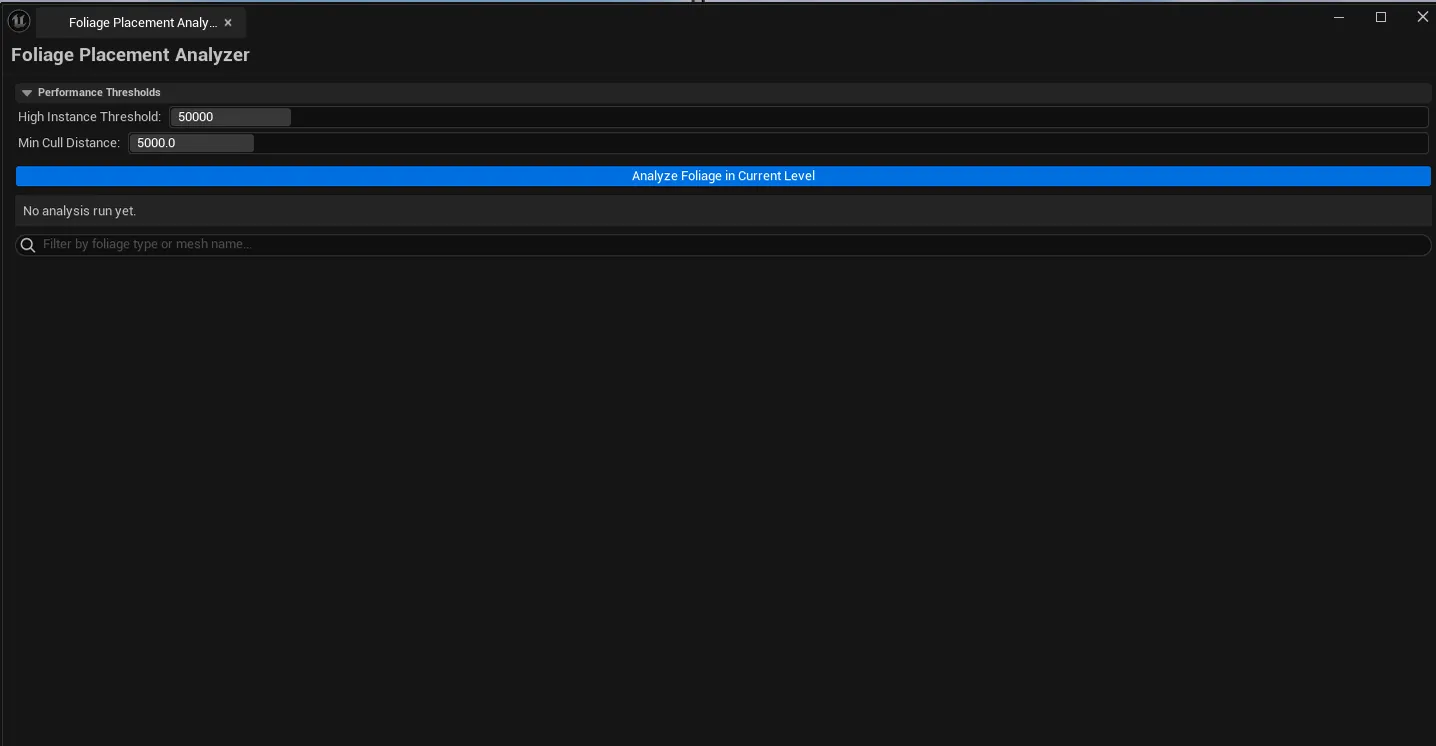
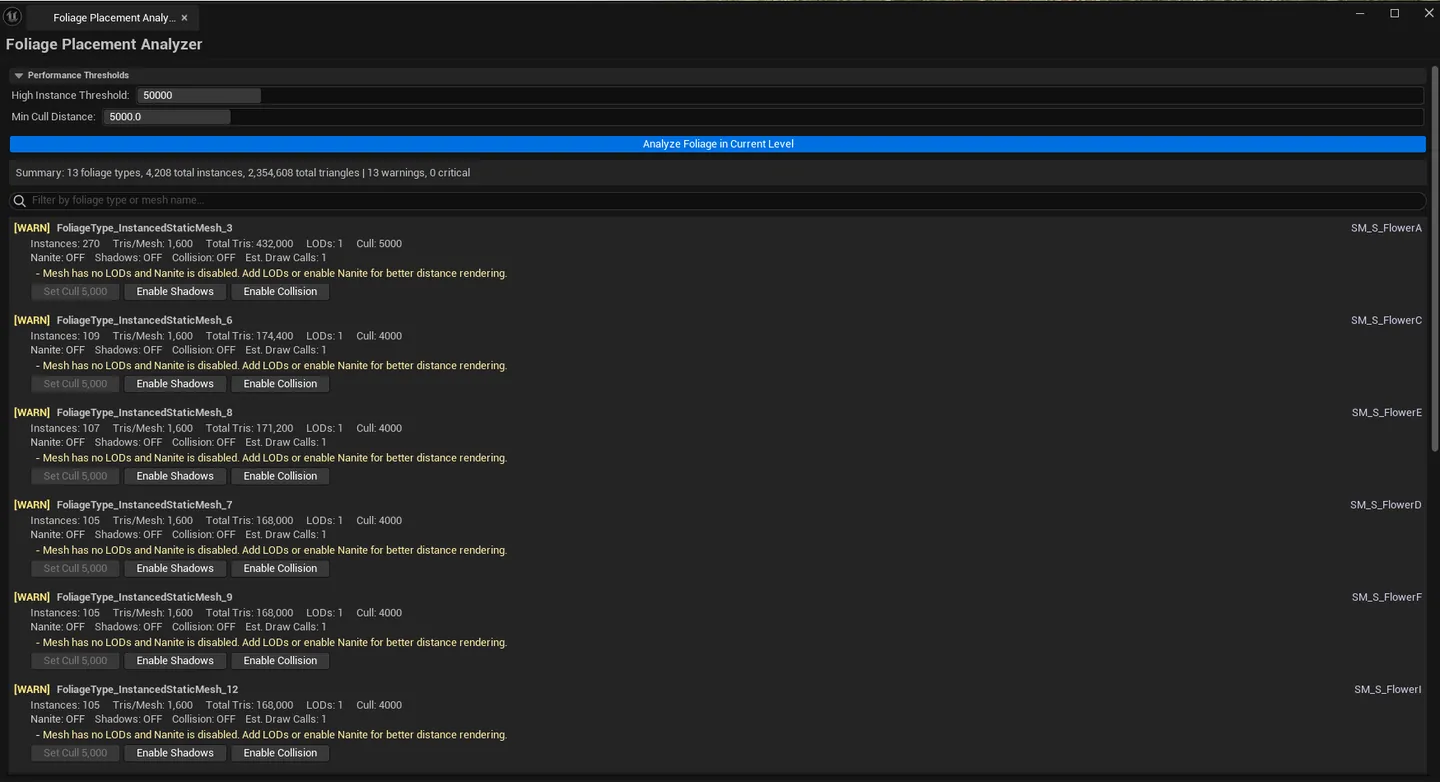
Analyzes the active level’s foliage actors and reports per-foliage-type instance counts, total triangle contribution, draw call estimates, LOD/cull settings, and Nanite status. Flags high-impact foliage types — usually a small number of foliage entries that account for the majority of foliage cost.
When to use it
Section titled “When to use it”- Final pass on a foliaged level: finding the foliage type that’s secretly costing 80% of the budget
- After importing a vegetation pack: seeing what you actually placed vs. what you intended
- Performance pass on mobile / VR targets: flagging foliage that exceeds the platform’s instance/triangle budget
- Verifying LOD and cull-distance settings across all foliage types
What it isn’t for
Section titled “What it isn’t for”- Don’t use this for non-foliage instanced meshes. It specifically inspects
AInstancedFoliageActor. For general ISMC analysis, use Modular Kit Auditor (Modeling module).
Opening the tool
Section titled “Opening the tool”- Open the EQLabs Hub and search for Foliage (or browse to Art → EnvironmentArt).
- Click the tool card.
- Make sure your level with foliage is loaded.
- Click Run Analysis.
Interface tour
Section titled “Interface tour”| Section | What it does |
|---|---|
| Run Analysis button | Walks every AInstancedFoliageActor in the active level |
| Search box | Filter reports by mesh name |
| Summary block | Total instances, total triangles, total foliage types, warning/critical counts |
| Reports list | Per-foliage-type row: mesh, foliage type, instance count, mesh tris, total tris, LOD count, cull distance, shadow flag, collision flag, Nanite flag, draw call estimate, severity, suggestions |
Severity coding
Section titled “Severity coding”| Severity | Meaning |
|---|---|
| Good | Below all thresholds, sensible LOD and cull settings |
| Warning | High instance count or triangle total, or short cull distance with high instance count |
| Critical | Crossed multiple thresholds — usually the level’s biggest performance offender |
Default thresholds
Section titled “Default thresholds”| Threshold | Default |
|---|---|
| High Instance Count | 50,000 |
| High Triangle Count | 5,000,000 |
| Min Cull Distance | 5,000 cm |
Workflow
Section titled “Workflow”Step 1: Load the level you want to audit
Section titled “Step 1: Load the level you want to audit”Foliage data lives on level-specific actors, so the tool needs the right level loaded.
Step 2: Run analysis
Section titled “Step 2: Run analysis”Click Run Analysis. The reports list populates with one row per foliage type.
Step 3: Sort + filter
Section titled “Step 3: Sort + filter”Sort by Total Triangles or Severity to see top offenders. Use the search box to narrow to a specific mesh family.
Step 4: Apply suggestions
Section titled “Step 4: Apply suggestions”Each row’s Suggestions column proposes specific fixes (LOD generation, cull distance reduction, Nanite enabling). The fixes themselves happen in the Static Mesh editor or Foliage panel — this tool surfaces what needs fixing.
Settings reference
Section titled “Settings reference”The thresholds (instance / triangle / min-cull) are currently fixed defaults; future updates will expose them as user settings.
Settings are persisted to
[Project]/Saved/EQLabs/Settings/FoliagePlacementAnalyzer.json.
Output
Section titled “Output”- In-panel reports. Cleared on each re-analysis.
- No edits. Read-only audit.
Tips and gotchas
Section titled “Tips and gotchas”- Total triangles is
instance count × source mesh tris. A low-poly mesh placed 100k times can still cost a lot, and a high-poly mesh placed 50 times is fine. The total is what matters. - Cull distance is the highest-leverage setting. Dropping foliage cull from 10,000 to 3,000 cm often cuts cost by 40%+ with minimal visual impact.
- Nanite-enabled foliage trades draw cost for tri-count tolerance. If the meshes are high-poly and Nanite is supported on your target platform, enabling it usually wins.
- Shadow casting on dense grass is rarely needed. The Cast Shadow column flags this; turning it off for grass-class foliage is a free win.
Related tools
Section titled “Related tools”- Landscape Layer Debugger — the landscape-side counterpart for paint layer analysis
- LOD & Nanite Studio (Modeling module) — for fixing the source meshes flagged by this tool
Opens our feedback form in a new tab with the tool name pre-filled.