
No. 0331 TE TechEQLabs Pro
Subsystem Viewer
Module: Tech · Category: Workflow · Tool ID:
SubsystemViewer
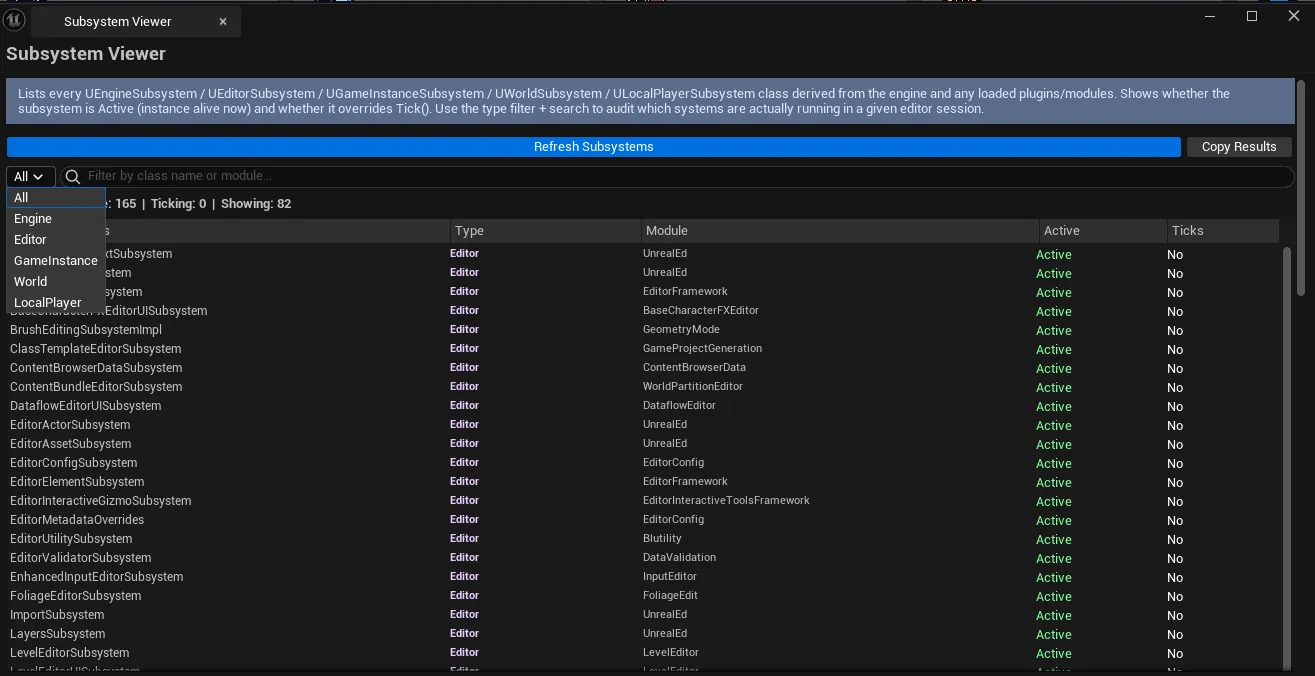
Enumerates every registered subsystem in the engine: UEngineSubsystem, UEditorSubsystem, UGameInstanceSubsystem, UWorldSubsystem, ULocalPlayerSubsystem. Per-subsystem display: class name, module origin, tick status, active state. Click a row to inspect the subsystem’s properties via reflection.
When to use it
Section titled “When to use it”- Auditing what subsystems are loaded: finding unexpected / leftover plugins’ subsystems
- Debugging “which subsystem owns this state?”: finding the right place to look
- Performance check: finding subsystems with tick enabled when they shouldn’t
What it isn’t for
Section titled “What it isn’t for”- Don’t expect runtime subsystem creation. Subsystems are discovered + registered automatically by UE.
Opening the tool
Section titled “Opening the tool”- Open the EQLabs Hub and search for Subsystem (or browse to Tech → Workflow).
- Click the tool card.
Interface tour
Section titled “Interface tour”| Section | What it does |
|---|---|
| Refresh | Re-enumerates subsystems |
| Type Filter combo | All / Engine / Editor / GameInstance / World / LocalPlayer |
| Search | Filter by class name |
| Copy Results | Plain-text dump |
| Stats | Active count / ticking count |
| Subsystems list | Per-row: class name, type, module, tick flag, active flag |
| Details panel | Reflection-based property view of the selected subsystem |
Workflow
Section titled “Workflow”- Click Refresh to enumerate.
- Filter by type or search by name.
- Click a row to populate the details panel.
- Use Copy Results for a project-wide audit dump.
Settings reference
Section titled “Settings reference”| Field | Default |
|---|---|
| Filter Type | All |
Settings file:
[Project]/Saved/EQLabs/Settings/SubsystemViewer.json
Output
Section titled “Output”- In-panel list and details.
- Clipboard. Copy Results.
- No edits. Read-only.
Tips and gotchas
Section titled “Tips and gotchas”- Subsystems with tick enabled cost CPU every frame. High-tick-count subsystems are an investigation target.
- Module origin is helpful for plugin attribution. Surprises usually mean a plugin you didn’t realize was active.
- Details panel is reflection-only. Shows public/protected UPROPERTY fields.
Related tools
Section titled “Related tools”- Plugin Dependency Viewer — for the plugin level
- Console Variable Browser — for CVars (often related to subsystem behavior)
Report an issue with this tool
Opens our feedback form in a new tab with the tool name pre-filled.