
No. 0201 TE TechEQLabs Pro
Material Replacer
Module: Tech · Category: Workflow · Tool ID:
MaterialReplacer
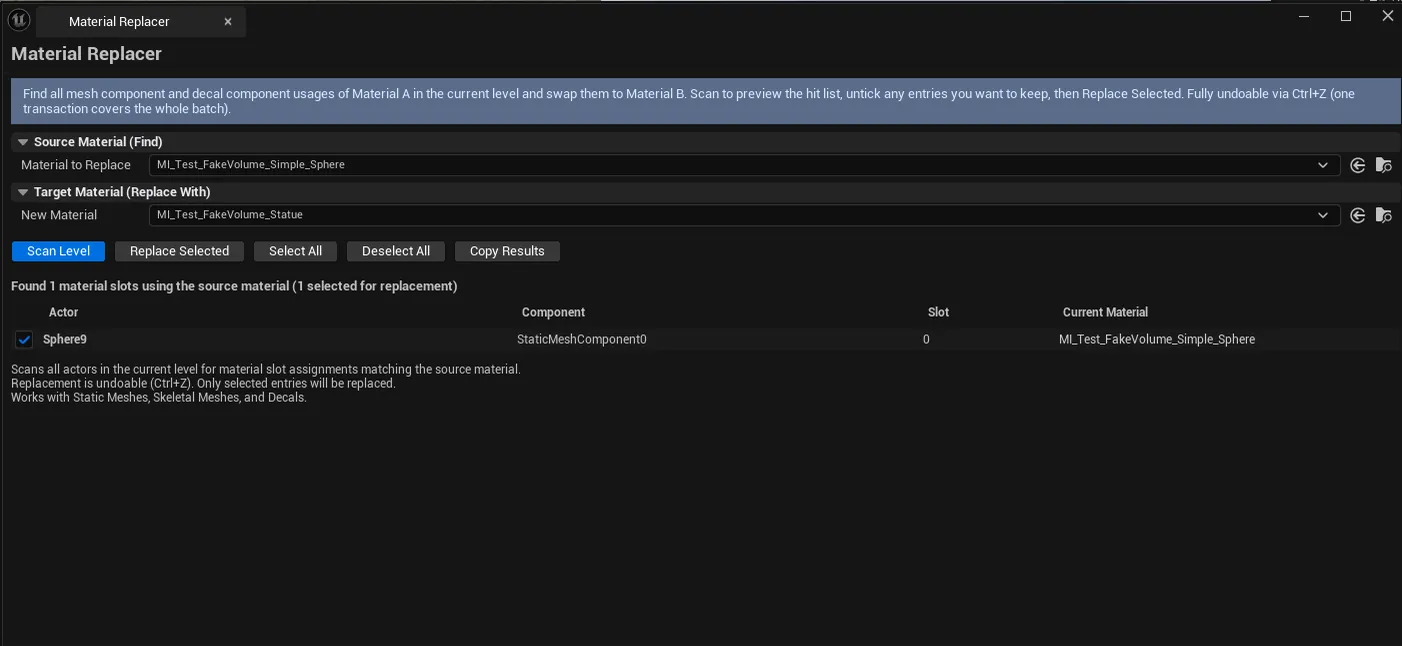
Batch-find and replace materials across actors in the current level. Scans Static Meshes, Skeletal Meshes, Decals, and other placed actors. Pick source material, pick target material, click Scan, review the per-actor list, optionally narrow with checkboxes, click Replace Selected. Fully undoable.

When to use it
Section titled “When to use it”- Migrating from one master material to another across an existing level
- Replacing placeholder materials with finals
- Bulk-cleaning levels of legacy materials before deletion
- Swapping a deprecated material for a new replacement
What it isn’t for
Section titled “What it isn’t for”- Don’t expect parameter remapping. Assignment is a straight material swap; parameter values come from the new MI’s defaults.
- Don’t use this for asset-side replacement. It operates on placed actors, not asset references.
Opening the tool
Section titled “Opening the tool”- Open the EQLabs Hub and search for Material Replacer (or browse to Tech → Workflow).
- Click the tool card.
- Pick source + target materials, scan, replace.
Interface tour
Section titled “Interface tour”| Field | What it does |
|---|---|
| Source Material picker | Material to replace (find usages) |
| Target Material picker | Material to substitute in |
| Scan Level | Walks the active level for actors using Source |
| Search box | Filter usages by actor name |
| Select All / Deselect All | Bulk toggle on the per-row checkboxes |
| Replace Selected | Performs the swap on every checked usage |
| Copy Results | Plain-text dump |
| Usages list | Per-row: actor name, component name, material slot, current material, selected flag |
Workflow
Section titled “Workflow”- Drop source material into the Source picker.
- Drop target material into the Target picker.
- Click Scan Level — usages list populates.
- Use Select All or per-row checkboxes to narrow.
- Click Replace Selected — swap is wrapped in a single transaction.
- Save the level.
Output
Section titled “Output”- Material assignment changes on selected actor components — undoable
- Clipboard. Copy Results.
Tips and gotchas
Section titled “Tips and gotchas”- Replacement is per-component-slot. Static Mesh + Skeletal Mesh + Decal components all replaced.
- Target material’s parameter values are used. Not the source’s. If you want to migrate parameter values, copy them via Material Preset Manager first.
- Save the level afterward. Replacement is in-memory until save.
Related tools
Section titled “Related tools”- Material Preset Manager — capture/apply parameter sets across instances
- Material Property Diff — diff two MIs to verify migration completeness
- Batch Actor Replacer — broader actor-class-based replacement
Report an issue with this tool
Opens our feedback form in a new tab with the tool name pre-filled.