
No. 0873 DE DesignEQLabs Pro
Plugin Dependency Viewer
Module: Design · Category: Systems · Tool ID:
PluginDependencyViewer
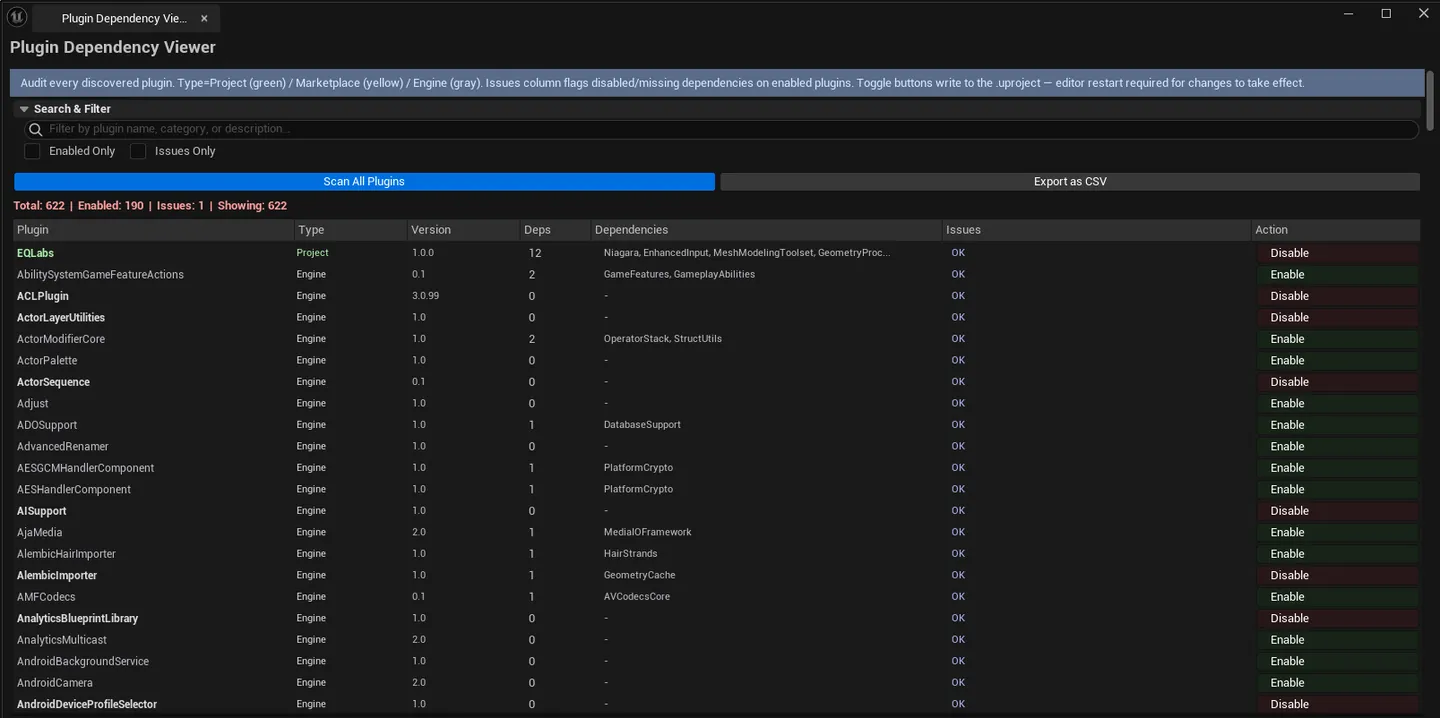
Project-wide audit of every plugin: enabled/disabled state, version, category, dependency count + names, classification (Project / Engine / Marketplace), and detected issues (missing or disabled dependencies). Includes an enable/disable toggle (with a restart warning) and CSV export.
When to use it
Section titled “When to use it”- Onboarding to a project: seeing every plugin in use at a glance
- Build / cook audit: finding marketplace plugins that should be replaced before shipping
- Diagnosing “X plugin won’t load”: usually a missing dependency
- Reporting plugin inventory to the team via CSV
What it isn’t for
Section titled “What it isn’t for”- Don’t use this to install plugins. It audits existing ones; install via Marketplace / file system.
- Don’t expect this to handle multiple engine versions. Only inspects the current.
Opening the tool
Section titled “Opening the tool”- Open the EQLabs Hub and search for Plugin (or browse to Design → Systems).
- Click the tool card.
- Click the scan button to enumerate every plugin.
Interface tour
Section titled “Interface tour”| Section | What it does |
|---|---|
| Scan button | Enumerates every plugin (project + engine + marketplace) |
| Search box | Filter by plugin name / category |
| Enabled Only checkbox | Hide disabled plugins |
| Issues Only checkbox | Hide healthy plugins |
| Toggle Plugin | Per-row action — enables/disables the plugin (with restart warning) |
| Export CSV | Saves the plugin inventory |
| Summary | Total / enabled / total issues |
| Plugins list | Per-plugin row: name, enabled flag, version, category, description, dependency count, classification, issues |
Classification
Section titled “Classification”| Color | Class | Meaning |
|---|---|---|
| Green | Project | Lives under <Project>/Plugins |
| White | Engine | Engine-shipped |
| Yellow | Marketplace | Installed via Marketplace |
Workflow
Section titled “Workflow”- Click Scan.
- Filter to Issues Only to find broken dependency chains.
- For unwanted plugins, click the toggle — UE prompts a restart.
- Optionally Export CSV for team review.
Settings reference
Section titled “Settings reference”| Field | What it does | Default |
|---|---|---|
| Search | Substring filter | empty |
| Enabled Only | Hide disabled | false |
| Issues Only | Hide healthy | false |
Settings file:
[Project]/Saved/EQLabs/Settings/PluginDependencyViewer.json
Output
Section titled “Output”- In-panel plugin list
- CSV export
- Editor edits. Toggling enable/disable modifies project config; UE prompts restart.
Tips and gotchas
Section titled “Tips and gotchas”- Toggling a plugin requires a restart. UE will prompt; don’t be surprised.
- Marketplace plugins should be vetted before shipping. Many have caveats around platform support.
- Missing dependencies block a plugin from loading. UE logs this at startup but the viewer surfaces it without combing logs.
Related tools
Section titled “Related tools”- Project Doctor Suite (Tech module) — broader project-health audit including plugin sanity
Report an issue with this tool
Opens our feedback form in a new tab with the tool name pre-filled.