
PCG Production Suite
PCG Production Suite
Section titled “PCG Production Suite”Module: Design · Category: PCG · Tool ID:
PCGProductionSuite
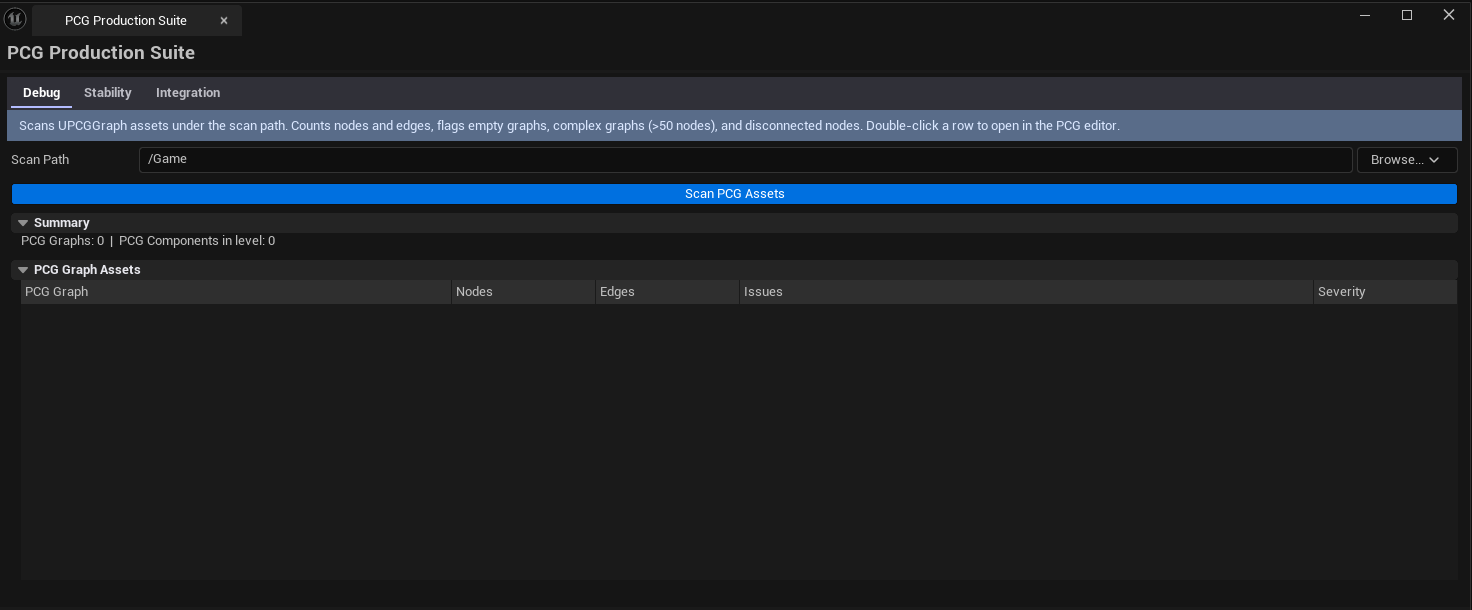
A three-tab production toolkit for Unreal’s Procedural Content Generation framework. Debug scans PCG graphs for node counts and disconnected nodes. Stability lints for known crash patterns, infinite loops, and missing bounds. Integration audits how PCG outputs interact with GameplayTags, NavMesh, and Smart Objects.
When to use it
Section titled “When to use it”- Debugging “my PCG won’t generate” reports — usually a disconnected node
- Stability audit before a long PCG bake — catching infinite-loop patterns first
- Confirming PCG outputs integrate correctly with NavMesh and Smart Objects
- Onboarding to a PCG-heavy project — getting the graph health overview
When not to use it
Section titled “When not to use it”- Don’t use this to author PCG graphs — UE’s PCG editor owns graph editing
- Don’t expect this to fix issues — it surfaces them; fixes happen per-graph
Opening the tool
Section titled “Opening the tool”- Open the EQLabs Hub and search for
PCG(or browse to Design → PCG) - Click the tool card
- Use the tab bar: Debug, Stability, Integration
Tab 1 — PCG Debugger
Section titled “Tab 1 — PCG Debugger”Per-graph scanner with node counts and disconnect detection.
| Section | What it does |
|---|---|
| Scan Path | Folder to scan for PCG graphs |
| Scan | Walks every UPCGGraph |
| Graphs list | Per-graph row: name, total node count, disconnected node count, complexity score |
| Disconnected nodes | Per-graph drill-in showing which nodes aren’t wired up |
Tab 2 — Stability Linter
Section titled “Tab 2 — Stability Linter”Crash-pattern detection.
| Section | What it does |
|---|---|
| Scan | Walks every PCG graph for known crash patterns |
| Issues list | Per-issue row: graph name, pattern, severity, line/node reference |
What gets flagged
Section titled “What gets flagged”- Infinite-loop patterns — recursive node references that don’t terminate
- Missing bounds — graphs that lack input bounds (cause runtime stalls)
- Known crash recipes — pattern matching against documented crash modes
Tab 3 — Smart Object Integration
Section titled “Tab 3 — Smart Object Integration”PCG ↔ GameplayTag / NavMesh / SmartObject audit.
| Section | What it does |
|---|---|
| Scan | Walks PCG graphs for integration with adjacent systems |
| Tag references | Which gameplay tags PCG graphs reference |
| NavMesh integration | Does the graph affect navmesh? |
| SmartObject integration | Are SmartObject classes spawned by the graph? |
Workflow
Section titled “Workflow”General audit
Section titled “General audit”- Set Scan Path
- Run all three tabs in sequence
- Resolve high-severity issues from Stability first, then Debug, then Integration
Settings reference
Section titled “Settings reference”| Field | Default |
|---|---|
| Scan Path | /Game |
Settings file:
[Project]/Saved/EQLabs/Settings/PCGProductionSuite.json
Output
Section titled “Output”- In-panel results per tab
- No edits — read-only audit
Tips & gotchas
Section titled “Tips & gotchas”- Disconnected nodes aren’t always bugs — sometimes intentional placeholders. The tool flags them; you decide
- PCG stability is platform-sensitive — a graph that works on PC may crash on mobile due to memory limits
- NavMesh integration audit is approximate — it tells you what could affect navmesh, not guaranteed runtime behavior
Related tools
Section titled “Related tools”- Procedural Scattering & Placement Suite — non-PCG-based scatter alternative
- Data Systems Inspector — for the gameplay tag side
Report an issue with this tool
Opens our feedback form in a new tab with the tool name pre-filled.