Module: Modeling · Category: LOD · Tool ID: LODNaniteStudio
A five-tab studio covering the full LOD-and-Nanite pipeline. LOD Analysis audits LOD chain quality. Nanite Mesh Validator flags meshes that should/shouldn’t have Nanite enabled. Nanite Readiness checks for material compatibility. Mobile Proxy estimates proxy requirements per platform profile. LOD Generator creates LODs in single or batch mode and generates HLOD configs.
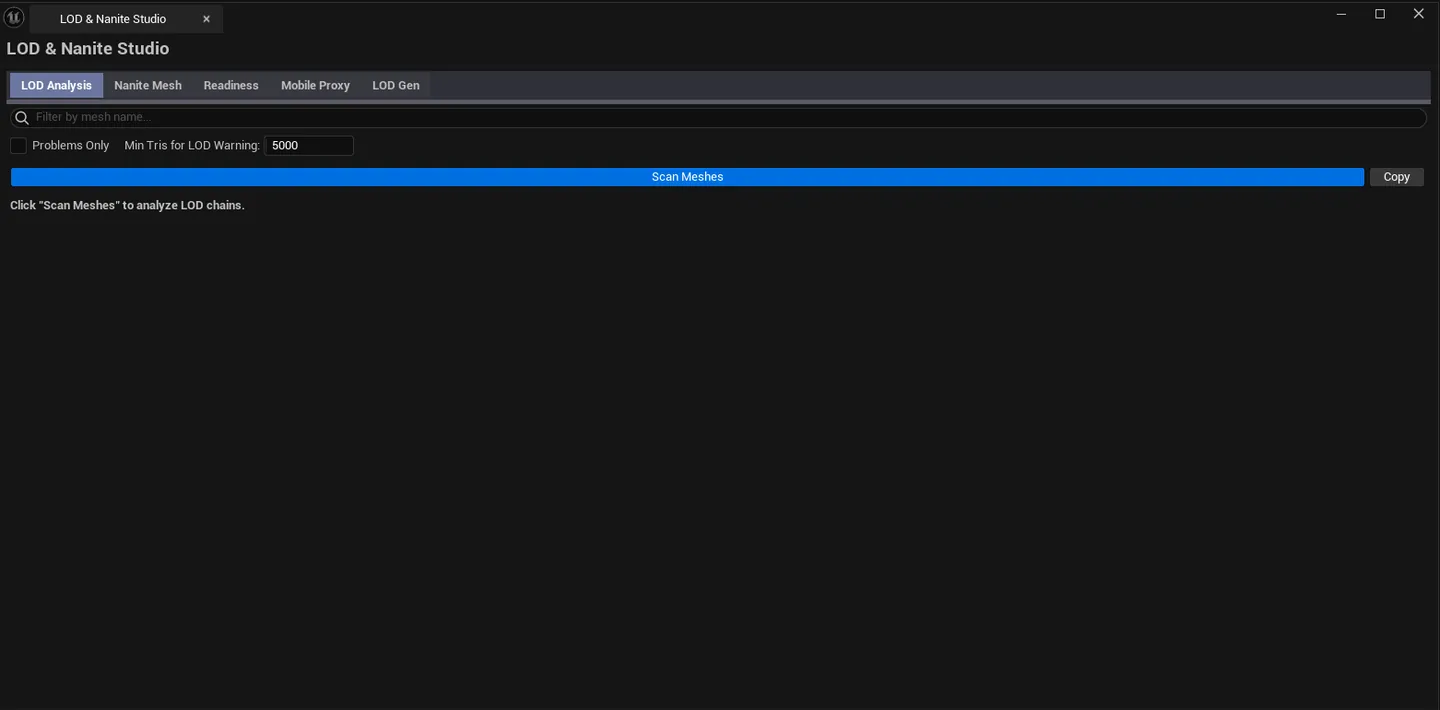
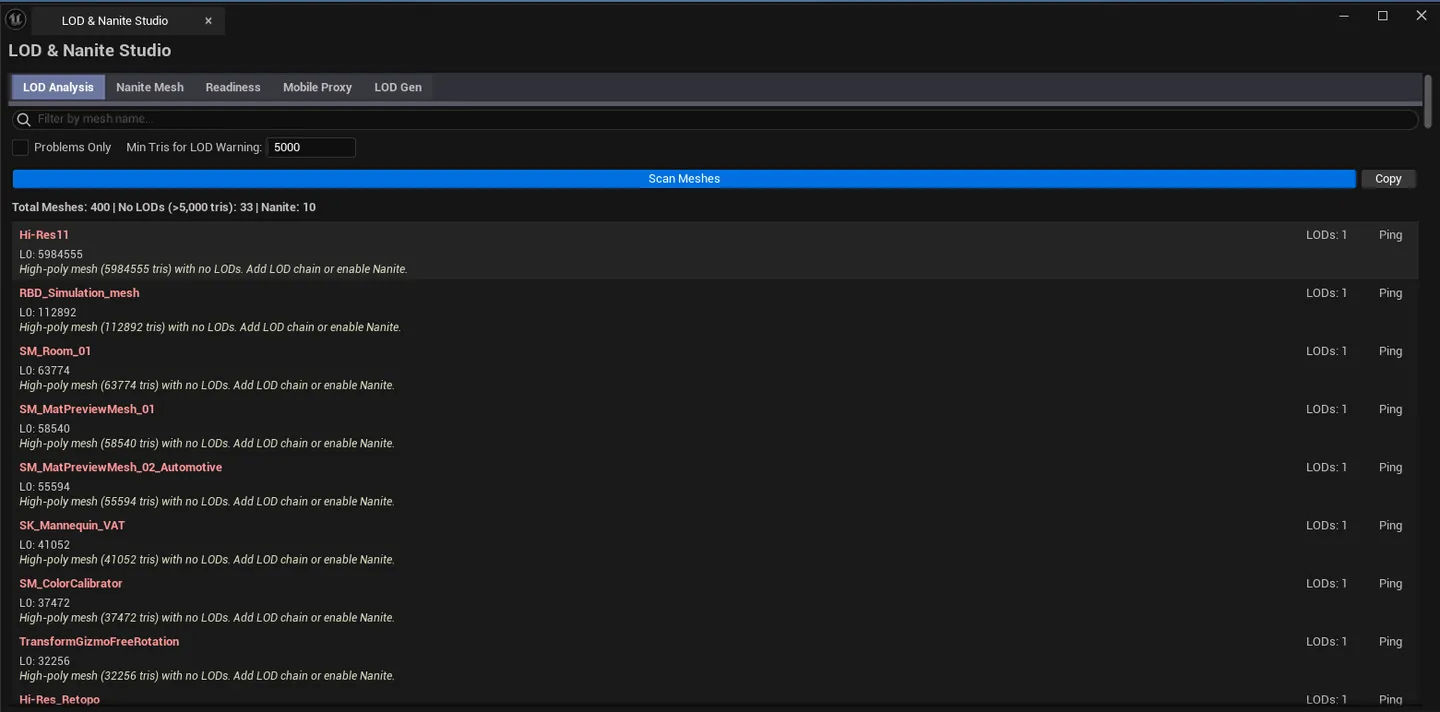
Studio open on the LOD Analysis tab with results visible, tab bar showing all 5 tabs.
Performance pass: find every high-poly mesh that’s missing LODs or missing Nanite, all in one place
Multi-platform shipping: get an objective view of what your assets cost on Mobile / Quest / Console targets
Pre-cook validation: meshes with Nanite enabled but using translucent / masked / WPO materials silently fall back to fallback meshes
New project setup: generate LOD chains in batch instead of asset-by-asset in the Static Mesh editor
Don’t use this for skeletal mesh LODs. Focus is Static Meshes.Don’t expect this to replace per-mesh hand-tuned LODs. The LOD Generator is good for batch first-passes, not for hero assets.
Open the EQLabs Hub and search for LOD (or browse to Modeling → LOD ).
Click the tool card.
Use the tab bar to pick the analysis or operation you need.
Project-wide audit of every static mesh’s LOD chain.
Section What it does Search box Filter by mesh name Problems Only checkboxHide healthy entries Min Triangles Threshold Don’t audit meshes below this triangle count (small meshes don’t need LODs) Scan Walks every Static Mesh and computes per-LOD reduction and screen size Copy Plain-text dump Summary Total meshes / no-LOD count / Nanite count Results list Per-mesh row, severity-coded
For each mesh: LOD count, LOD0 triangles, Nanite enabled flag, auto-LOD setting, full LOD chain with reduction percent and screen size per level.
Severity Meaning Good LOD chain in good shape (or Nanite enabled and high-poly) Warning High-tri mesh with no LODs, or LODs with poor reduction ratios (<30% reduction between consecutive LODs) Critical Severe issues — no LODs on a very high-poly mesh that isn’t Nanite-eligible
Results list showing mixed severities, Suggestion column visible. Per-mesh Nanite recommendation engine.
Section What it does Default Scan Path Folder to scan /GameHigh-Poly Threshold Tri count above which Nanite is recommended 10000Low-Poly Threshold Tri count below which Nanite is not worth the overhead 500Scan Walks meshes and classifies each Batch Enable Nanite Enables Nanite on all selected meshes flagged “Should Enable” Batch Disable Nanite Disables Nanite on all selected meshes flagged “Should Disable” Copy Plain-text dump Summary Total / Nanite-enabled / Should-enable / Should-disable
Status Meaning OK Nanite setting matches mesh complexity Enable Nanite High-poly mesh that would benefit from Nanite Disable Nanite Very low-poly mesh — Nanite overhead exceeds the gain
Pick a scan path, click Scan .
Review the recommendations; select rows you trust to be batch-fixed.
Click Batch Enable Nanite or Batch Disable Nanite as appropriate.
Save All to persist.
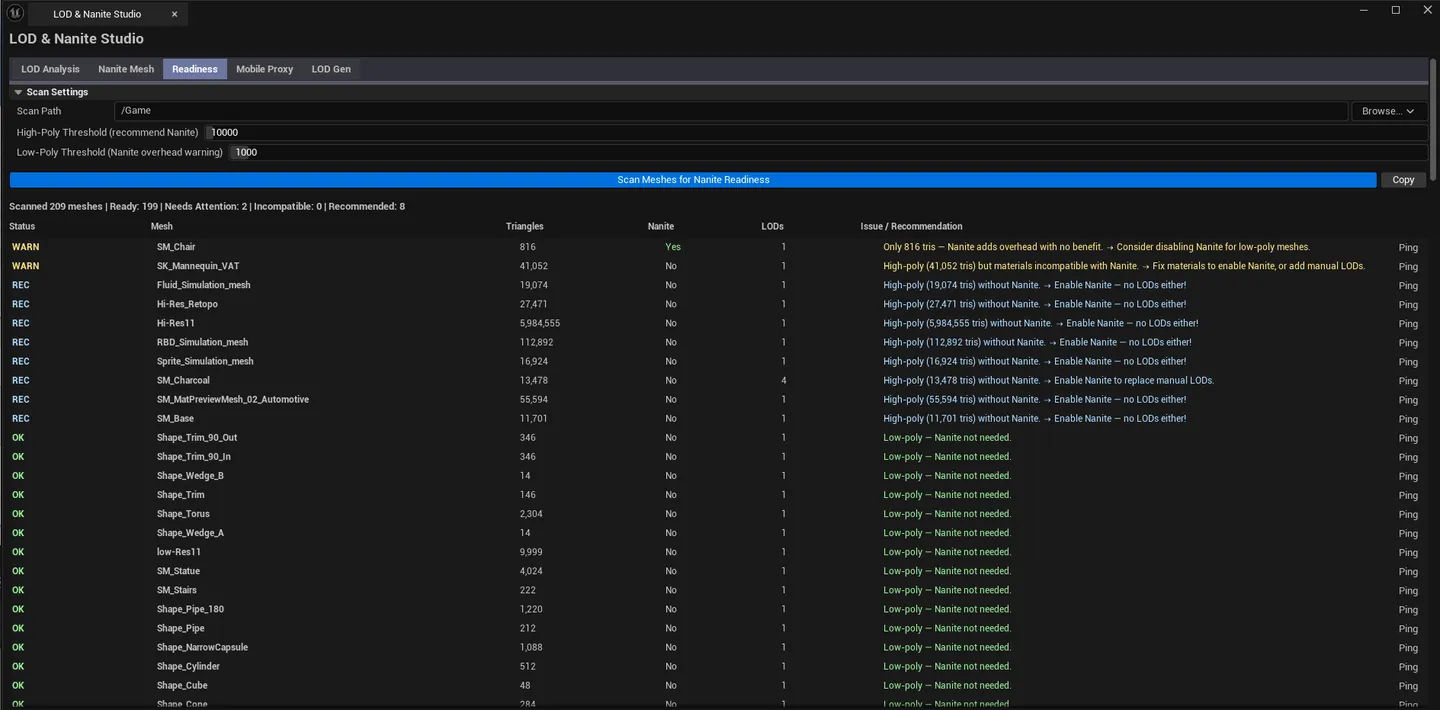
Material-side compatibility check. Nanite has hard requirements — translucent, masked, or WPO-using materials force fallback.
Section What it does Default Scan Path Folder to scan /GameHigh-Poly Threshold Tri count for “should use Nanite” classification 10000Low-Poly Threshold Tri count below which Nanite isn’t worth it 1000Scan Walks meshes and inspects assigned materials Copy Plain-text dump Summary Ready / Needs Attention / Incompatible / Recommended counts
State Meaning Ready Nanite enabled and materials are all compatible Needs Attention Nanite enabled but at least one material has WPO / translucency / masked usage Incompatible Mesh would benefit from Nanite but materials make it incompatible Recommended High-poly mesh, materials are compatible — recommend enabling
WPO. World Position Offset usage in a material disables Nanite for that mesh.Translucency. Translucent materials are not Nanite-eligible.Masked. Masked materials work but with caveats; flagged for review.
Results list with mixed readiness states, including a "Needs Attention" row showing the WPO / translucent / masked flags. Cross-platform proxy analysis. Pick a platform profile, see which meshes need proxies.
Section What it does Scan Path Folder to scan Platform Profile comboPick the target — Mobile Low / Mobile High / Quest VR / Console Scan Analyzes Nanite meshes against the selected profile Copy Plain-text dump Summary Total Nanite meshes / proxies needed / tri budget used / over-material-limit Results list Per-mesh row with target tri count, base LOD recommendation, status
Profile Max Triangles Max Material Slots Vertex Colors Required Mobile Low 5,000(configured) (configured) Mobile High 15,000(configured) (configured) Quest VR 10,000(configured) (configured) Console 50,000(configured) (configured)
Status Meaning Good Source already fits within the platform’s budget Warning Needs a proxy; reduction is achievable Critical Source exceeds material slot limit, or vertex colors need baking
The tab tells you which existing LOD level would best serve as a base for the proxy and whether vertex colors need to be baked separately.
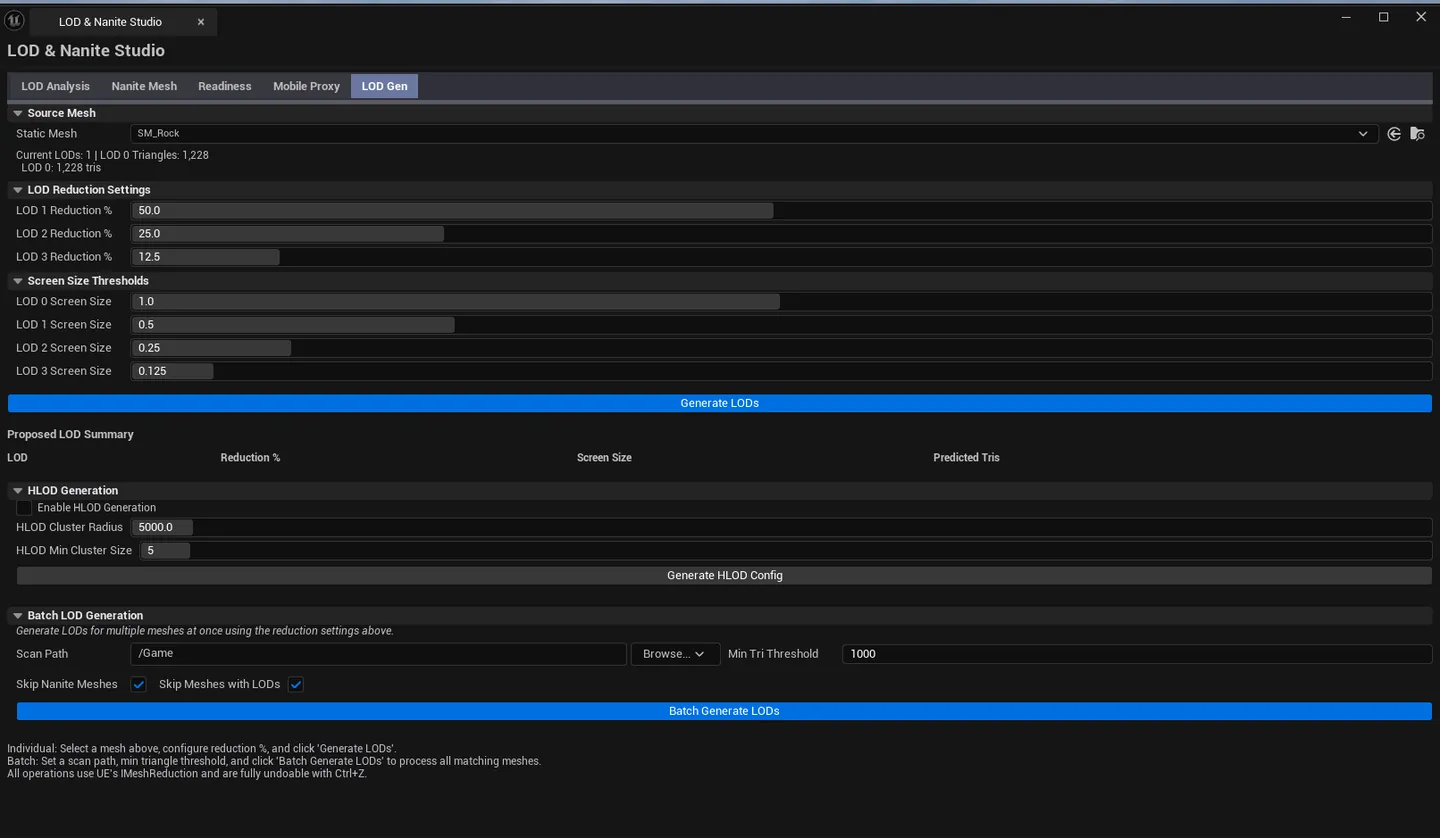
Generates LOD chains for single meshes or in batch. Includes an HLOD configuration section.
Field What it does Default Source Mesh Static Mesh to generate LODs for (empty) Reduction Percents LOD reduction targets, in order [50%, 25%, 12.5%]Screen Sizes Screen size thresholds per LOD [1.0, 0.5, 0.25, 0.125]Generate LODs buttonBuilds the LOD chain on the source mesh
The Proposed Levels list previews predicted tri counts before commit.
Field What it does Default Batch Scan Path Folder to operate on /GameMin Triangles Skip meshes below this tri count 1000Skip Nanite Skip meshes that already have Nanite enabled trueSkip Existing LODs Skip meshes that already have LODs trueBatch Generate LODs buttonWalks the path, generates LODs on every eligible mesh
Field What it does Default Enable HLOD Toggle HLOD config generation falseCluster Radius World-space radius for HLOD clustering 5000 cmMin Cluster Size Minimum actor count to form a cluster 5Generate HLOD Config buttonBuilds an HLOD setup based on these params
LOD Gen tab with a source mesh picked, Proposed Levels list visible showing predicted tri counts.
Drop a Static Mesh into the Source field.
Tweak Reduction Percents and Screen Sizes if needed (defaults are sensible).
Confirm the Proposed Levels preview looks reasonable.
Click Generate LODs .
Set the Batch Scan Path.
Adjust Min Triangles to control which meshes are touched.
Leave Skip Nanite and Skip Existing LODs on unless you have a specific reason.
Click Batch Generate LODs — a progress dialog tracks the run.
Save All afterward.
Field Default Min Triangles Threshold 5000Problems Only false
Field Default High-Poly Threshold 10000Low-Poly Threshold 500
Field Default High-Poly Threshold 10000Low-Poly Threshold 1000
Field Default Reduction Percents [50, 25, 12.5]Screen Sizes [1.0, 0.5, 0.25, 0.125]Batch Min Triangles 1000Skip Nanite trueSkip Existing LODs true
Field Default Enable HLOD falseCluster Radius 5000 cmMin Cluster Size 5
Settings are persisted to [Project]/Saved/EQLabs/Settings/LODNaniteStudio.json.
In-place modifications. Batch Enable/Disable Nanite, single-mesh and batch LOD generation modify Static Mesh assets directly. Marked dirty until Save All .Undo. Nanite toggles and LOD generation are wrapped in ScopedTransaction. Ctrl+Z reverts. Batch operations are a single undo step.Clipboard. Every tab has a Copy button.HLOD config. Generated configuration is applied to the level’s HLOD setup.
Nanite recommendation thresholds are heuristics. The defaults work for typical games. Tighten the High-Poly Threshold for mobile-first projects, loosen for film-quality archviz.WPO disables Nanite silently. A Nanite mesh whose material uses WPO falls back at runtime with no warning. The Readiness Checker is the only signal you’ll get.Batch LOD generation respects the safety toggles. Skip Nanite and Skip Existing LODs are on by default for a reason; only turn them off if you understand the implications.HLOD config generation is a starting point, not a finished setup. You’ll typically need to tune cluster radius and inclusion rules in the World Settings afterward.Mobile Proxy Generator is analysis-only. It tells you what proxies you’d need; actually generating them is the LOD Generator’s job (with low Reduction Percents) or a manual export.Single-click pings the asset in the Content Browser; double-click opens the Static Mesh editor.