
No. 1125 MO ModelingEQLabs Pro
Physics & Collision Studio
Module: Modeling · Category: Physics · Tool ID:
PhysicsCollisionStudio
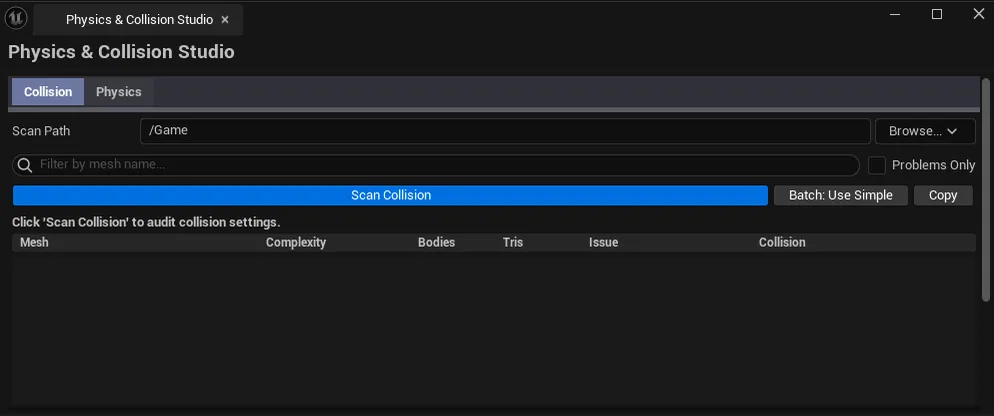
A two-tab panel for everything collision and physics. The Collision tab audits static-mesh collision setups (missing collision, complex-as-simple, convex body counts) and lets you batch-apply simple collision in one transaction. The Physics tab walks every PhysicsAsset and SkeletalMesh, flagging missing physics assignments, suspicious body/constraint counts, and orphaned assets.
When to use it
Section titled “When to use it”- Before a packaged build: confirm every collision-relevant mesh has some collision setup
- Optimization pass: find meshes using complex-as-simple (a known performance trap)
- Onboarding to a project: see at a glance which skeletal meshes are missing physics assets
- Pre-cinematic / pre-physics-sim: sanity-check ragdoll PhysicsAssets against body/constraint budgets
What it isn’t for
Section titled “What it isn’t for”- Don’t use this to author collision. UE’s Static Mesh editor still owns the actual hull authoring; this tool batch-applies and audits.
- Don’t use this for runtime physics tuning. That’s the PhysicsAsset editor’s job.
Opening the tool
Section titled “Opening the tool”- Open the EQLabs Hub and search for Physics (or browse to Modeling → Physics).
- Click the tool card.
- Use the tab bar at the top to switch between Collision and Physics.
Tab 1: Collision Preset Manager
Section titled “Tab 1: Collision Preset Manager”Audits static mesh collision and lets you batch-fix the most common problem: meshes with no simple collision at all.
Interface
Section titled “Interface”| Section | What it does |
|---|---|
| Scan Path | Folder to scan recursively. Default /Game. |
| Search box | Filter the list by mesh name. |
| Problems Only checkbox | Hide rows that have no collision issues. |
| Scan button | Walks every Static Mesh under the path and inspects collision setup. |
| Batch Apply Simple | Adds simple box collision to every selected entry that’s missing one. Single undoable transaction. |
| Copy | Plain-text dump of visible (filtered) entries. |
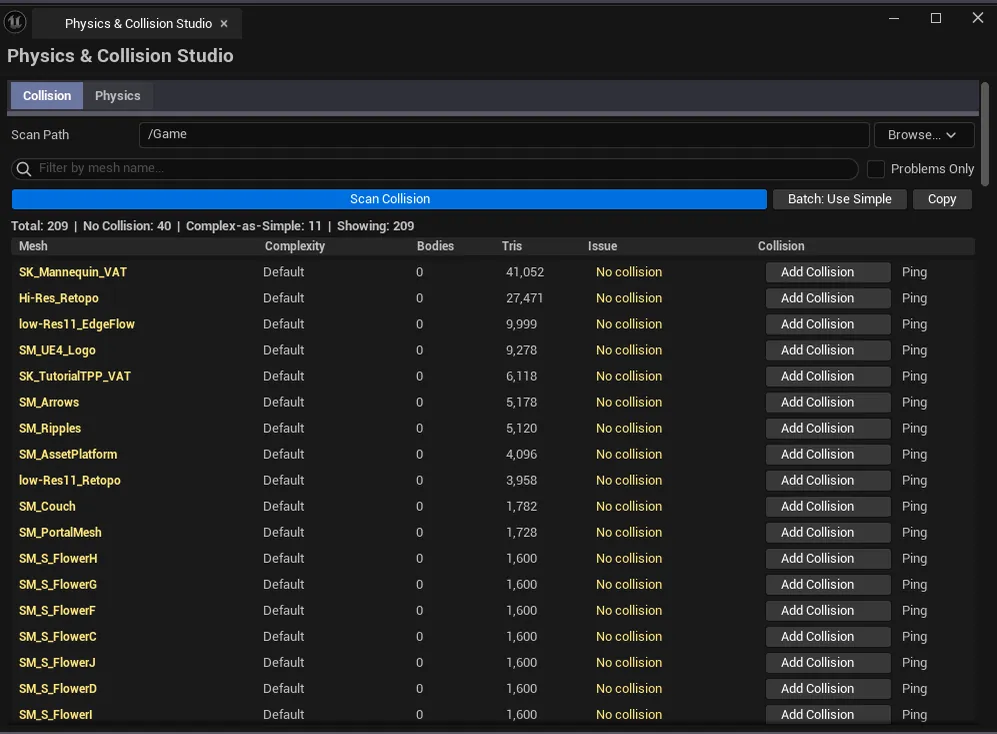
| Results list | Per-mesh row with severity, issue description, and a per-row Add Collision action. |
Severity coding
Section titled “Severity coding”| Severity | Meaning |
|---|---|
| Good (green) | Has simple collision, no obvious issues |
| Warning (yellow) | Has collision but with caveats — e.g., very high convex body count |
| Critical (red) | No simple collision, or relies on complex-as-simple |
Workflow
Section titled “Workflow”- Pick a scan path, click Scan.
- Toggle Problems Only to focus on critical/warning rows.
- Either: Ctrl+Click rows + Batch Apply Simple, or use per-row Add Collision for one-off fixes.
- Save All to persist the new collision data to disk.
Tab 2: Physics Asset Debugger
Section titled “Tab 2: Physics Asset Debugger”Surfaces PhysicsAsset health and finds skeletal meshes that don’t have a physics asset assigned.
Interface
Section titled “Interface”| Section | What it does |
|---|---|
| Scan Path | Folder to scan recursively. |
| Scan button | Walks every PhysicsAsset and SkeletalMesh under the path. |
| Copy | Plain-text dump. |
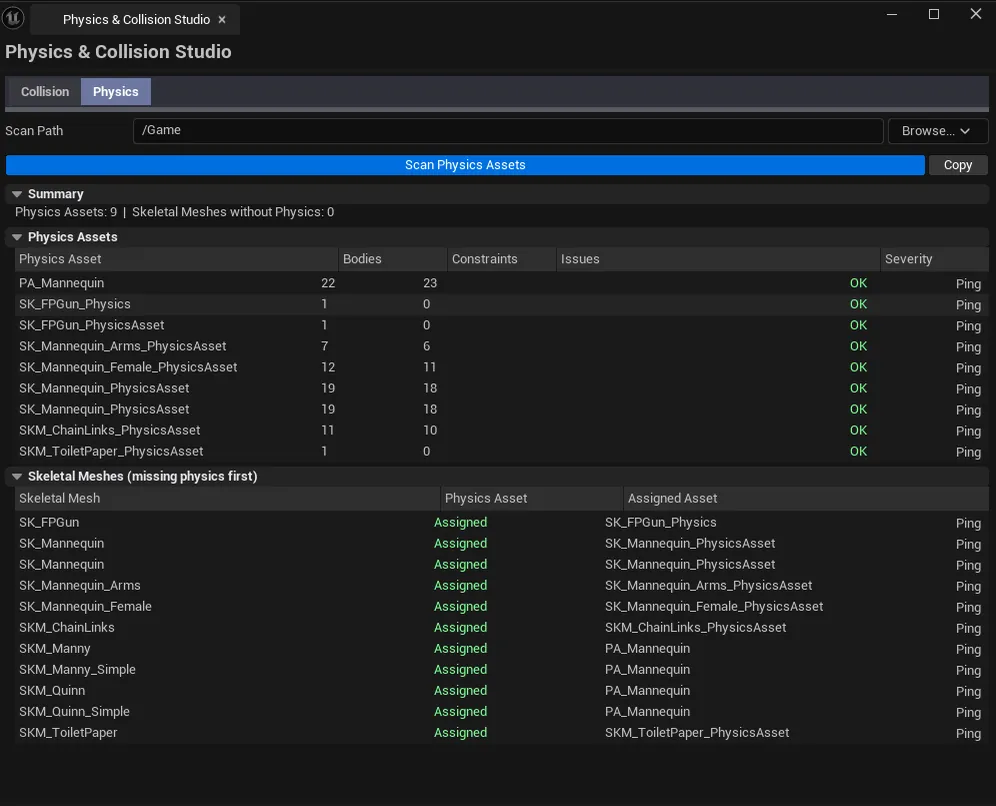
| Physics Assets list | Per-PhysicsAsset row: body count, constraint count, severity (OK / Warning / Error), issue description. |
| Skeletal Meshes list | Per-SkeletalMesh row: has-physics-asset flag, name of the assigned asset (if any). |
Severity coding
Section titled “Severity coding”| Severity | Meaning |
|---|---|
| OK | Body/constraint counts in expected ranges, no orphans |
| Warning | Suspicious counts (very high or zero), broken references |
| Error | Missing references, malformed asset |
Workflow
Section titled “Workflow”- Pick a scan path, click Scan.
- Walk the Physics Assets list — anything yellow or red gets a manual review in the PhysicsAsset editor.
- Walk the Skeletal Meshes list — meshes without a physics asset typically need one assigned (or explicit confirmation that they shouldn’t have one).
Settings reference
Section titled “Settings reference”Collision tab
Section titled “Collision tab”| Field | What it does | Default |
|---|---|---|
| Scan Path | Folder to scan | /Game |
| Name Filter | Substring filter | empty |
| Problems Only | Hide healthy rows | false |
Physics tab
Section titled “Physics tab”| Field | What it does | Default |
|---|---|---|
| Scan Path | Folder to scan | /Game |
Settings are persisted to
[Project]/Saved/EQLabs/Settings/PhysicsCollisionStudio.json.
Output
Section titled “Output”- In-place edits.
Batch Apply Simpleand per-row Add Collision modify Static Mesh assets directly. Mark dirty until Save All. - Undo. Every collision-add is wrapped in
ScopedTransaction.Ctrl+Zreverts. - Clipboard. The Copy button on each tab writes the visible list as plain text.
- No physics-asset edits. The Physics tab is read-only; fixes happen in the dedicated PhysicsAsset editor.
Tips and gotchas
Section titled “Tips and gotchas”- Complex-as-simple is a perf trap. Meshes flagged for using complex collision as simple may look fine in editor but stutter under physics queries at runtime. Replace with simple primitives or a convex hull.
Batch Apply Simpleadds a box, not a hull. It’s a fast guard against “no collision at all,” not a substitute for hand-authored hulls. Use it as triage; refine in the Static Mesh editor.- High convex body counts hurt. Anything over ~16 convex bodies on a single mesh starts paying real cost. The Collision tab surfaces these as Warnings.
- A skeletal mesh without a physics asset is sometimes intentional. Non-physics characters (UI puppets, cinematic stand-ins) don’t need one. Don’t blanket-fix.
- Save All afterward. Collision changes are in-memory until you save.
Related tools
Section titled “Related tools”- Mesh Intelligence Dashboard — broader static-mesh stats, batching, pivot
- LOD & Nanite Studio — LODs and Nanite are interconnected with collision (e.g., Nanite meshes still need traditional collision)
Opens our feedback form in a new tab with the tool name pre-filled.