
No. 1145 MO ModelingEQLabs Pro
UV & Texel Suite
Module: Modeling · Category: UV · Tool ID:
UVTexelSuite
A four-tab suite that covers everything you’d want to know about UVs in a project. Layout Checker flags overlapping triangles, missing channels, and stretched UVs. Texel Density measures pixel-per-cm consistency against a configurable target. Channel Manager shows per-mesh channel counts and utilization. UDIM Overview detects UDIM tile usage and coverage gaps.
When to use it
Section titled “When to use it”- Lookdev pre-pass: confirming texel density is consistent before spending time on materials
- Lightmap setup: finding meshes missing UV channel 1 (the typical lightmap channel)
- UDIM workflow validation: making sure UDIM-authored meshes actually use the tiles you expect
- Optimization sweep: overlapping or stretched UVs cause visible artifacts that are cheaper to catch in the editor than in QA
What it isn’t for
Section titled “What it isn’t for”- Don’t use this to fix UVs. It’s a read-only audit; UV fixes happen in your DCC or in the Static Mesh editor’s UV viewer.
- Don’t use it for skeletal mesh UV inspection. The suite focuses on Static Meshes.
Opening the tool
Section titled “Opening the tool”- Open the EQLabs Hub and search for UV (or browse to Modeling → UV).
- Click the tool card.
- Use the tab bar to switch between Layout Checker, Texel Density, Channel Manager, UDIM Overview.
Tab 1: UV Layout Checker
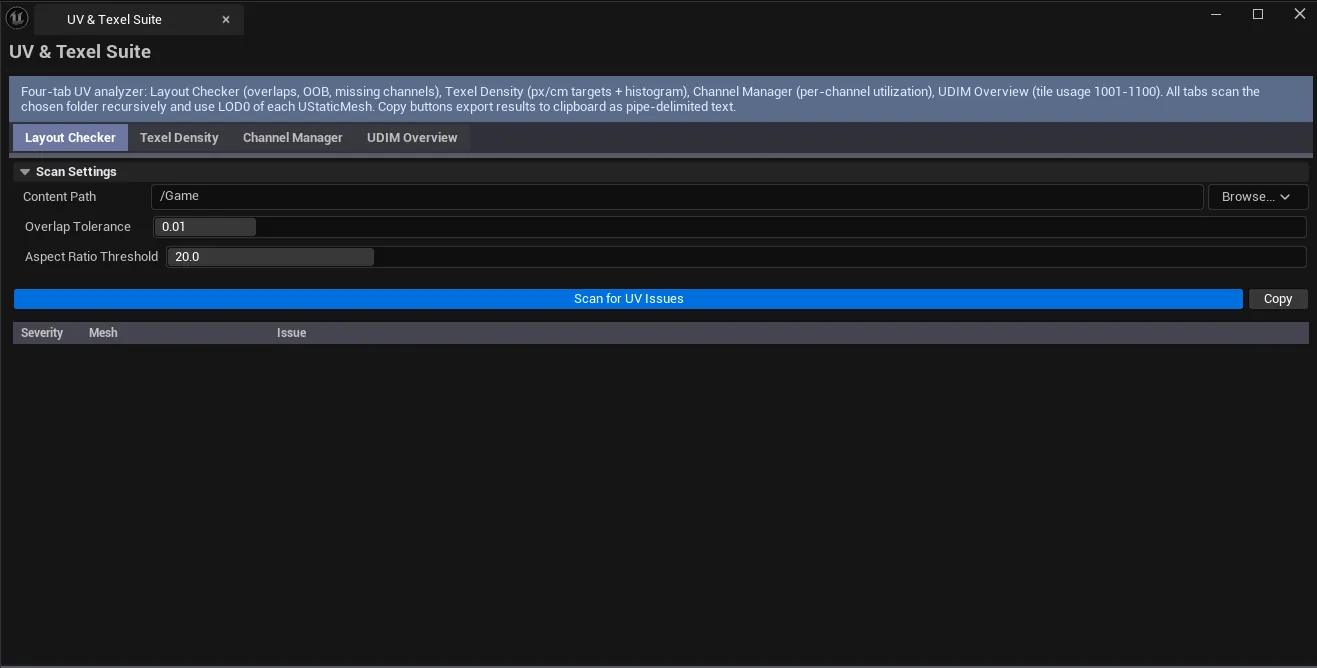
Section titled “Tab 1: UV Layout Checker”Scans static meshes for overlapping triangles, extreme aspect ratios, and missing UV channels.
Interface
Section titled “Interface”| Section | What it does |
|---|---|
| Content Path | Folder to scan recursively. Default /Game. |
| Overlap Tolerance | UV-space distance threshold for flagging overlapping triangles. Default 0.01. |
| Aspect Ratio Threshold | Triangle edge max/min ratio above which the triangle is flagged as stretched. Default 20.0. |
| Scan for UV Issues | Runs the audit. |
| Copy | Plain-text dump of visible results. |
| Results list | Per-mesh row with issue description, severity-coded (green / yellow / red). |
Severity coding
Section titled “Severity coding”| Severity | Meaning |
|---|---|
| Green (0) | No issues detected |
| Yellow (1) | Soft issue — stretched triangles within tolerance |
| Red (2) | Hard issue — significant overlap, missing channels, OOB UVs |
Tab 2: Texel Density Analyzer
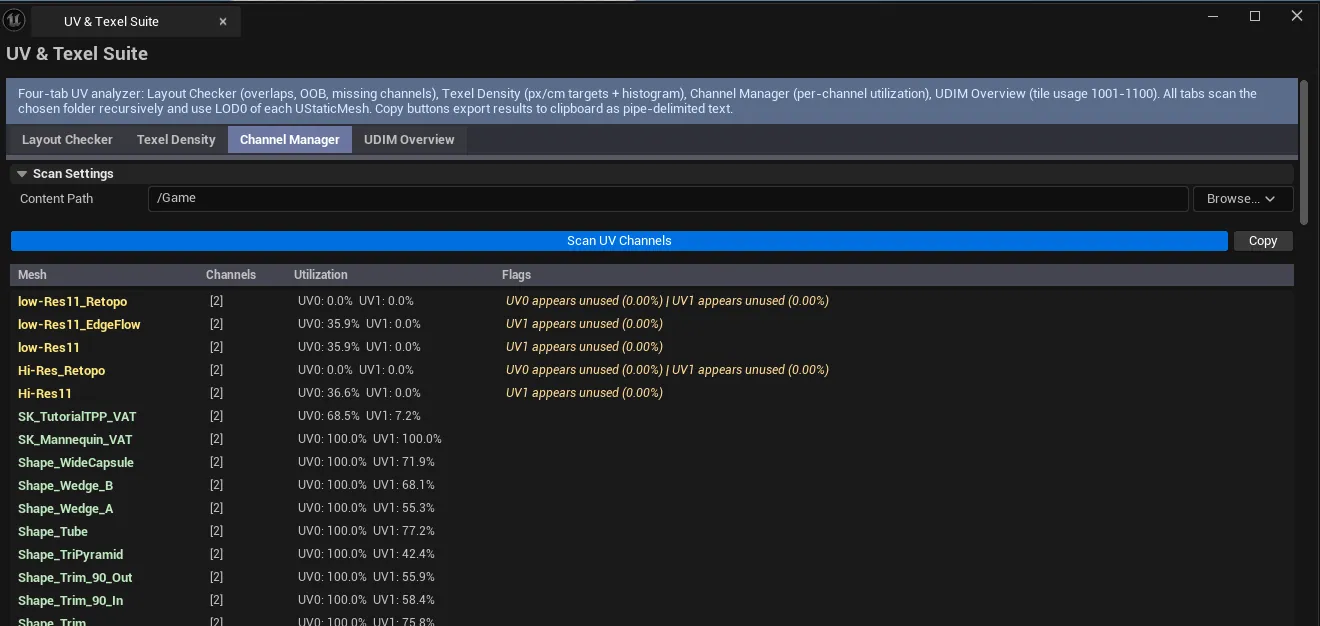
Section titled “Tab 2: Texel Density Analyzer”Computes texel density (pixels per centimeter) for each mesh and compares against a target.
Interface
Section titled “Interface”| Section | What it does |
|---|---|
| Content Path | Folder to scan. |
| Target px/cm | Target texel density in pixels per centimeter. |
| Texture Size (px) | Resolution of the texture you’re authoring against. |
| Deviation Threshold % | How far a mesh can deviate from target before being flagged. Default 30%. |
| Quick presets | One-click buttons for common targets: 5.12, 10.24, 20.48 px/cm. |
| Analyze Texel Density | Runs the analysis. |
| Copy | Plain-text dump. |
| Density summary | Avg / Min / Max densities + histogram across the result set. |
| Results list | Per-mesh row: density, deviation %, severity. |
How density is computed
Section titled “How density is computed”For each mesh:
Density = TextureSize × √(TotalUVArea / TotalWorldArea)Compared against Target px/cm. Severity rises as deviation grows: under 1× threshold = good (0), over = warning (1), over 2× = critical (2).
Quick preset reference
Section titled “Quick preset reference”| Preset | Typical use |
|---|---|
| 5.12 px/cm | Hero environments at moderate texel budgets |
| 10.24 px/cm | Standard target for most game art (default) |
| 20.48 px/cm | High-end / archviz / FPS first-person assets |
Tab 3: UV Channel Manager
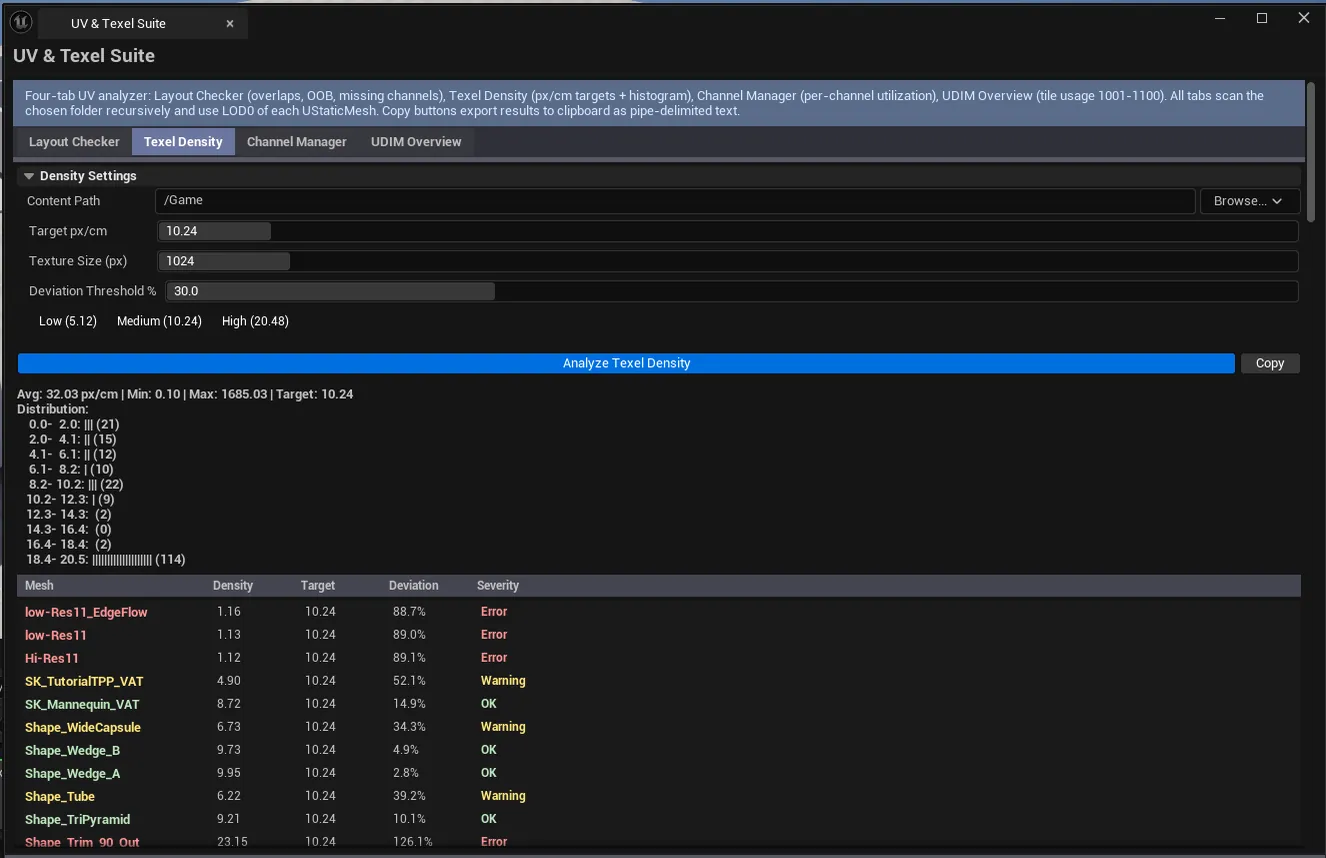
Section titled “Tab 3: UV Channel Manager”Shows per-mesh channel counts and per-channel area utilization. Flags meshes missing the lightmap channel.
Interface
Section titled “Interface”| Section | What it does |
|---|---|
| Content Path | Folder to scan. |
| Scan UV Channels | Walks every Static Mesh and reads channel data. |
| Copy | Plain-text dump. |
| Results list | Per-mesh row: channel count, per-channel utilization, flags, severity. |
Columns
Section titled “Columns”| Column | What it shows |
|---|---|
| Mesh | Asset name |
| Channels | Number of UV channels |
| Utilization | Per-channel area coverage (how much of 0..1 UV space is used) |
| Flags | Notes — e.g., “missing lightmap channel” |
| Severity | Green / Yellow / Red |
Tab 4: UDIM Overview
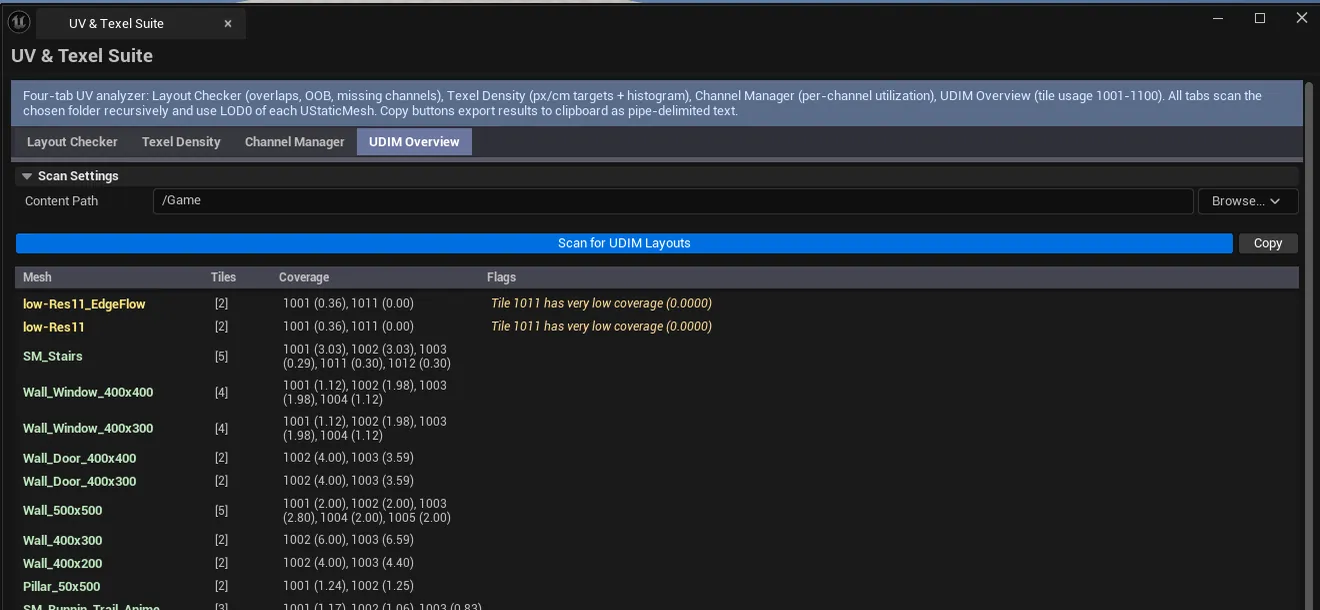
Section titled “Tab 4: UDIM Overview”Detects which meshes use UDIM tiles and reports tile-by-tile coverage.
Interface
Section titled “Interface”| Section | What it does |
|---|---|
| Content Path | Folder to scan. |
| Scan UDIM | Walks every Static Mesh and reports UDIM usage. |
| Copy | Plain-text dump. |
| Results list | Per-mesh row: tile count, used tiles (e.g., 1001, 1002, 1011), per-tile coverage, flags, severity. |
What gets flagged
Section titled “What gets flagged”- Meshes that touch UDIM tiles but only use a small fraction of any tile (waste)
- Meshes that span tiles but with severe coverage imbalance (some tiles barely used)
- Authoring inconsistencies (e.g., gaps in the tile sequence)
Workflow
Section titled “Workflow”A typical project-wide UV audit walks all four tabs:
Step 1: Layout Checker
Section titled “Step 1: Layout Checker”Pick /Game/Meshes (or a more specific folder), set Overlap Tolerance and Aspect Threshold, click Scan for UV Issues. Review red entries first; yellow rows are usually edge cases.
Step 2: Texel Density
Section titled “Step 2: Texel Density”Pick the same path. Set the Texture Size to whatever your project’s standard is (commonly 1024 or 2048). Click a preset button to set Target px/cm, then Analyze Texel Density. The histogram tells you how consistent the project is — a tight spread is good, a wide spread means inconsistent authoring.
Step 3: Channel Manager
Section titled “Step 3: Channel Manager”Quick scan to confirm every mesh has the channels it needs (especially the lightmap channel for any non-Lumen-only project).
Step 4: UDIM Overview
Section titled “Step 4: UDIM Overview”Only relevant if your pipeline uses UDIMs. Confirms tiles are being used as authored.
Settings reference
Section titled “Settings reference”Layout Checker
Section titled “Layout Checker”| Field | What it does | Default |
|---|---|---|
| Content Path | Folder to scan | /Game |
| Overlap Tolerance | UV distance threshold for overlap detection | 0.01 |
| Aspect Ratio Threshold | Edge max/min ratio for stretched-triangle flag | 20.0 |
Texel Density
Section titled “Texel Density”| Field | What it does | Default |
|---|---|---|
| Content Path | Folder to scan | /Game |
| Target px/cm | Target texel density | 10.24 |
| Texture Size (px) | Reference texture resolution | 1024 |
| Deviation Threshold % | When to flag drift | 30 |
Channel Manager / UDIM Overview
Section titled “Channel Manager / UDIM Overview”| Field | What it does | Default |
|---|---|---|
| Content Path | Folder to scan | /Game |
Settings are persisted to
[Project]/Saved/EQLabs/Settings/UVTexelSuite.json.
Output
Section titled “Output”- In-panel results. Four independent lists, one per tab, cleared on each re-scan.
- Clipboard. Every tab has a Copy button.
- No mesh edits. The suite is read-only.
Tips and gotchas
Section titled “Tips and gotchas”- Texel density is meaningless without a target you actually author against. Pick a project standard (
10.24is a sane default for most games) and stick to it. - The histogram is more useful than any single number. A clean histogram with everything stacked near the target is what you want; a flat or bimodal distribution means you have inconsistent authoring.
- Lightmap channel is conventionally UV1. If Channel Manager says a mesh has only one UV channel (
Channels: 1) and your project uses static lighting, that’s a problem. - UDIM tile numbering is
1001 + (x + y×10).1001is the bottom-left,1002is to the right of it,1011is one row up. The tool surfaces the raw tile numbers; this is just for reading. - Aspect Ratio Threshold defaults to
20.0which is generous. Drop to8or10for stricter authoring standards.
Related tools
Section titled “Related tools”- Mesh Intelligence Dashboard — geometry-side stats (tris, vertices, bounds) — pairs naturally with UV analysis
- Scan Cleanup & Remesh Utility — when scanned meshes need UVs rebuilt before audit
- Universal Bake Suite (Art module) — texture baking depends on UV layout being clean
Opens our feedback form in a new tab with the tool name pre-filled.