
World Partition Inspector
World Partition Inspector
Section titled “World Partition Inspector”Module: Design · Category: LevelDesign · Tool ID:
WorldPartitionInspector
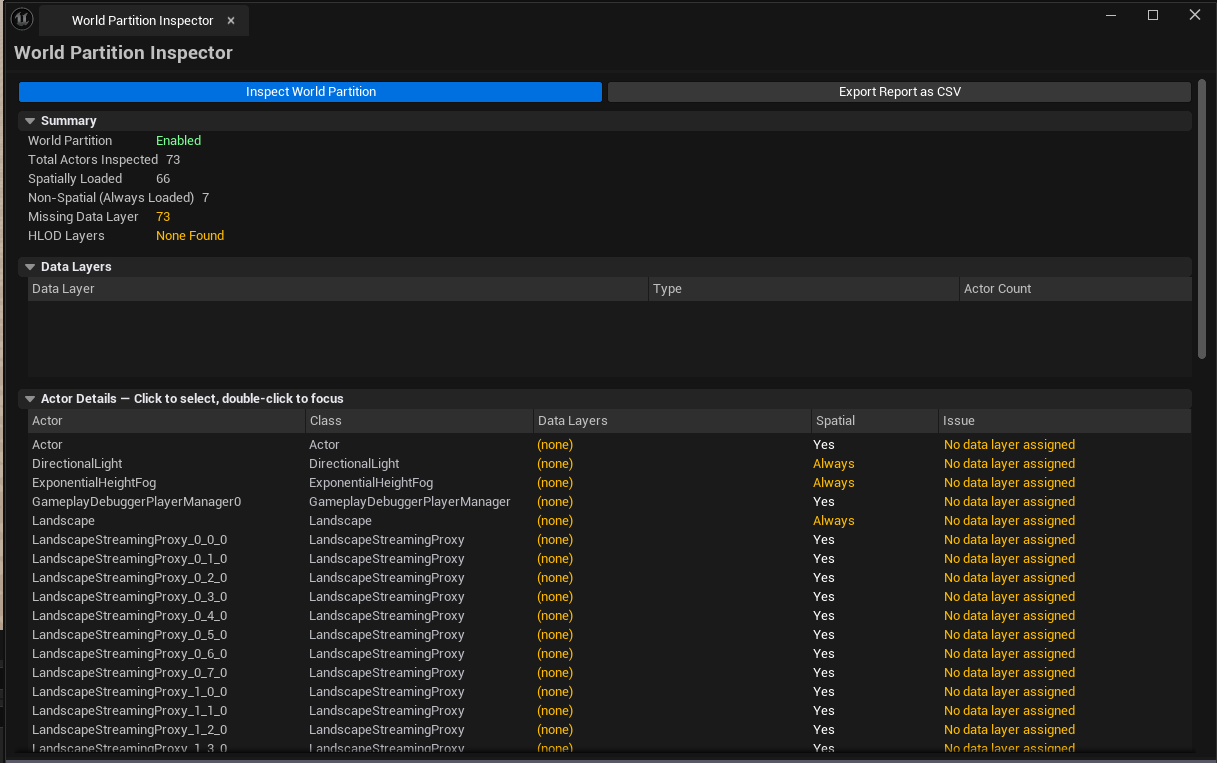
Analyzes the active level’s World Partition setup. Lists every actor with its data-layer assignments, spatial-loading state, and class. Lists every data layer with its type (Runtime / Editor) and actor count. Detects HLOD layers, flags actors missing data-layer assignments, and exports the audit as CSV.
When to use it
Section titled “When to use it”- Auditing an open-world level — confirming every actor has the data layer it should
- Pre-cook validation — finding actors missing a layer assignment (a common World Partition bug)
- Inheriting an open-world project — getting an objective view of what’s spatially loaded vs. always loaded
- Reporting partition health to the team via CSV
When not to use it
Section titled “When not to use it”- Don’t use this on non-WP levels — when the active level isn’t World-Partitioned, the report is mostly empty
- Don’t expect this to author data layers — that’s UE’s Data Layers panel; this audits
Opening the tool
Section titled “Opening the tool”- Open the EQLabs Hub and search for
World Partition(or browse to Design → LevelDesign) - Click the tool card
- Make sure the WP level you want to audit is open
- Click Inspect
Interface tour
Section titled “Interface tour”| Section | What it does |
|---|---|
| Inspect button | Walks the active level’s World Partition |
| Export CSV | Saves the audit as CSV |
| Summary | Total actors / spatially loaded / non-spatial / missing layer count / HLOD layers detected |
| Actors list | Per-actor row: name, class, data layer names, spatial flag, missing-layer flag, issue text |
| Data Layers list | Per-layer row: name, type, actor count, visible flag, runtime flag |
Single-click an actor row to select it in the level. Double-click to fly the camera to it.
Workflow
Section titled “Workflow”- Open the WP level
- Click Inspect
- Walk the actor list — sort by missing-layer flag to find unassigned actors first
- Cross-reference with the Data Layers list to see which layers are over- or under-populated
- Optionally Export CSV for team review
Settings reference
Section titled “Settings reference”No persisted settings beyond standard tool framework.
Settings file:
[Project]/Saved/EQLabs/Settings/WorldPartitionInspector.json
Output
Section titled “Output”- In-panel results — actors + data layers lists
- CSV export — full audit
- No edits — read-only
Tips & gotchas
Section titled “Tips & gotchas”- A “missing data layer” can be intentional — global / always-loaded actors don’t need one. Read the warning before fixing
- HLOD layer detection is presence-based — flags whether HLOD layers exist, not whether they’re correctly built
- Single-click selects in viewport; double-click flies the camera
Related tools
Section titled “Related tools”- OFPA Nexus — One File Per Actor integrity for WP levels
- Level Analysis Suite — broader level metrics
Report an issue with this tool
Opens our feedback form in a new tab with the tool name pre-filled.