
No. 0021 TE TechEQLabs Pro
Batch Material Creator
Module: Tech · Category: Workflow · Tool ID:
BatchMaterialCreator
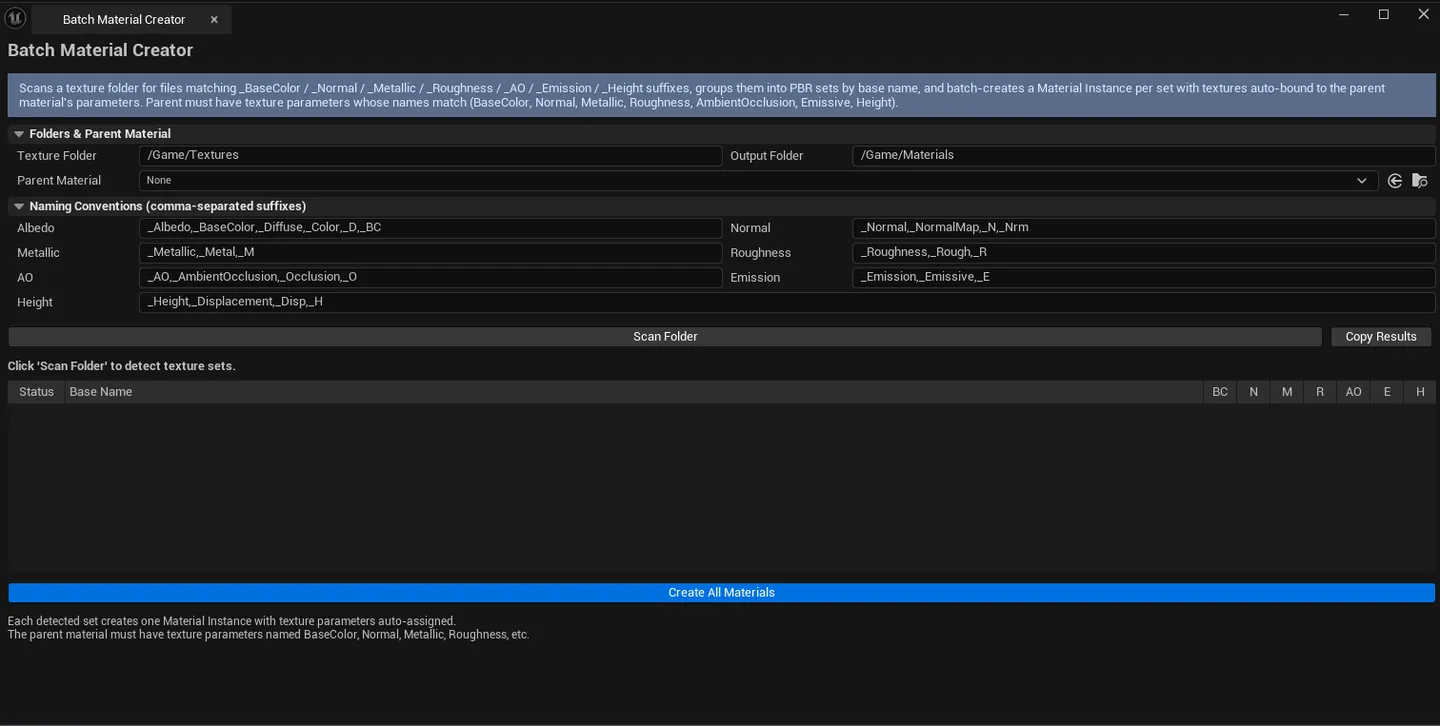
Scans a texture folder, matches files against configurable naming conventions (_Albedo, _Normal, _Metallic, _Roughness, _AO, _Emission, _Height + many aliases), groups them into material sets per base name, and creates UMaterialInstanceConstant from a chosen parent material with the appropriate textures wired into the right parameters.
When to use it
Section titled “When to use it”- Bulk import: a folder of texture sets that all use the same parent material
- Naming-convention-driven material creation
- Migrating from another engine where textures are organized by base name
- Producing master-instance pairs from a 50-set library in one click
What it isn’t for
Section titled “What it isn’t for”- Don’t expect this to author master materials. It creates instances from a parent.
- Don’t expect non-naming-convention matching. The tool reads filename suffixes.
Opening the tool
Section titled “Opening the tool”- Open the EQLabs Hub and search for Batch Material (or browse to Tech → Workflow).
- Click the tool card.
- Configure folders + parent, click Scan, then Create.
Interface tour
Section titled “Interface tour”| Field | What it does | Default |
|---|---|---|
| Texture Folder | Folder with the source textures | /Game/Textures |
| Output Folder | Where created MIs save | /Game/Materials |
| Parent Material picker | The master material to instance from | (empty) |
| Albedo Suffixes | Comma-separated suffix list | _Albedo,_BaseColor,_Diffuse,_Color,_D,_BC |
| Normal Suffixes | _Normal,_NormalMap,_N,_Nrm | |
| Metallic Suffixes | _Metallic,_Metal,_M | |
| Roughness Suffixes | _Roughness,_Rough,_R | |
| AO Suffixes | _AO,_AmbientOcclusion,_Occlusion,_O | |
| Emission Suffixes | _Emission,_Emissive,_E | |
| Height Suffixes | _Height,_Displacement,_Disp,_H | |
| Scan | Walks the folder, groups into sets | |
| Create | Creates MIs for every detected set | |
| Copy Results | Plain-text dump | |
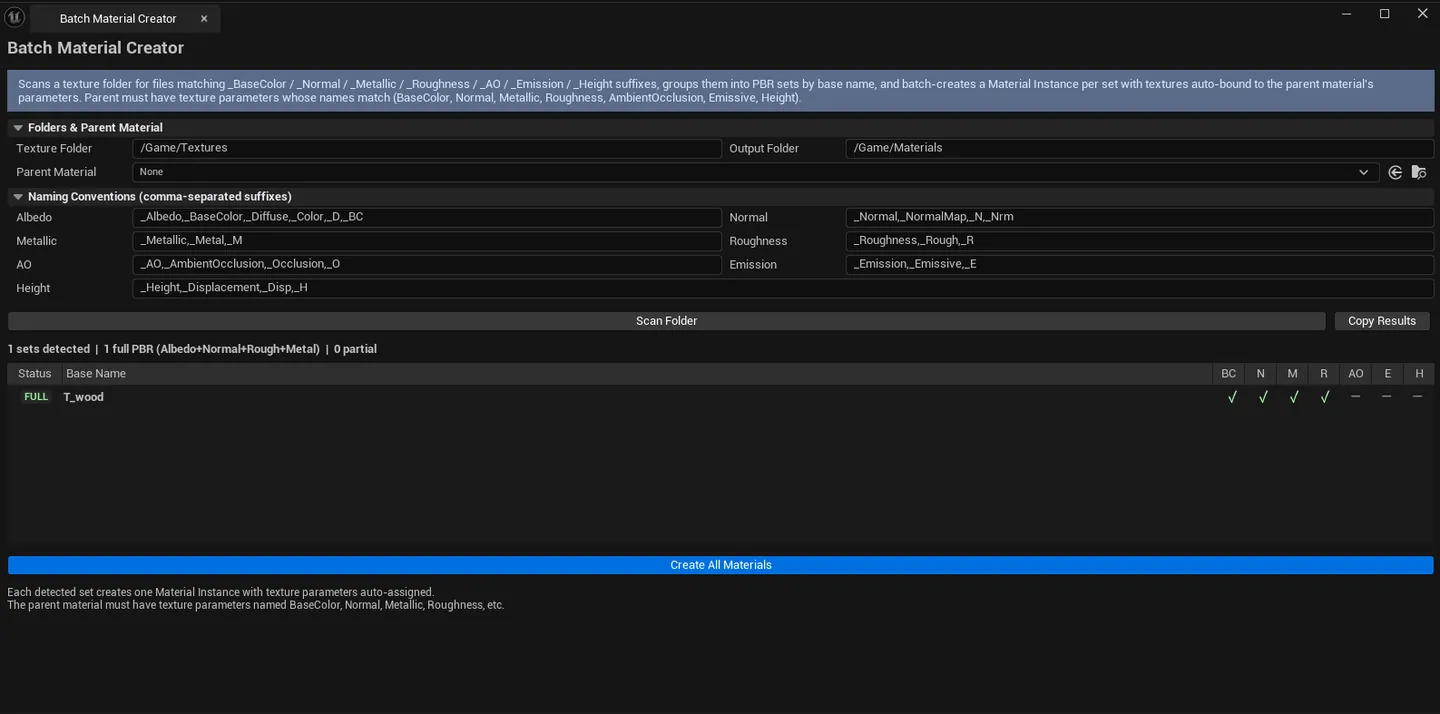
| Detected Sets list | Per-set row: base name, found maps, Full PBR flag |
| Stat | What it shows |
|---|---|
| Full PBR Count | Sets with Albedo + Normal + Roughness + Metallic |
| Partial Count | Sets missing at least one of the above |
Workflow
Section titled “Workflow”- Set Texture Folder and Output Folder.
- Drop the parent material into the picker.
- Optionally tweak suffix lists for your team’s conventions.
- Click Scan — sets list populates.
- Review the list — confirm the right textures are matched per set.
- Click Create — material instances are generated and saved.
Settings reference
Section titled “Settings reference”Suffix lists, folders, and parent material persist to [Project]/Saved/EQLabs/Settings/BatchMaterialCreator.json.
Output
Section titled “Output”UMaterialInstanceConstantassets. One per detected set, saved to Output Folder.- Naming:
MI_<BaseName>(configurable via parent material naming) - Texture parameters wired to standard names (
BaseColor,Normal, etc.) — make sure your parent material exposes parameters with those names
Tips and gotchas
Section titled “Tips and gotchas”- Parent material parameter names matter. The tool wires textures to parameters named
BaseColor,Normal,Roughness,Metallic,AO,Emission,Height. Rename if your parent uses different conventions. - Suffix lists are case-sensitive. Match your team’s actual filenames.
- Partial sets still get MIs created. Only the matched textures are wired; unmatched parameters use the parent default.
Related tools
Section titled “Related tools”- Smart Mask & Texture Processor — for the Material Instance Factory side (single MI from explicit slots)
- Material Layer Studio — debug created instances
Report an issue with this tool
Opens our feedback form in a new tab with the tool name pre-filled.