
No. 0592 AR ArtEQLabs Pro
Smart Mask & Texture Processor
Module: Art · Category: TextureArt · Tool ID:
SmartMaskTextureProcessor
A four-tab texture processor consolidating common per-asset operations. Height to Normal converts heightmaps via Sobel filter. Normal Map Mixer blends two normal maps (RNM, Linear, Overlay, Partial Derivative). Smart Mask Generator auto-builds edge/wear, cavity, position-gradient, and ID masks from a source texture. Material Instance Factory creates UMaterialInstanceConstant from a parent material + texture set.
When to use it
Section titled “When to use it”- Quick height-to-normal conversion without leaving UE
- Blending two normal maps (e.g., a base detail normal with a per-asset variation)
- Generating smart masks for material setup (edge wear, cavity AO, height-based blending)
- Batch creating material instances from a parent + texture set workflow
What it isn’t for
Section titled “What it isn’t for”- Don’t expect this to replace Substance Designer / Painter. It’s targeted at quick in-engine operations, not full procedural authoring.
- Don’t use for runtime texture generation. All operations are offline asset edits.
Opening the tool
Section titled “Opening the tool”- Open the EQLabs Hub and search for Smart Mask (or browse to Art → TextureArt).
- Click the tool card.
- Use the tab bar: Height to Normal, Normal Map Mixer, Smart Mask Generator, or Material Instance Factory.
Tab 1: Height to Normal
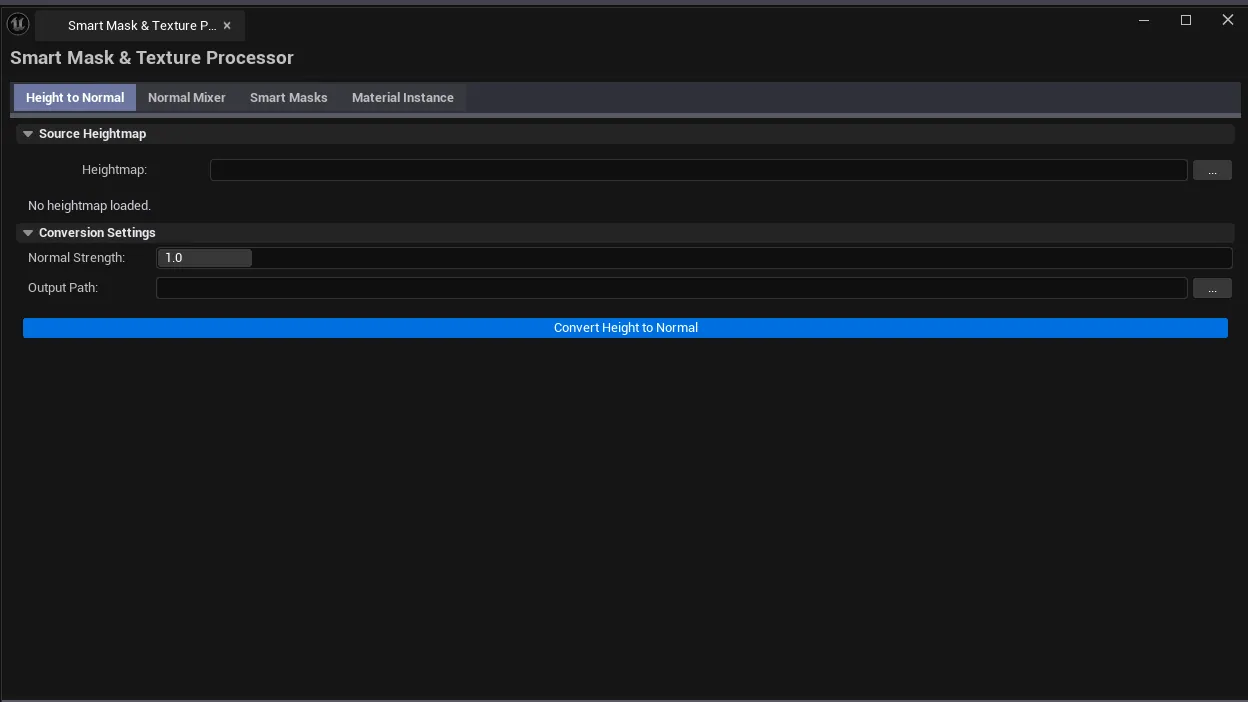
Section titled “Tab 1: Height to Normal”Convert a heightmap to a normal map via Sobel filtering.
Interface
Section titled “Interface”| Field | What it does | Default |
|---|---|---|
| Heightmap picker | The grayscale source heightmap | (empty) |
| Heightmap Thumb | Live thumbnail preview | — |
| Normal Strength | Scale factor on the computed normals | 1.0 |
| Output Path | Folder for the resulting normal map | (empty) |
| Convert | Runs Sobel + saves as a UTexture2D |
Workflow
Section titled “Workflow”- Drop the heightmap.
- Tune Normal Strength (
1.0is neutral; raise for more pronounced normals). - Pick output path, click Convert.
Tab 2: Normal Map Mixer
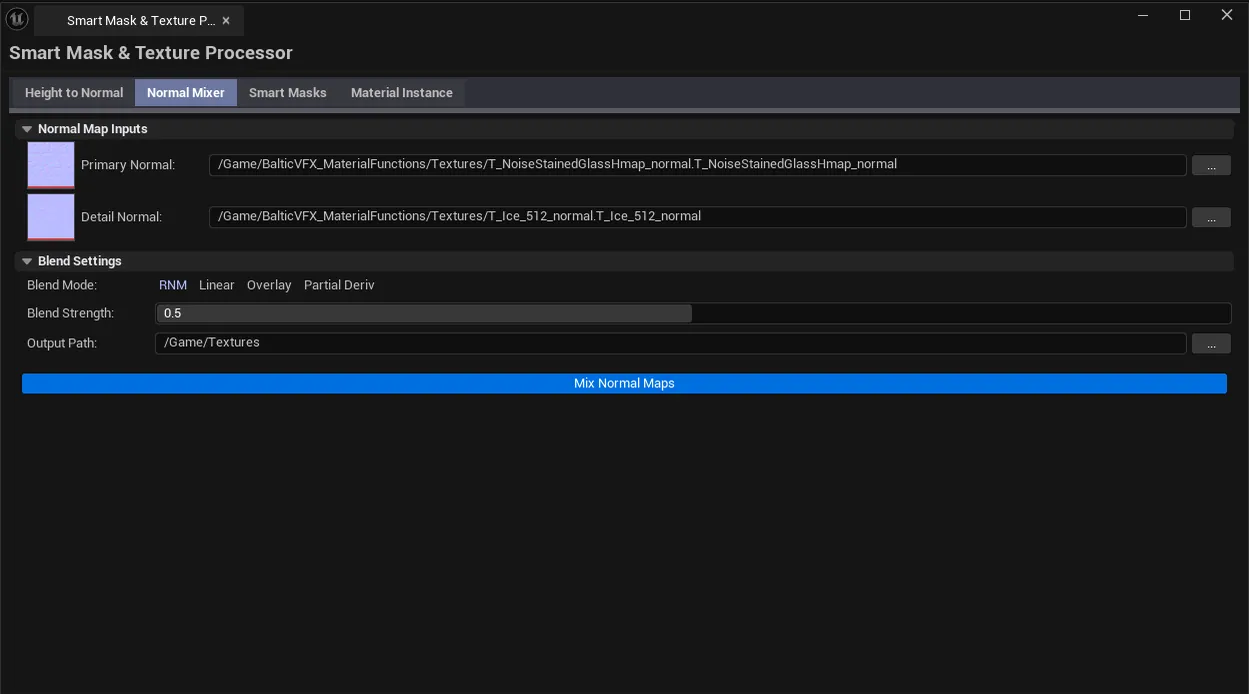
Section titled “Tab 2: Normal Map Mixer”Blend two normal maps using a chosen blend mode.
Interface
Section titled “Interface”| Field | What it does | Default |
|---|---|---|
| Primary Normal picker | Base normal map | (empty) |
| Detail Normal picker | Detail / second normal | (empty) |
| Blend Mode | RNM, Linear, Overlay, Partial Derivative | RNM |
| Blend Strength | Mix weight | 0.5 |
| Output Path | Save destination | (empty) |
| Mix | Runs the blend + saves |
Blend modes
Section titled “Blend modes”| Mode | What it does |
|---|---|
| RNM (Reoriented Normal Mapping) | Mathematically correct normal blend; preserves both surfaces’ direction |
| Linear | Simple lerp; loses detail at high blend values |
| Overlay | Photoshop-style overlay; cheap and stylized |
| Partial Derivative | Differentiation-based blend; high quality |
Tab 3: Smart Mask Generator
Section titled “Tab 3: Smart Mask Generator”Auto-build common masks from a single source texture.
Interface
Section titled “Interface”| Field | What it does | Default |
|---|---|---|
| Mask Source picker | Source texture | (empty) |
| Generate Edge Mask | Toggle edge mask generation | true |
| Edge Threshold | Sensitivity of edge detection | 0.15 |
| Generate Cavity Mask | Toggle cavity mask | true |
| Cavity Strength | How aggressive cavity detection is | 1.0 |
| Generate Position Gradient | Toggle position gradient mask | true |
| Generate ID Mask | Toggle ID mask | true |
| ID Mask Color Count | Number of unique colors in the ID mask | 4 |
| Generate | Runs all enabled mask generators | |
| Mask Results list | Per-mask row: name, description, dimensions, export PNG action |
Mask types
Section titled “Mask types”| Mask | What it represents |
|---|---|
| Edge | Detected edges (great for wear/scratch authoring) |
| Cavity | Recessed areas (great for AO darkening / dirt accumulation) |
| Position Gradient | XY-position-driven gradient (height-blend authoring) |
| ID | Color-quantized regions (per-region material masks) |
Tab 4: Material Instance Factory
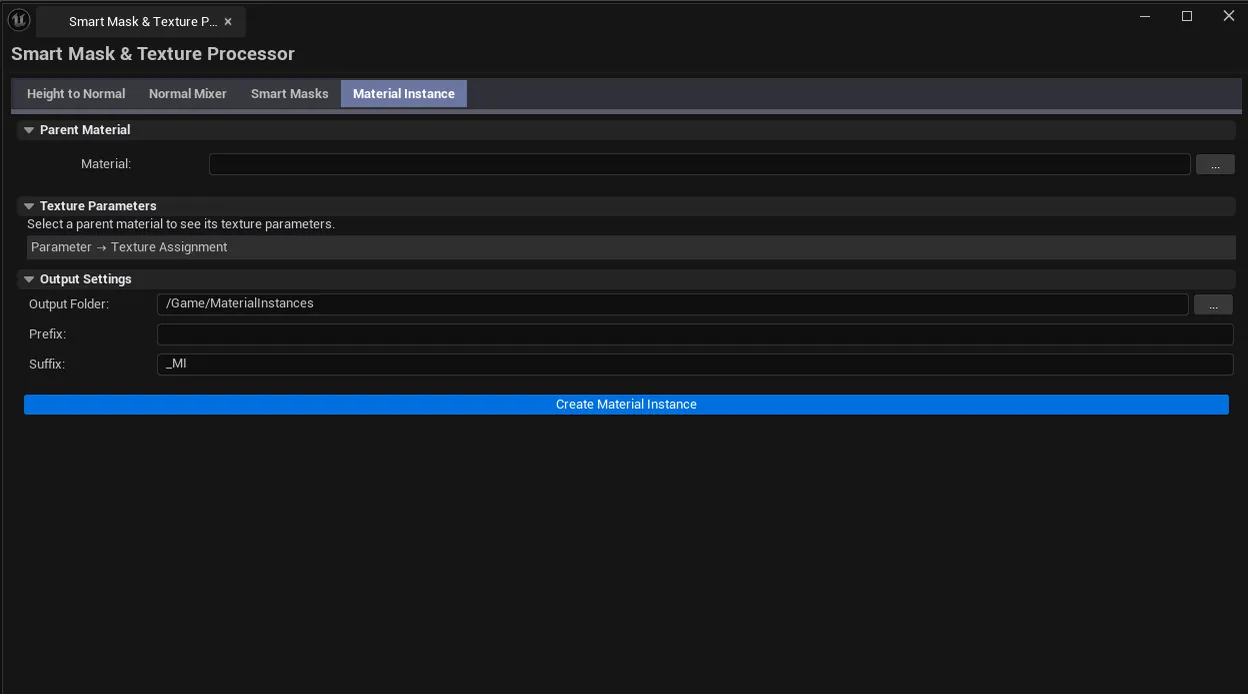
Section titled “Tab 4: Material Instance Factory”Create UMaterialInstanceConstant from a parent material + texture set.
Interface
Section titled “Interface”| Field | What it does | Default |
|---|---|---|
| Master Material picker | Parent UMaterialInterface | (empty) |
| MI Output Folder | Where instances are saved | /Game/MaterialInstances |
| MI Name Prefix / Suffix | Filename prefix and suffix | empty / _MI |
| Texture Param Slots | Auto-populated from parent material’s texture parameters; assign textures per slot | |
| Refresh Material Params | Reads parameters from the picked master material | |
| Create Material Instance | Builds the instance with the assigned textures |
Workflow
Section titled “Workflow”- Pick a master material (must have texture parameters).
- Click Refresh Material Params — slots populate from the master’s texture parameters.
- For each slot, assign the appropriate texture.
- Configure name prefix/suffix and output folder.
- Click Create Material Instance.
Settings reference
Section titled “Settings reference”Per-tab defaults
Section titled “Per-tab defaults”| Field | Default |
|---|---|
| Normal Strength | 1.0 |
| Blend Mode | RNM |
| Blend Strength | 0.5 |
| Edge Threshold | 0.15 |
| Cavity Strength | 1.0 |
| ID Mask Color Count | 4 |
| MI Output Folder | /Game/MaterialInstances |
| MI Suffix | _MI |
Settings are persisted to
[Project]/Saved/EQLabs/Settings/SmartMaskTextureProcessor.json.
Output
Section titled “Output”- Height to Normal. New normal map
UTexture2Dasset. - Normal Map Mixer. New blended normal map
UTexture2D. - Smart Mask Generator. Generates masks in-panel; export each as PNG via per-row action.
- Material Instance Factory. New
UMaterialInstanceConstantasset.
Tips and gotchas
Section titled “Tips and gotchas”- RNM is the right default for normal blending. Linear can lose detail at high blend values.
- Edge Threshold of 0.15 is a good baseline. Drop to 0.05 for very subtle edge detection on smooth surfaces.
- ID Mask color count should match material setups. If you have 3 paint zones, use 3 ID colors.
- Material Instance Factory respects parent texture parameter naming. Make sure your master material has clearly named parameters before using.
- Absorbs HeightmapToNormal and NormalMapMixer. Those legacy standalone tools are now Tabs 0 and 1 of this suite.
Related tools
Section titled “Related tools”- Universal Bake Suite (Material Texture Baker) — for baking material channels to textures, complementary to mask generation
- Texture Authoring Suite — seamless texture and variation generation
- Material Layer Studio — debug material instances created by Tab 4
Opens our feedback form in a new tab with the tool name pre-filled.