
No. 0261 TE TechEQLabs Pro
Rendering Systems Auditor
Module: Tech · Category: Performance · Tool ID:
RenderingSystemsAuditor
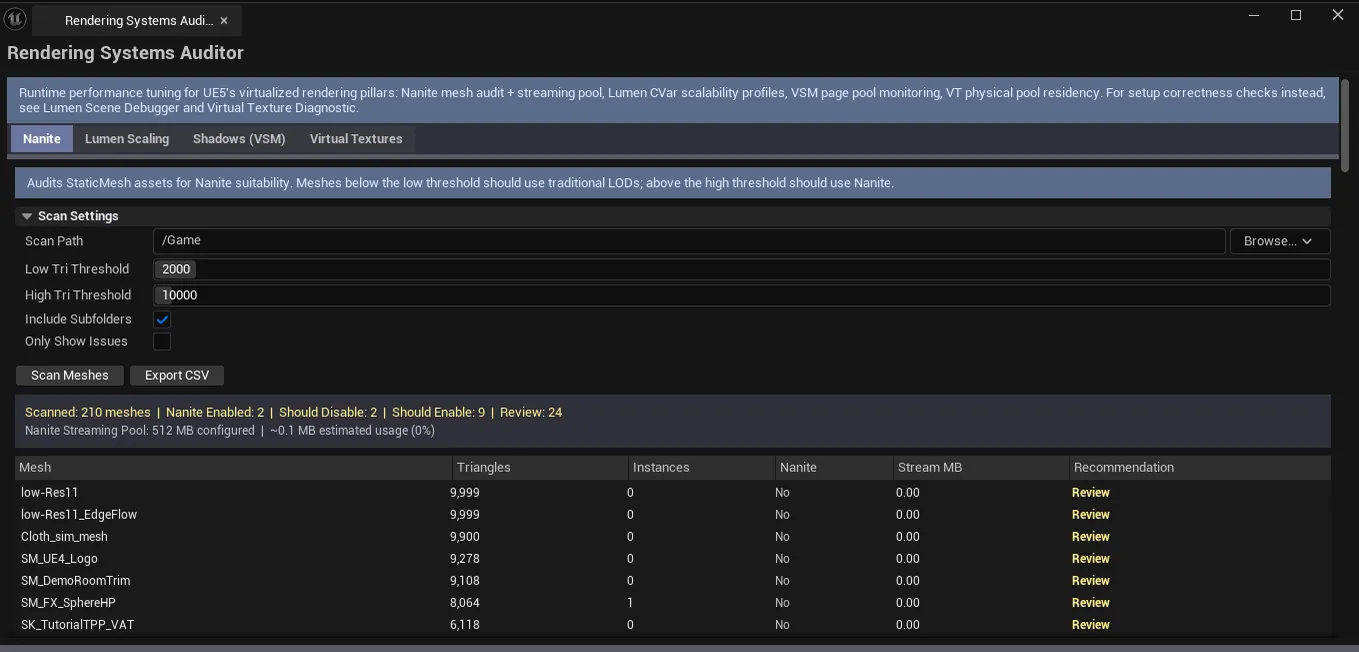
Four-tab UE5 rendering pipeline auditor covering the four pillars of virtualized rendering. Nanite audits mesh suitability and monitors the streaming pool. Lumen Scaling automates Lumen CVar management with hardware-profile presets. Shadows (VSM) monitors Virtual Shadow Map page pool and tunes dynamically. Virtual Textures monitors VT physical pool residency and detects oversubscription.
ℹ️ Focus: runtime performance tuning. For scene correctness checks, cross-reference Lumen Scene Debugger and Virtual Texture Diagnostic.
When to use it
Section titled “When to use it”- UE5 rendering performance tuning: Nanite / Lumen / VSM / VT
- Pre-shipping perf audit on systems-level rendering
- Hardware-profile preset application (low-end / mid / high / cinematic)
- Monitoring streaming pools at runtime in PIE
What it isn’t for
Section titled “What it isn’t for”- Don’t expect this to handle scene-correctness issues. See Lumen Scene Debugger / Virtual Texture Diagnostic.
- Don’t expect this to fix asset-side issues. Runtime tuning only.
Opening the tool
Section titled “Opening the tool”- Open the EQLabs Hub and search for Rendering Systems (or browse to Tech → Performance).
- Click the tool card.
- Use the tab bar: Nanite / Lumen Scaling / Shadows (VSM) / Virtual Textures.
Tab 1: Nanite
Section titled “Tab 1: Nanite”Mesh suitability + streaming pool monitoring.
Tab 2: Lumen Scaling
Section titled “Tab 2: Lumen Scaling”Automated Lumen CVar management with hardware-profile presets (Low / Medium / High / Epic / Cinematic). Apply a preset, all relevant Lumen CVars set together.
Tab 3: Shadows (VSM)
Section titled “Tab 3: Shadows (VSM)”Virtual Shadow Map page pool monitoring + dynamic tuning. Surfaces page pool overflow conditions and suggests CVar adjustments.
Tab 4: Virtual Textures
Section titled “Tab 4: Virtual Textures”VT physical pool residency + oversubscription detection.
Output
Section titled “Output”- CVar changes. Applied during Lumen Scaling preset apply (and similar).
- In-panel monitoring. Live during PIE.
- No asset edits. Runtime tuning only.
Tips and gotchas
Section titled “Tips and gotchas”- Lumen scaling presets are starting points. Tune to project after applying a preset.
- VSM page pool overflow is a frequent UE5 perf issue. Monitor in PIE, adjust pool size CVars.
- VT oversubscription causes streaming hitches. Large pool sizes solve this but eat VRAM.
Related tools
Section titled “Related tools”- Lumen Scene Debugger — scene correctness side
- Virtual Texture Diagnostic — VT setup side
- Runtime Insights Suite — broader runtime profiling
Opens our feedback form in a new tab with the tool name pre-filled.