
No. 0582 AR ArtEQLabs Pro
Procedural Scattering & Placement Suite
Module: Art · Category: Scatter · Tool ID:
ProceduralScatterSuite
A five-tab environment art workflow for raycast-based scatter and drop placement. Drop & Place drops meshes from height and lets them land naturally on surfaces. Drop Controls adds PolygonFlow-style jitter / reset / duplicate / mobility-toggle. Scatter Recipe does ray-cast area scatter with slope and collision filters. Rule Presets gives one-click setups for Foliage, Debris, Rock, Crowd, Interior. Backend & Bake bakes the scattered actors to HISM for runtime efficiency.
When to use it
Section titled “When to use it”- Environment dressing: rocks, debris, foliage, crowd actors, interior props
- Quick natural-looking placement that physics simulation can’t reasonably do at runtime
- Bulk scatter into HISM for ten-thousands of instances at runtime cost of one
- Iterative dressing pass: drop, jitter, reset, refine
What it isn’t for
Section titled “What it isn’t for”- Don’t expect interactive viewport brush painting. That’s planned for a Phase 2 update with a custom EdMode. V1 is button-driven.
- Don’t use this for runtime spawn. It’s offline-authoring, baking to HISM at the end.
Opening the tool
Section titled “Opening the tool”- Open the EQLabs Hub and search for Scatter (or browse to Art → Scatter).
- Click the tool card.
- Use the tab bar: Drop & Place, Drop Controls, Scatter Recipe, Rule Presets, or Backend & Bake.
Tab 1: Drop & Place
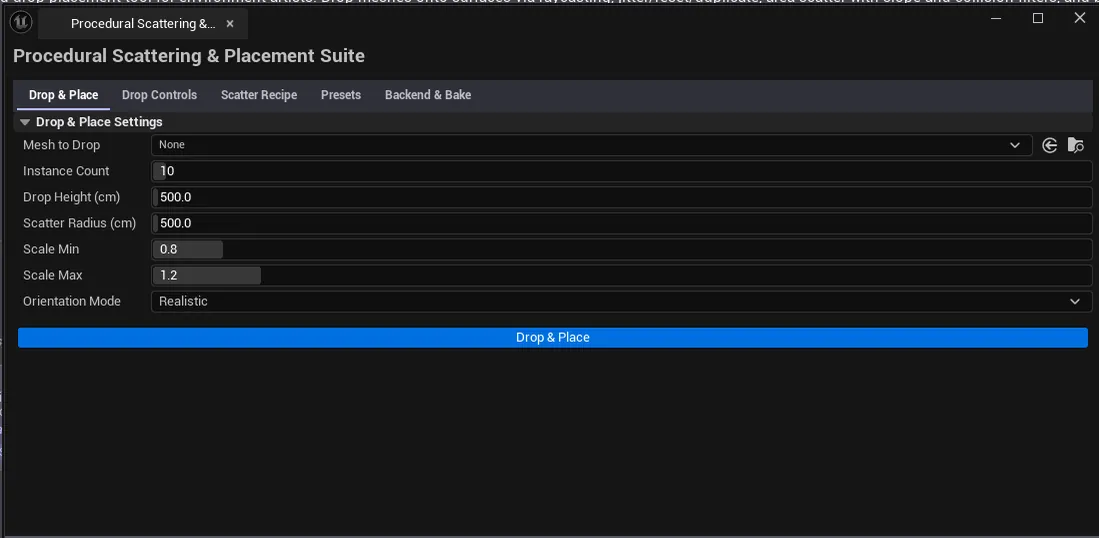
Section titled “Tab 1: Drop & Place”Drop meshes from a configurable height and let them land on surfaces.
Interface
Section titled “Interface”| Field | What it does | Default |
|---|---|---|
| Physics Drop Mesh picker | The mesh to drop | (empty) |
| Drop Count | How many instances to drop | 10 |
| Drop Height Offset | Height above the target surface to spawn | 500 cm |
| Scale Min / Max | Random scale range | 0.8 / 1.2 |
| Scatter Radius | Horizontal radius around the drop point | 500 cm |
| Orientation Mode | Realistic / Randomized / Locked | Realistic |
| Drop & Simulate | Spawns the drop and runs a brief sim |
Orientation modes
Section titled “Orientation modes”| Mode | What it does |
|---|---|
| Realistic | Natural rotation, changes based on collision |
| Randomized | Random initial rotation; doesn’t change on collision |
| Locked | Maintain original orientation regardless of surface |
Tab 2: Drop Controls (PolygonFlow-style)
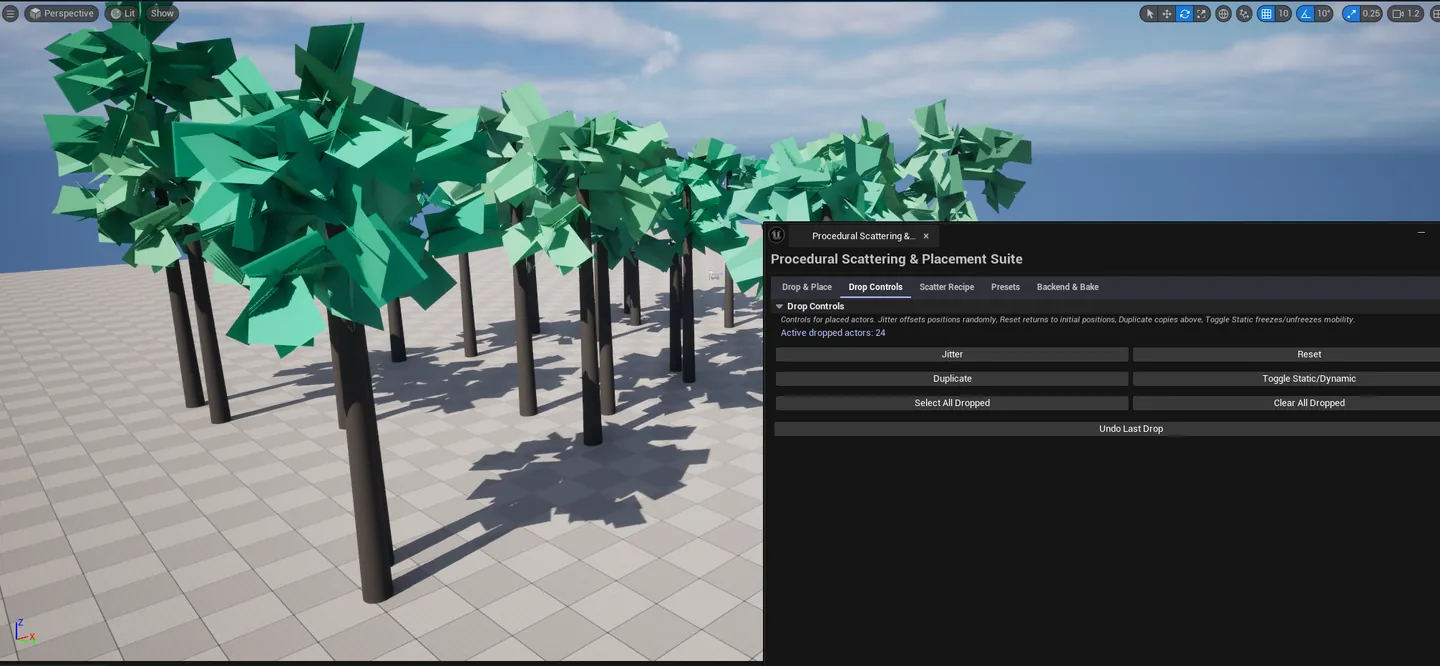
Section titled “Tab 2: Drop Controls (PolygonFlow-style)”Manipulate dropped instances after the drop.
Interface
Section titled “Interface”| Action | What it does |
|---|---|
| Jitter | Randomly perturbs positions of dropped actors |
| Reset Positions | Restores initial drop transforms |
| Duplicate Dropped | Duplicates the dropped set |
| Select All Dropped | Selects all dropped actors in the viewport |
| Toggle Static | Toggle Static / Dynamic mobility per actor |
| Clear Dropped | Removes all dropped actors |
| Undo Last Drop | Undoes the most recent drop operation |
Tab 3: Scatter Recipe
Section titled “Tab 3: Scatter Recipe”Ray-cast area scatter with slope and collision filtering.
Interface
Section titled “Interface”| Field | What it does | Default |
|---|---|---|
| Scatter Mesh picker | The mesh to scatter | (empty) |
| Density | Instances per area unit | 100 |
| Min / Max Scale | Random scale range | 0.8 / 1.2 |
| Random Rotation | Toggle random Yaw rotation | true |
| Slope Max (deg) | Skip surfaces steeper than this | 45 |
| Collision Avoid Radius | Minimum distance between instances | 50 cm |
| Scatter Area Radius | Total scatter area | 2000 cm |
| Execute Scatter | Runs the scatter |
Tab 4: Rule Presets
Section titled “Tab 4: Rule Presets”Built-in scatter presets for common environment-art use cases.
Available presets
Section titled “Available presets”| Preset | Tuned for |
|---|---|
| Foliage | High density, low scale variation, steep slope tolerance |
| Debris | Medium density, high scale variation, irregular distribution |
| Rock | Low density, high scale variation, gravity-aware |
| Crowd | Even spacing, low scale variation, vertical alignment |
| Interior | Tight spacing, no rotation, surface-snapped |
Workflow
Section titled “Workflow”Pick a preset from the list — it pre-fills the Scatter Recipe tab’s parameters. Tweak from there.
Tab 5: Backend & Bake
Section titled “Tab 5: Backend & Bake”Bake scattered actors to Hierarchical Instanced Static Meshes for runtime efficiency.
Interface
Section titled “Interface”| Action | What it does |
|---|---|
| Bake to HISM | Converts every scattered actor into instances of a single HISM component |
After baking, draw call cost drops from N (one per actor) to 1 (one per mesh, regardless of instance count).
Settings reference
Section titled “Settings reference”Every tab persists its settings to [Project]/Saved/EQLabs/Settings/ProceduralScatterSuite.json.
Output
Section titled “Output”- In-place actor placement. Drop and Scatter create real
AStaticMeshActorinstances in the level. - HISM baking. Bake to HISM converts them to a single Hierarchical Instanced Static Mesh.
- Undo. Operations are wrapped in
ScopedTransaction. Drop Controls’ Undo Last Drop is a dedicated action.
Tips and gotchas
Section titled “Tips and gotchas”- Drop Height Offset matters.
500cm is fine for most props; very tall objects need more headroom to settle naturally. - Slope Max controls cliff scatter. At
45°, rocks won’t scatter on steep surfaces; raise to90°for full coverage including walls. - Collision Avoid Radius prevents instance overlap. Set to roughly your mesh’s bounding radius for natural spacing.
- Bake to HISM is cheap at runtime, expensive at edit time. Once baked, individual instances are harder to edit. Author first, bake last.
- Display name is “Procedural Scattering & Placement Suite”. Class and tool ID are
ProceduralScatterSuite.
Related tools
Section titled “Related tools”- Spline Asset Placer — for spline-driven distribution (roads, fences, pipes)
- Foliage Placement Analyzer. Analyze the foliage-specific side after scatter.
- Modular Kit Auditor (Modeling module) — validate placement after scatter
Opens our feedback form in a new tab with the tool name pre-filled.