
Chaos Destruction Wizard
Chaos Destruction Wizard
Section titled “Chaos Destruction Wizard”Module: Design · Category: Destruction · Tool ID:
ChaosDestructionWizard
A four-tab end-to-end destruction setup wizard. Setup & Convert turns a Static Mesh into a UGeometryCollection asset and spawns a AGeometryCollectionActor, with optional initial Voronoi fracture. Damage & Clustering configures damage thresholds and cluster levels. Field Systems spawns anchor / disable / strain field actors around the GC. VFX & LOD attaches Niagara dust/debris, configures LOD distances, and toggles audio. Quick presets cover common scenarios (glass, concrete, wood).
ℹ️ What this is and isn’t: This wizard handles all the infrastructure around a Chaos GeometryCollection — actor spawning, fields, VFX, audio, LODs. The actual fracturing patterns (Voronoi / Radial / Slab / etc.) should be done via UE’s built-in Fracture Mode after the GC asset is created. This tool spawns an initial Voronoi fracture during Convert as a starting point, but full fracture authoring lives in Fracture Mode.
When to use it
Section titled “When to use it”- Setting up a destructible mesh from scratch — handles everything except the fracture patterns themselves
- Auditing an existing GC’s damage / cluster / field setup
- Applying a tested preset (glass / concrete / wood) and tweaking from there
- Pre-cinematic destruction setup — VFX + LOD + audio in one pass
When not to use it
Section titled “When not to use it”- Don’t use this for fracture pattern authoring — Fracture Mode is the right tool for Voronoi / Radial / Slab work
- Don’t expect runtime physics tuning — this configures asset-side parameters
Opening the tool
Section titled “Opening the tool”- Open the EQLabs Hub and search for
ChaosorDestruction(or browse to Design → Destruction) - Click the tool card
- Use the tab bar: Setup, Damage, Field Systems, VFX & LOD, plus the Quick Presets section
Tab 1 — Setup & Convert
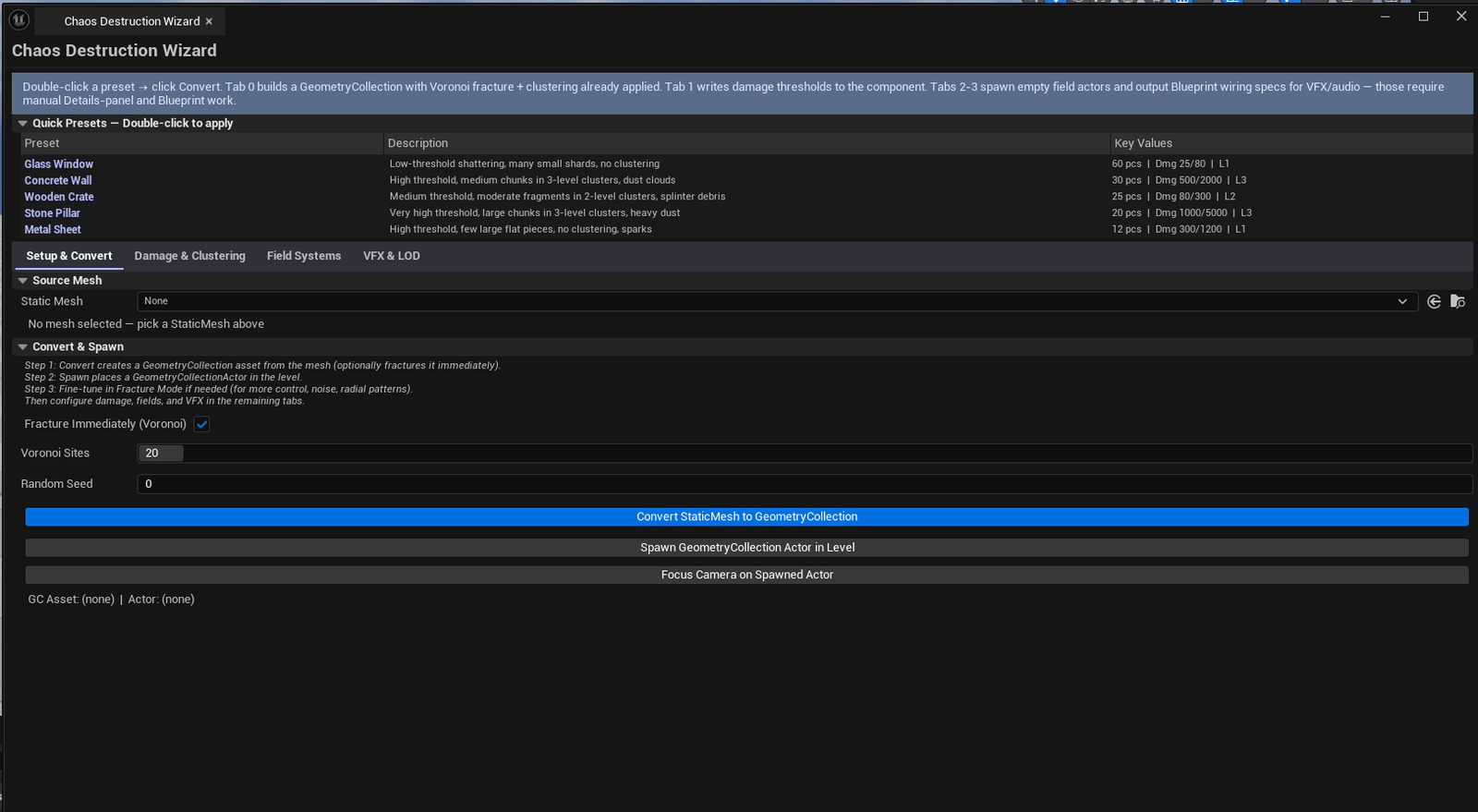
Section titled “Tab 1 — Setup & Convert”Convert a Static Mesh to a GeometryCollection.
| Field | What it does | Default |
|---|---|---|
| Source Mesh picker | Static mesh to convert | (empty) |
| Fracture on Convert | Apply initial Voronoi during conversion | true |
| Voronoi Site Count | Cells for the initial fracture | 20 |
| Fracture Seed | Random seed | 0 |
| Convert to GC | Creates the UGeometryCollection asset | |
| Spawn GC Actor | Spawns AGeometryCollectionActor in the level |
After convert, refine the fracture in Fracture Mode.
Tab 2 — Damage & Clustering
Section titled “Tab 2 — Damage & Clustering”Configure damage propagation.
| Field | What it does | Default |
|---|---|---|
| Cluster Levels | Hierarchy levels (chunks → debris) | 2 |
| Cluster Radius | Spatial cluster grouping radius | 100.0 |
| Damage Threshold L1 | First level damage threshold | 100.0 |
| Damage Threshold L2 | Second level threshold | 500.0 |
| Apply Damage Settings | Writes the values back to the GC asset |
Tab 3 — Field Systems
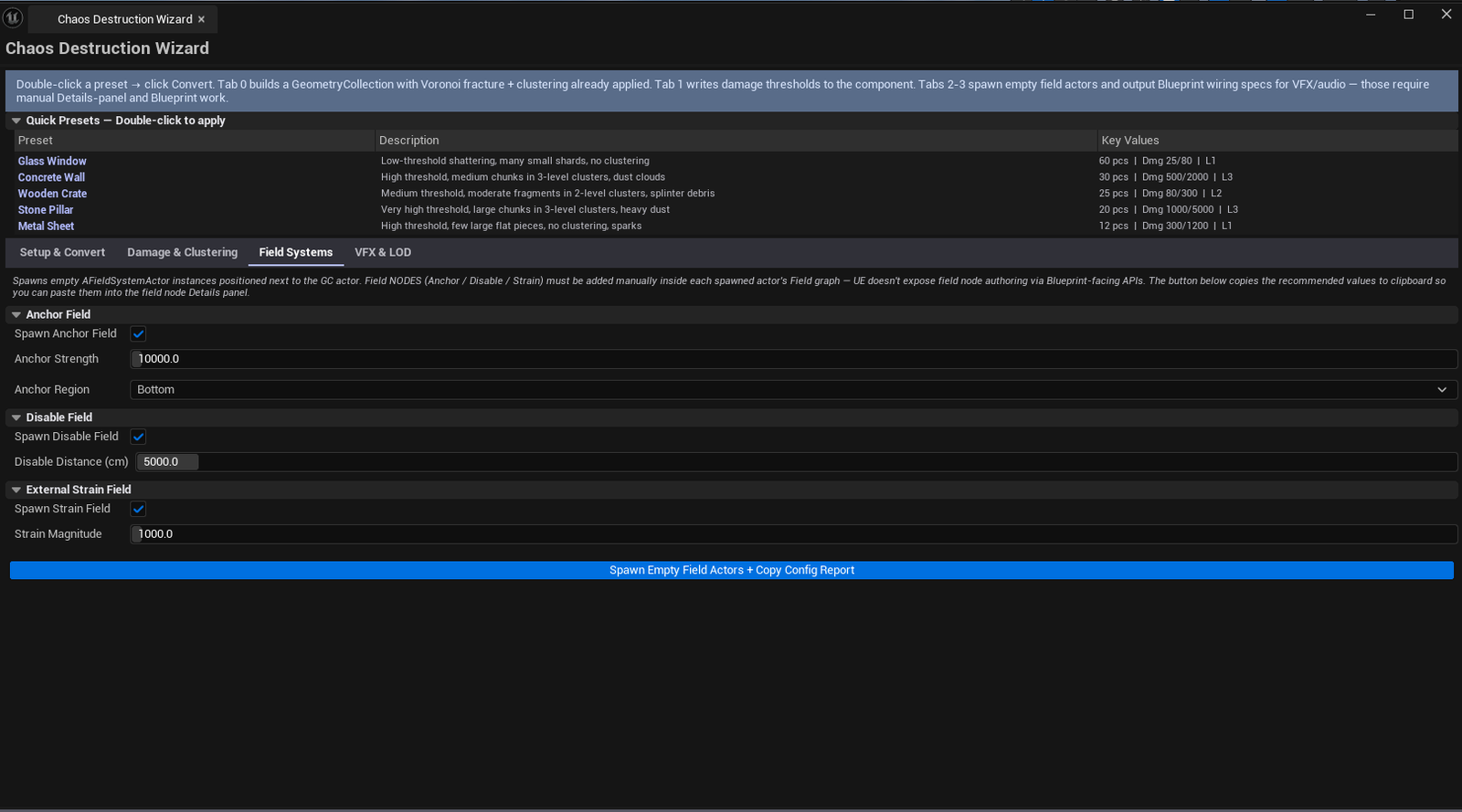
Section titled “Tab 3 — Field Systems”Spawn field actors that drive the destruction.
| Field | What it does | Default |
|---|---|---|
| Anchor Type combo | Which type of anchor field | |
| Anchor Strength | Anchor field strength | 10000 |
| Disable Distance | Distance at which field disables | 5000 |
| Strain Magnitude | Strain field magnitude | 1000 |
| Spawn Anchor / Disable / Strain | Toggles per field type | |
| Spawn Field Systems | Spawns the configured field actors around the GC |
Field types
Section titled “Field types”| Field | What it does |
|---|---|
| Anchor | Holds chunks in place until forced |
| Disable | Stops simulating chunks beyond a distance from the field |
| Strain | Drives directional damage / forces |
Tab 4 — VFX & LOD
Section titled “Tab 4 — VFX & LOD”Attach VFX, configure LODs and audio.
| Field | What it does | Default |
|---|---|---|
| Auto Spawn Dust | Spawn dust Niagara on impact | true |
| Auto Spawn Debris | Spawn debris Niagara on break | true |
| VFX Scale | Niagara VFX scale | 1.0 |
| LOD Near Distance | Near LOD switch | 1000 |
| LOD Far Distance | Far LOD switch | 5000 |
| Auto Spawn Impact Sound | Attach impact audio | true |
| Apply VFX Settings | Configures the GC actor with the chosen VFX/LOD/audio |
Quick Presets
Section titled “Quick Presets”Common destruction setups in one click. Tuned for typical materials:
| Preset | Tuned for |
|---|---|
| Glass | High Voronoi count, low damage thresholds, tight cluster, dust + debris |
| Concrete | Medium Voronoi, high damage thresholds, large cluster, heavy debris |
| Wood | Low Voronoi (planks), high strain, splinter debris |
| (More) | Custom presets per project |
Workflow
Section titled “Workflow”Setup from scratch
Section titled “Setup from scratch”- Drop a static mesh into the picker
- Apply a preset (e.g., Concrete)
- Click Convert to GC
- Click Spawn GC Actor
- Switch to Fracture Mode in UE’s main toolbar — refine fracture patterns
- Return to this wizard, walk through Damage / Field Systems / VFX & LOD tabs
Settings reference
Section titled “Settings reference”Per-tab parameters persist to [Project]/Saved/EQLabs/Settings/ChaosDestructionWizard.json.
Output
Section titled “Output”UGeometryCollectionasset — created via Convert to GCAGeometryCollectionActor— spawned in levelAFieldSystemActor— spawned for each enabled field- Niagara VFX components — attached during VFX & LOD apply
- Audio components — attached during VFX & LOD apply
- Undo — operations wrapped in
ScopedTransaction
Tips & gotchas
Section titled “Tips & gotchas”- Quick presets only set parameters; they don’t replace human judgment — apply, then tune to your specific source mesh
- Fracture Mode is where real pattern authoring happens — this wizard’s initial Voronoi is just a starting point
- Disable Distance is a perf knob — too small and you’ll see chunks stop simulating mid-air; too large and physics cost is permanent
- Field actors must be near the GC actor — auto-spawn places them around the GC’s bounds; if you move the GC later, move the fields too
Related tools
Section titled “Related tools”- Niagara FX Library — for finding the dust / debris VFX this wizard attaches
- Physics & Collision Studio (Modeling module) — for the underlying physics asset
Opens our feedback form in a new tab with the tool name pre-filled.