
No. 0351 TE TechEQLabs Pro
Texture Validation & Color Management
Module: Tech · Category: Workflow · Tool ID:
TextureValidationColorMgmt
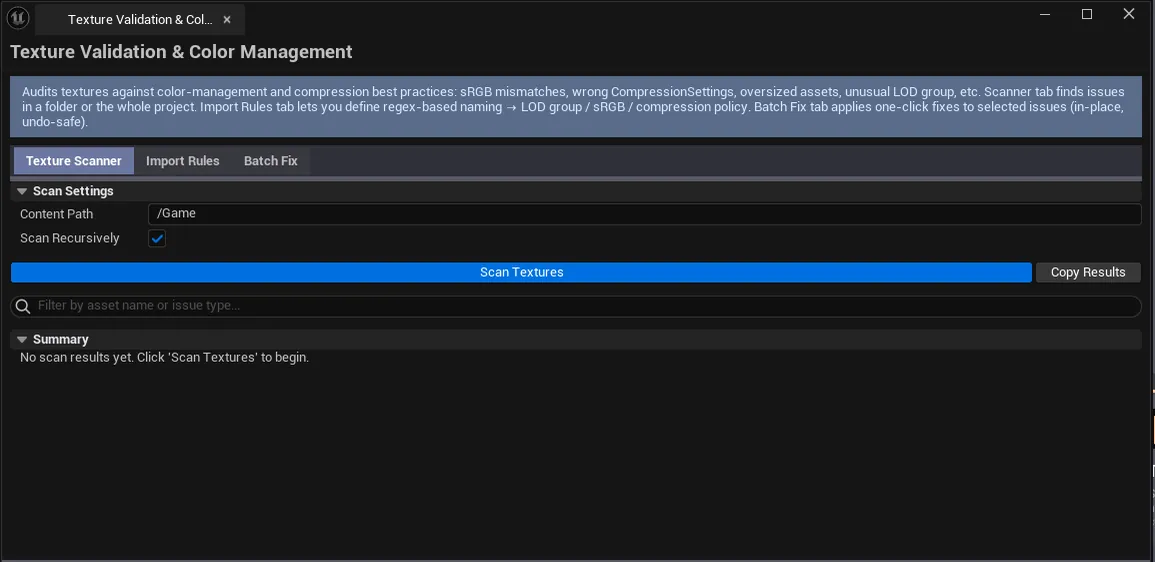
Three-tab texture validation tool. Texture Scanner scans all UTexture2D assets for sRGB, compression, dimensions, LOD group issues, and oversized warnings. Import Rules lets you author regex-to-setting rules for automated import enforcement. Batch Fix selects scanner results and applies fixes; exports CSV reports.
ℹ️ Absorbs the legacy
PBRTextureValidator,NormalMapMixer,HeightmapToNormal, andTextureImportEnforcerstandalone tools (AF-04).
When to use it
Section titled “When to use it”- Pre-shipping texture audit: confirming sRGB / compression / LOD group are correct project-wide
- Authoring import rules: automating “all
_Ntextures should be Normal Map compression, sRGB off” - Batch fixing texture settings discovered during scan
What it isn’t for
Section titled “What it isn’t for”- Don’t use this for color grading. See LUT Color Grading Baker.
- Don’t use this to bake. See Universal Bake Suite (Material Texture Baker).
Opening the tool
Section titled “Opening the tool”- Open the EQLabs Hub and search for Texture Validation (or browse to Tech → Workflow).
- Click the tool card.
- Use the tab bar: Scanner / Import Rules / Batch Fix.
Tab 1: Texture Scanner
Section titled “Tab 1: Texture Scanner”| Field | What it does | Default |
|---|---|---|
| Scan Path | Folder to scan | /Game |
| Scan Recursive | Toggle | true |
| Search | Filter results | |
| Run Scan | Walks every UTexture2D | |
| Copy Scan Results | Plain-text dump | |
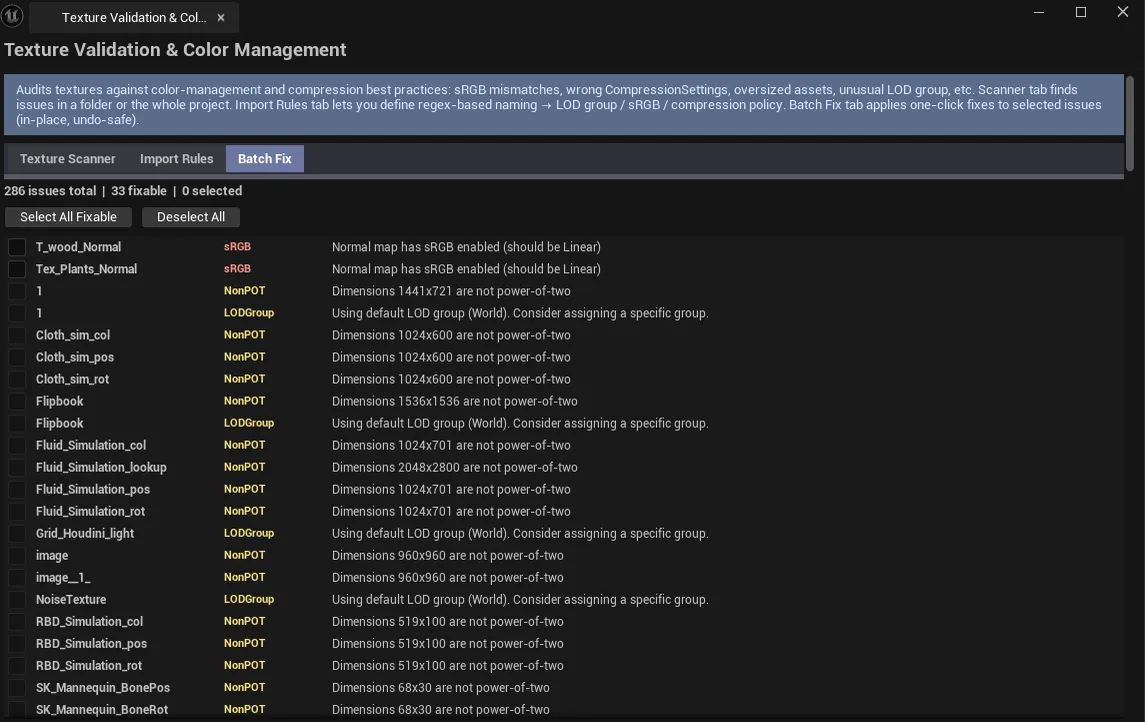
| Issues list | Per-row: asset name, issue type, details, severity, can-auto-fix flag |
Issue types
Section titled “Issue types”| Type | What it flags |
|---|---|
| sRGB | sRGB flag wrong for the texture’s role (e.g., Normal map with sRGB on) |
| Compression | Wrong compression for the texture’s role |
| NonPOT | Non-power-of-two dimensions (sometimes intentional) |
| LODGroup | Wrong LOD group |
| Oversized | Resolution exceeds expected limit |
Summary
Section titled “Summary”Total scanned / OK / Warning / Critical / per-issue counts.
Tab 2: Import Rules
Section titled “Tab 2: Import Rules”Author regex-to-setting rules.
| Section | What it does |
|---|---|
| Pattern | Regex like .*_N$ |
| Display Name | Friendly label like “Normal Maps” |
| Compression | Target compression |
| sRGB | Target sRGB flag |
| LOD Group | Target LOD group |
| Add Rule | Adds the rule |
| Remove Selected Rule | Deletes |
| Apply Rules | Applies rules to existing textures (V1: log-only) |
Default rules
Section titled “Default rules”Out-of-the-box rules cover normal maps (_N$), masks (_M$), AO (_AO$), data textures, etc.
Tab 3: Batch Fix
Section titled “Tab 3: Batch Fix”| Section | What it does |
|---|---|
| Issues list (same as Scanner) | With selection checkboxes |
| Select All / Deselect All | Bulk toggle |
| Fix Selected | Applies fixes for every checked row |
| Export CSV | Saves scan results as CSV |
Workflow
Section titled “Workflow”Audit + fix
Section titled “Audit + fix”- Tab 1 — Set Scan Path, run scan.
- Tab 3 — Walk the issues, select what to fix, click Fix Selected.
Author import rules
Section titled “Author import rules”- Tab 2 — Build rules matching your team conventions.
- Click Apply Rules to log what would change (V1 is log-only — actual auto-apply is on the import-side, configured manually).
Settings reference
Section titled “Settings reference”Settings + import rules persist via [Project]/Saved/EQLabs/Settings/TextureValidationColorMgmt.json.
Output
Section titled “Output”- Texture asset edits. Fix Selected modifies texture settings; undoable.
- CSV export. Batch Fix tab.
- Clipboard. Copy Scan Results.
Tips and gotchas
Section titled “Tips and gotchas”- sRGB matters for color correctness. Wrong flag = wrong gamma = wrong shading.
- Normal maps with sRGB on is the most common texture bug — surfaces it cleanly
- LOD group affects streaming budget. Wrong LOD group can blow the streaming pool.
- V1 of Import Rules is log-only. Full auto-apply requires hooking the import pipeline (a future release).
Related tools
Section titled “Related tools”- Texture Channel Packer — for channel packing
- Smart Mask & Texture Processor — for normal-map blending and masks
- Project Doctor Suite — broader texture audit
Opens our feedback form in a new tab with the tool name pre-filled.