
ArabicBridge RTL Suite
ArabicBridge RTL Suite
Section titled “ArabicBridge RTL Suite”Module: Design · Category: Localization · Tool ID:
ArabicBridgeRTLSuite
A seven-tab RTL (right-to-left) localization toolkit covering Arabic, Hebrew, Farsi, and Urdu. Goes beyond simple text translation: font glyph coverage, UMG UI mirroring, RTL-readiness QA, Eastern Arabic vs Western numeral config, culture preview/reset, full localization manager with translation API integration, and a custom RTL text widget generator with BiDi configuration.
When to use it
Section titled “When to use it”- Shipping a game in Arabic, Hebrew, Farsi, or Urdu
- Auditing existing fonts for RTL glyph coverage before localization begins
- Auto-mirroring LTR-authored UMG widgets for RTL rendering
- Configuring Eastern Arabic vs Western numerals project-wide
- Managing string tables with translation API integration
When not to use it
Section titled “When not to use it”- Don’t use this for non-RTL localization — UE’s standard localization workflow handles that
- Don’t expect this to translate game text — it integrates with translation APIs but the translation itself comes from the API or a translator
Opening the tool
Section titled “Opening the tool”- Open the EQLabs Hub and search for
ArabicorRTL(or browse to Design → Localization) - Click the tool card
- Use the tab bar to pick a function
Tab 1 — Font Coverage
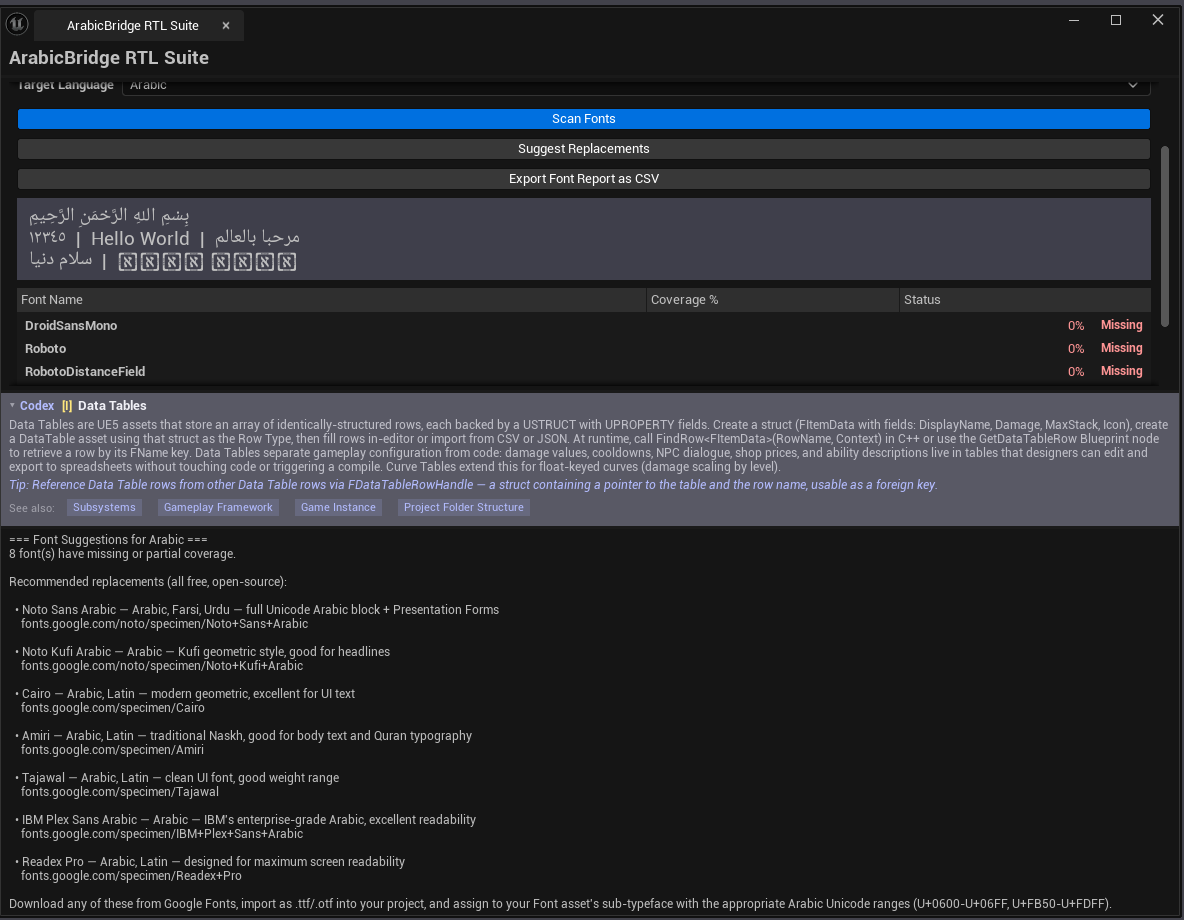
Section titled “Tab 1 — Font Coverage”Audits project fonts for glyph coverage against the selected language.
| Section | What it does |
|---|---|
| Language combo | Arabic / Hebrew / Farsi / Urdu |
| Scan Fonts | Walks the project for fonts and computes glyph coverage |
| Suggest Replacements | For low-coverage fonts, suggests alternatives |
| Export Font Report | Saves coverage CSV |
| Fonts list | Per-font row: name, asset path, coverage %, status (Complete / Partial / Missing) |
Tab 2 — UI Mirror
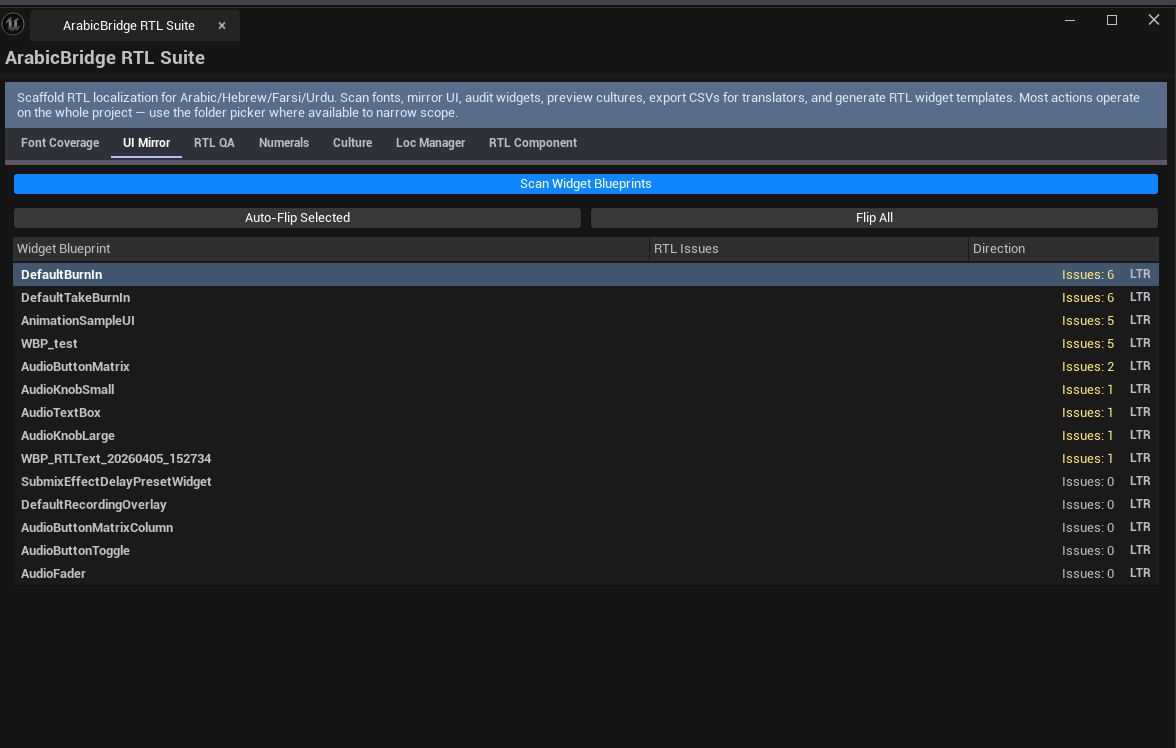
Section titled “Tab 2 — UI Mirror”Detects LTR widgets and flips them for RTL.
| Section | What it does |
|---|---|
| Scan Widget Blueprints | Walks the project for UWidgetBlueprint |
| Auto-Flip Selected | Mirrors selected widgets |
| Flip All | Mirrors every widget in the list |
| Widgets list | Per-widget row: name, asset path, issue count, flipped flag |
Tab 3 — RTL QA Scanner
Section titled “Tab 3 — RTL QA Scanner”Audits widgets for RTL-readiness issues.
| Section | What it does |
|---|---|
| Run QA Scan | Walks all widgets for RTL issues |
| Export QA Report | CSV |
| Issues list | Per-issue row: widget name, issue type, description, severity (Info / Warning / Critical) |
What gets flagged
Section titled “What gets flagged”- Hard-coded English text in widgets (not localized)
- Anchor placement that won’t mirror correctly
- Hardcoded layout offsets that break in RTL
- Missing BiDi-aware text widgets
Tab 4 — Numeral Config
Section titled “Tab 4 — Numeral Config”Toggle between Eastern Arabic numerals (٠١٢٣٤٥٦٧٨٩) and Western numerals (0123456789) project-wide.
| Section | What it does |
|---|---|
| Use Eastern Arabic | Toggle |
| Numeral Preview | Live preview in both numeral systems |
| Apply Project-Wide | Updates project culture settings |
Tab 5 — Culture Preview
Section titled “Tab 5 — Culture Preview”Preview the editor / game in different cultures.
| Section | What it does |
|---|---|
| Culture combo | Arabic / Hebrew / Farsi / Urdu / English / etc. |
| Preview Culture | Switches editor to the preview culture |
| Reset Culture | Restores original culture |
Note: stores the original culture on first preview so Reset always works.
Tab 6 — Localization Manager
Section titled “Tab 6 — Localization Manager”Project-wide string table management with translation API integration.
| Section | What it does |
|---|---|
| Scan String Tables | Walks all UStringTable assets |
| Export for Translation | Outputs CSV in translation-vendor format |
| Import Translations | Reads translation results back into string tables |
| Translate Selected | Calls the translation API directly |
| API Key + Provider | Configure translation service |
| String Tables list | Per-table row: name, entry count, has-Arabic-translation flag |
Tab 7 — RTL Text Component
Section titled “Tab 7 — RTL Text Component”Generates a custom RTL-aware text widget Blueprint.
| Field | What it does |
|---|---|
| BiDi Algorithm combo | Unicode BiDi / Visual / Logical |
| Cursor Behavior combo | Visual / Logical |
| Test Text Box | Live test of the RTL widget |
| Direction Indicator | Shows detected text direction |
| Widget Output Path | Where the generated WBP saves |
| Generate Widget Blueprint | Creates a custom RTL UWidgetBlueprint |
Workflow
Section titled “Workflow”A typical RTL pre-shipping audit:
- Font Coverage — scan fonts, fix any with Missing / Partial Arabic coverage
- UI Mirror — auto-flip widgets that need RTL layout
- RTL QA Scanner — fix Critical-severity issues
- Numeral Config — confirm numeral system matches project requirements
- Localization Manager — translate string tables
- Culture Preview — verify the result
- RTL Text Component — generate any custom widgets needed
Settings reference
Section titled “Settings reference”Per-tab settings persist to [Project]/Saved/EQLabs/Settings/ArabicBridgeRTLSuite.json.
Output
Section titled “Output”- CSV exports — font report, QA report, translation export
- Widget Blueprints — generated RTL text components
- Modified widgets — UI Mirror flips widgets in place
- Culture changes — Culture Preview / Reset modify editor culture state
Tips & gotchas
Section titled “Tips & gotchas”- Fonts with partial Arabic glyph coverage will render fallback boxes — pick fonts with full coverage from the start
- UI mirror is heuristic — it handles most cases, but check critical screens manually after auto-flip
- Eastern Arabic numerals are sometimes mixed with Western — picking one is a project decision; partial use needs hand-tuning
- Translation API integration requires API keys — DeepL, Google Translate, custom endpoints supported per provider config
- The original culture is stored on first preview — Reset Culture always works
Related tools
Section titled “Related tools”- Project Doctor Suite (Tech module) — broader project audit including localization
Opens our feedback form in a new tab with the tool name pre-filled.