
No. 0622 AR ArtEQLabs Pro
Texture Authoring Suite
Module: Art · Category: TextureArt · Tool ID:
TextureAuthoringSuite
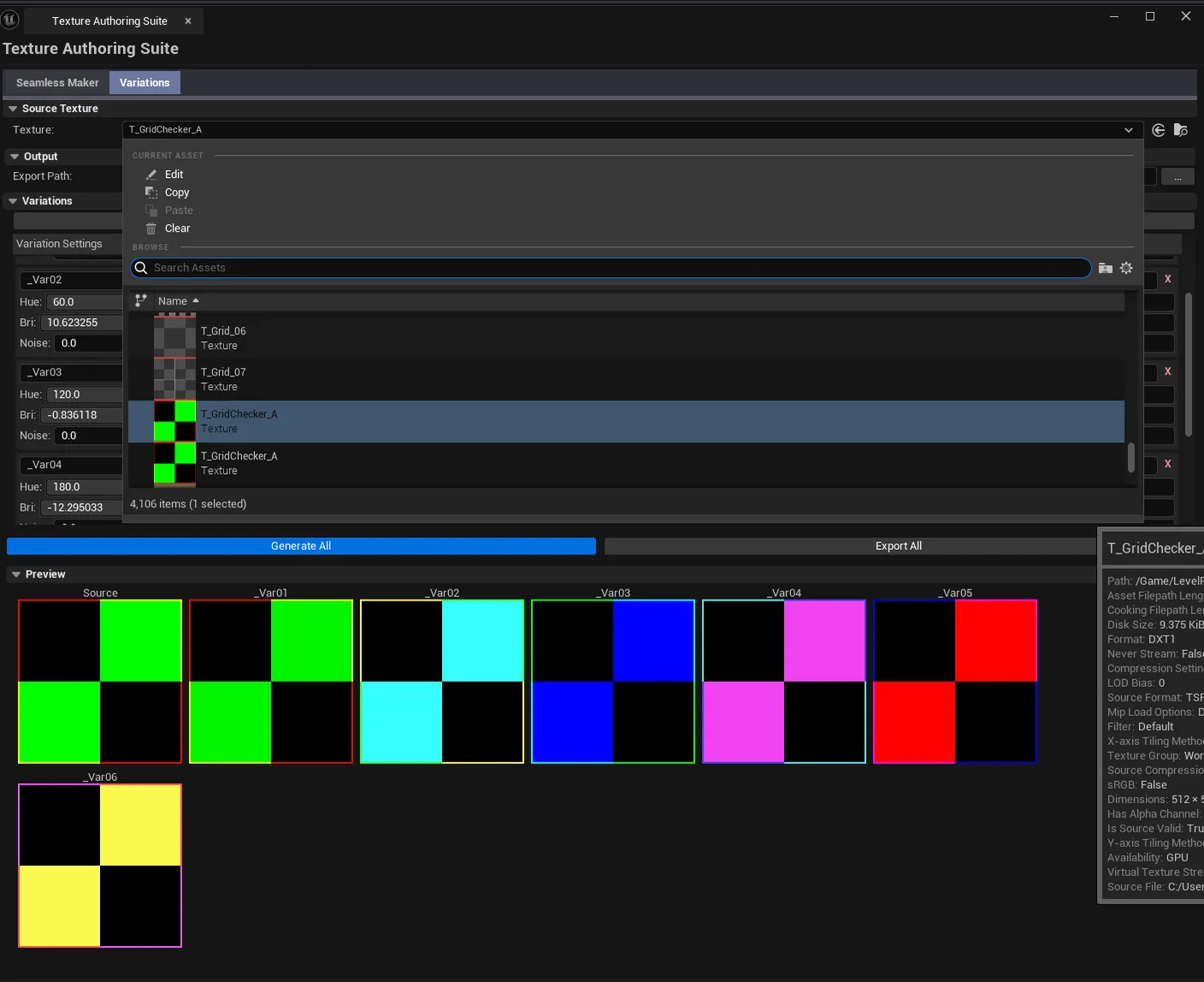
A two-tab texture authoring panel. Seamless converts a non-tileable source into a seamless texture using cross-blend, mirror, or offset modes. Variations generates batch hue/saturation/brightness variations from a base texture for environment dressing or detail breakup.

When to use it
Section titled “When to use it”- Quickly making a non-tileable texture seamless without going to a DCC
- Generating quick HSL variations from a hero texture for variety in dressing
- Producing palette-shifted variants for material wear/dirt setups
What it isn’t for
Section titled “What it isn’t for”- Don’t use this for hero hand-authored seamless textures. It’s good for quick fixes; for true production-quality seamless tiling, author in your DCC.
- Don’t expect AI-driven variation. Variations are HSL math, not learned.
Opening the tool
Section titled “Opening the tool”- Open the EQLabs Hub and search for Texture Authoring (or browse to Art → TextureArt).
- Click the tool card.
- Use the tab bar to switch between Seamless and Variations.
Tab 1: Seamless Texture Maker
Section titled “Tab 1: Seamless Texture Maker”Convert a non-tileable source into a seamless texture.
| Mode | What it does |
|---|---|
| Cross-Blend | Blends opposite edges into the center for a smooth seamless result |
| Mirror | Mirrors the texture along seams (useful for stylized / non-photographic) |
| Offset | Half-offsets and blends (classic DCC seamless trick) |
Interface
Section titled “Interface”| Section | What it does |
|---|---|
| Source Texture picker | The non-tileable input |
| Blend Mode | One of the three modes above |
| Blend Strength / Width | How aggressive the seamless blend is |
| Generate | Runs the seamless conversion |
| Preview | Tiled preview showing result without visible seams |
| Export | Save the result as a UTexture2D asset |
Tab 2: Texture Variation Generator
Section titled “Tab 2: Texture Variation Generator”Generate batch HSL variations from a base texture.
Interface
Section titled “Interface”| Section | What it does |
|---|---|
| Base Texture picker | The source texture |
| Variation Count | How many variations to generate |
| Hue Range | Random hue shift range (degrees) |
| Saturation Range | Random saturation shift range |
| Brightness Range | Random brightness shift range |
| Generate | Runs the variation pass |
| Variations list | Each row is a generated variation; export individually or all at once |
Workflow
Section titled “Workflow”Seamless Texture
Section titled “Seamless Texture”- Drop a non-tileable source texture.
- Pick a blend mode (
Cross-Blendis the safest default). - Tune blend strength/width.
- Click Generate, preview the result.
- Export.
Variations
Section titled “Variations”- Drop a base texture.
- Set variation count and HSL ranges.
- Click Generate.
- Export individually or all.
Settings reference
Section titled “Settings reference”Seamless tab
Section titled “Seamless tab”| Field | Default |
|---|---|
| Blend Mode | Cross-Blend |
| Blend Strength | 0.5 |
Variations tab
Section titled “Variations tab”| Field | Default |
|---|---|
| Variation Count | 4 |
| Hue Range (deg) | 15 |
| Saturation Range | 0.1 |
| Brightness Range | 0.1 |
Settings are persisted to
[Project]/Saved/EQLabs/Settings/TextureAuthoringSuite.json.
Output
Section titled “Output”- Seamless. New
UTexture2Dasset in the Content Browser. - Variations. Multiple
UTexture2Dassets, one per variation.
Tips and gotchas
Section titled “Tips and gotchas”- Cross-Blend works best on natural textures (rock, wood, dirt) — Mirror is better for stylized
- Wide blend widths smear central detail. Keep blend width small if the texture has important features near the edges.
- Variation HSL ranges are random per generation. Re-running gives different results. Lock a seed if you need reproducibility (planned for V2).
Related tools
Section titled “Related tools”- Smart Mask & Texture Processor — for normal map mixing and mask generation
- Flow Map Studio — interactive flow-map authoring
Report an issue with this tool
Opens our feedback form in a new tab with the tool name pre-filled.