
No. 0401 TE TechEQLabs Pro
Widget Blueprint Auditor
Module: Tech · Category: Performance · Tool ID:
WidgetBlueprintAuditor
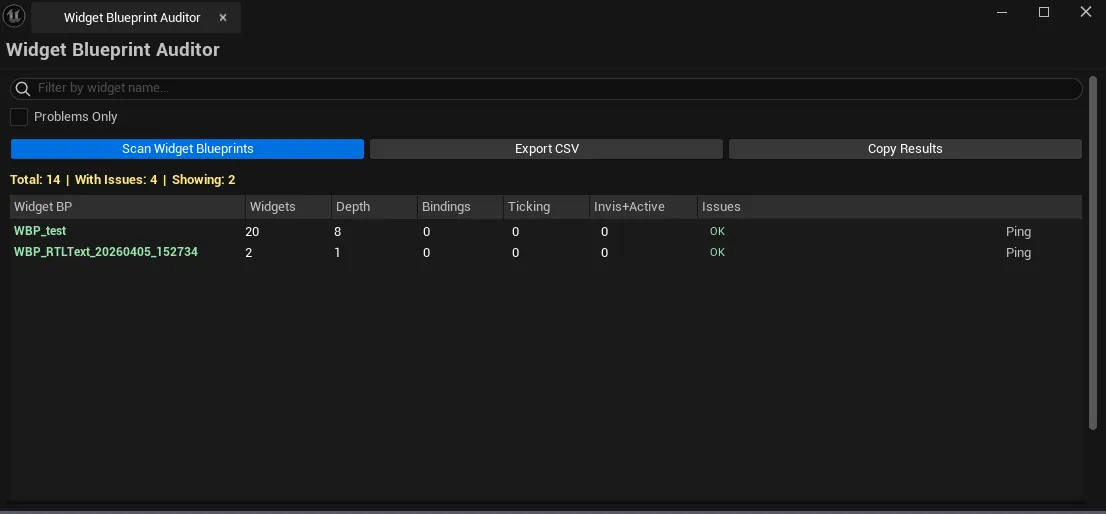
Project-wide UMG audit. Scans every UWidgetBlueprint for: deep nesting (>10 levels), excessive bindings (per-frame evaluations), high widget count (>100 per BP), tick-enabled widgets, invisible-but-active widgets with bindings (an easy-to-miss perf issue). CSV export for UI team review.
When to use it
Section titled “When to use it”- UI performance pass: finding the widgets eating frame time
- Tick-enabled UMG audit: usually a bug
- Invisible-but-active widget hunting: they still consume binding cost
- Pre-shipping UMG cleanup
What it isn’t for
Section titled “What it isn’t for”- Don’t expect runtime UMG profiling. See Runtime Insights for that.
- Don’t expect this to fix issues. Surfaces; per-BP fixes happen in the WBP editor.
Opening the tool
Section titled “Opening the tool”- Open the EQLabs Hub and search for Widget Auditor (or browse to Tech → Performance).
- Click the tool card.
- Click Scan.
Interface tour
Section titled “Interface tour”| Field | What it does |
|---|---|
| Scan | Walks every UWidgetBlueprint |
| Search | Filter by name |
| Problems Only | Hide healthy BPs |
| Export CSV | Saves the audit |
| Copy Results | Plain-text dump |
| Stats | Total Widget BPs / problematic count |
| Results list | Per-BP row: name, widget count, max depth, binding count, ticking widgets, invisible-active count, severity, issue text |
Severity coding
Section titled “Severity coding”| Severity | Meaning |
|---|---|
| Good | Within thresholds |
| Warning | Crossed at least one threshold |
| Critical | Multiple severe issues |
Workflow
Section titled “Workflow”- Click Scan.
- Toggle Problems Only to focus.
- Sort by severity / metric of interest.
- Single-click pings the WBP; double-click opens it in the UMG editor.
Output
Section titled “Output”- In-panel widget BP list.
- CSV export
- Clipboard. Copy Results.
Tips and gotchas
Section titled “Tips and gotchas”- Tick-enabled UMG widgets are almost always a bug. UMG ticks per-frame; refactor to event-driven.
- Bindings cost per-frame evaluation. High binding counts add up. Replace with event-driven updates where possible.
- Deep nesting (>10) often indicates an authoring problem. Splitting into multiple WBPs improves clarity and perf.
Related tools
Section titled “Related tools”- Runtime Insights Suite — runtime UMG perf
- Blueprint Inspector — broader BP complexity
Report an issue with this tool
Opens our feedback form in a new tab with the tool name pre-filled.