
No. 0683 DE DesignEQLabs Pro
Blockout Generator
Module: Design · Category: LevelDesign · Tool ID:
BlockoutGenerator
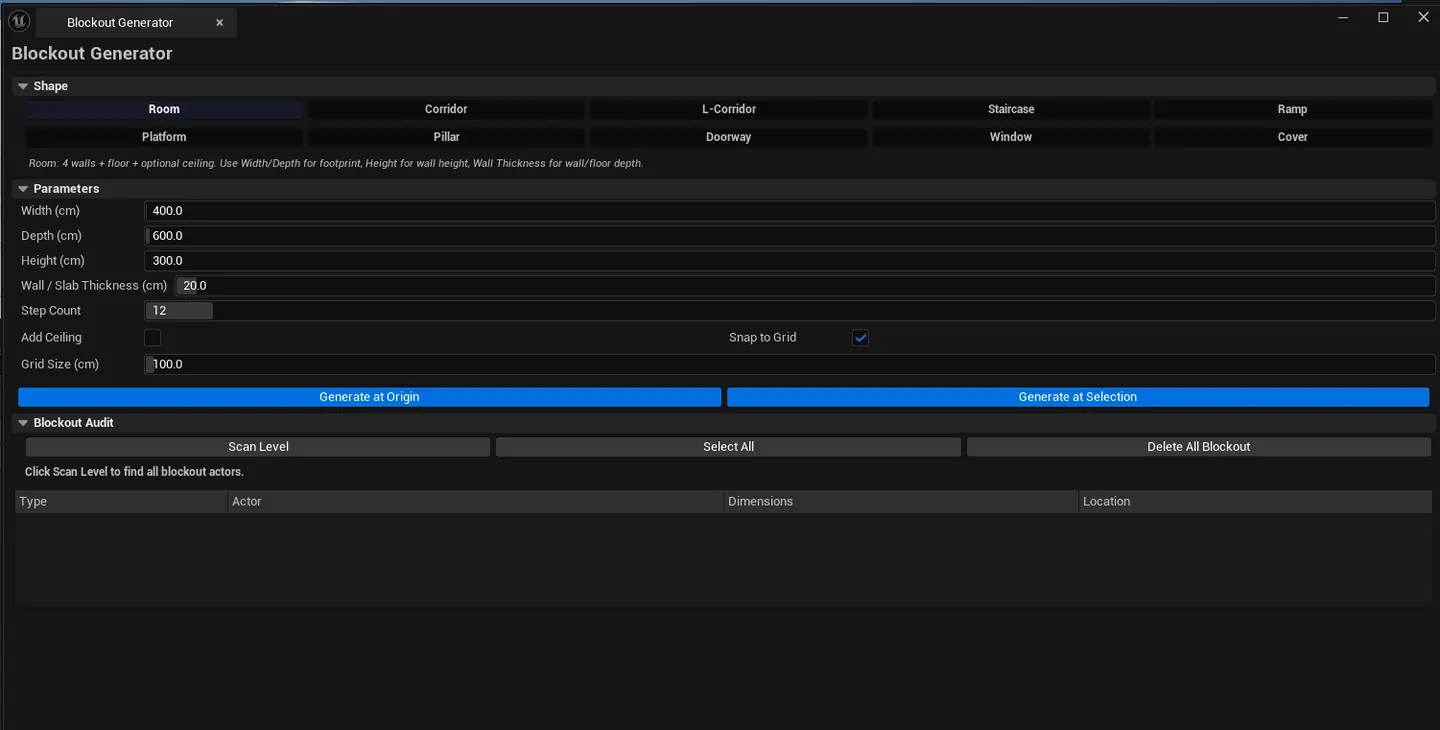
Parametric blockout tool that spawns configurable primitive shapes (Room / Corridor / L-Corridor / Staircase / Ramp / Platform / Pillar / Doorway / Window / Cover Wall) using /Engine/BasicShapes/Cube with an auto-assigned flat-grey blockout material. Auto-organizes everything under an EQLabs/Blockout folder, supports grid snap, full undo, and a per-level audit with double-click navigation.
When to use it
Section titled “When to use it”- Rapid level prototyping: spawning rooms / corridors / staircases by clicking shape buttons
- Pre-Blockout Lab whiteboxing: quick parametric primitives before committing to a full custom-asset blockout
- Mocking up cover combat layouts: drop in cover walls and platforms quickly
- Documentation / pitch builds: get a blocked-out level ready for review fast
What it isn’t for
Section titled “What it isn’t for”- Don’t use this for production geometry. Output is always primitive cubes with auto-material.
- Don’t expect spline / curved shapes. Only the parametric shapes listed below.
Opening the tool
Section titled “Opening the tool”- Open the EQLabs Hub and search for Blockout (or browse to Design → LevelDesign).
- Click the Blockout Generator card.
Interface tour
Section titled “Interface tour”Shape selector
Section titled “Shape selector”10 shape buttons (with description previews):
| Shape | Description |
|---|---|
| Room | 4 walls + floor, optional ceiling (hollow box) |
| Corridor | 2 walls + floor, optional ceiling (open-ended) |
| L-Corridor | L-shaped corridor with configurable turn direction |
| Staircase | Ascending steps with configurable count + run/rise |
| Ramp | Angled surface with optional side rails |
| Platform | Elevated flat surface with support column |
| Pillar | Single vertical column |
| Doorway | Wall segment with rectangular opening |
| Window | Wall segment with raised rectangular opening |
| Cover Wall | Waist-height cover for shooter-style levels |
Parameters
Section titled “Parameters”| Field | What it does | Default |
|---|---|---|
| Width / Depth / Height | Shape dimensions | 400 / 600 / 300 |
| Wall Thickness | Wall depth | 20 |
| Step Count | Staircase steps | 12 |
| Add Ceiling | Toggle (Room/Corridor) | false |
| Snap to Grid | Toggle | true |
| Grid Size | Snap grid in UU | 100 |
Actions
Section titled “Actions”| Action | What it does |
|---|---|
| Generate at Origin | Spawns at world origin (snapped) |
| Generate at Selection | Spawns at the currently-selected actor’s location |
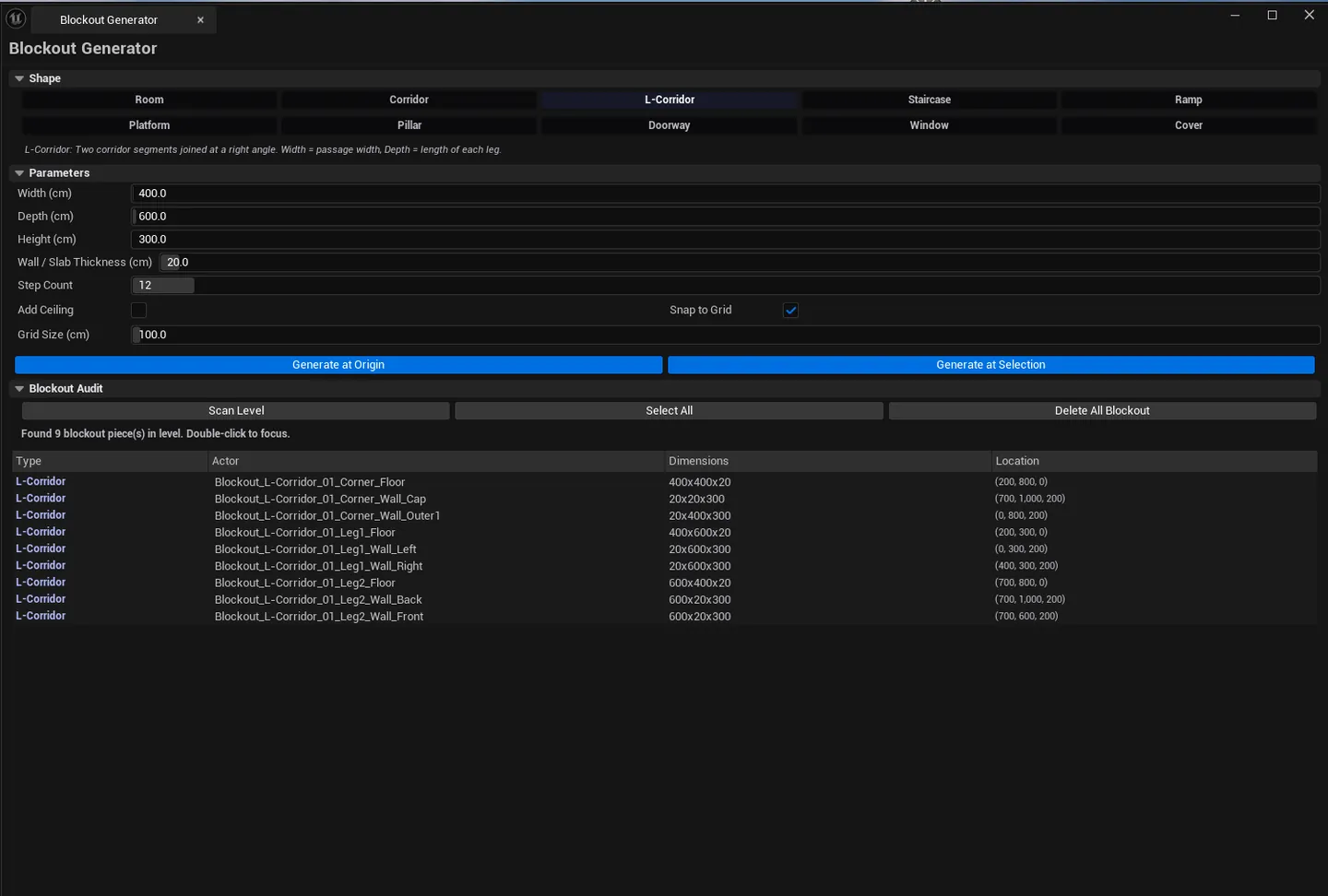
| Scan Blockout Actors | Audits the level for blockout-tagged actors |
| Select All Blockout | Selects every blockout actor |
| Delete All Blockout | Removes every blockout-tagged actor |
Audit list
Section titled “Audit list”Per-blockout-actor row: label, shape type, location, dimensions. Single-click pings the actor; double-click flies the camera to it.
Workflow
Section titled “Workflow”Build a level
Section titled “Build a level”- Click Room in the shape selector.
- Configure width / depth / height.
- Click Generate at Origin — a room appears.
- Move the viewport, click Corridor, configure, click Generate at Selection — corridor extends from the room.
- Add staircase, doorways, etc.
Cleanup
Section titled “Cleanup”- Click Scan Blockout Actors to audit.
- Click Select All Blockout to select everything.
- Click Delete All Blockout to wipe (or use the ground-truth Save All if you want to keep).
Settings reference
Section titled “Settings reference”Per-tool parameters persist to [Project]/Saved/EQLabs/Settings/BlockoutGenerator.json.
Output
Section titled “Output”AStaticMeshActorinstances using/Engine/BasicShapes/Cubewith auto-blockout material- Auto-organized. Placed under
EQLabs/Blockoutfolder in the World Outliner. - Auto-tagged. Every spawned actor has a
Blockouttag for audit. - Undo. Wrapped in
ScopedTransaction.Ctrl+Zreverses. - Material. Flat grey material instance dynamically created.
Tips and gotchas
Section titled “Tips and gotchas”- The blockout material is intentionally distinct. Flat grey signals “this is placeholder, don’t ship”.
- Generate at Selection respects pivot. If you pick a doorway after a room, the doorway spawns at the room’s pivot, not center.
- Delete All Blockout uses the tag. Non-blockout actors are safe even if they’re in the EQLabs/Blockout folder.
- For full level layout authoring (rooms with terrain, water, paths, gameplay zones, custom asset assignment), use Blockout Lab. The custom asset editor.
Related tools
Section titled “Related tools”- Blockout Lab — the full custom-asset-editor blockout workflow
- Reference Image Overlay — overlay reference images while blocking out
- Smart Actor Align & Distribute — align spawned blockout pieces
Opens our feedback form in a new tab with the tool name pre-filled.