
No. 0291 TE TechEQLabs Pro
Scene Optimization Advisor
Module: Tech · Category: Performance · Tool ID:
SceneOptimizationAdvisor
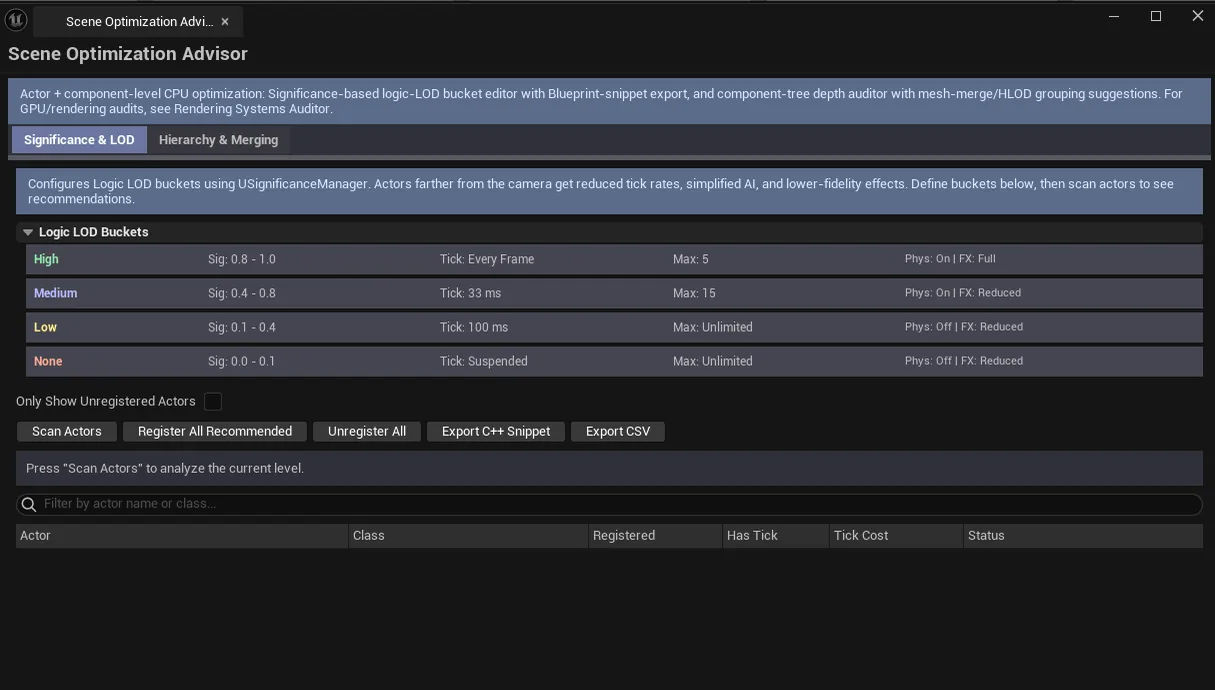
Two-tab CPU-side scene optimization. Significance & LOD uses UE’s SignificanceManager to bucket actors by importance and apply different fidelity tiers (logic LODs). Tick audit, Blueprint snippet export. Hierarchy & Merging audits component-tree depth, estimates transform cost, suggests mesh merges and HLOD groupings.
When to use it
Section titled “When to use it”- CPU-bound scenes: finding the actors that don’t need full-fidelity logic
- Component hierarchy review: flattening deep trees that hurt transform updates
- Mesh merge / HLOD grouping suggestions
- Tick audit: finding actors with unnecessary tick
What it isn’t for
Section titled “What it isn’t for”- Don’t expect rendering-side suggestions. See Rendering Systems Auditor for GPU.
- Don’t expect this to author Significance Manager. UE’s
USignificanceManageris what runs at runtime.
Opening the tool
Section titled “Opening the tool”- Open the EQLabs Hub and search for Scene Optimization (or browse to Tech → Performance).
- Click the tool card.
- Use the tab bar: Significance & LOD / Hierarchy & Merging.
Tab 1: Significance & LOD
Section titled “Tab 1: Significance & LOD”SignificanceManager bucket editor — define actor importance buckets and per-bucket fidelity (logic LOD). Includes:
- Tick audit per-actor
- Blueprint snippet export: paste-ready code for your AnimBP / GameMode
Tab 2: Hierarchy & Merging
Section titled “Tab 2: Hierarchy & Merging”- Component tree depth audit
- Transform cost estimation
- Mesh merge suggestions: actors that could be combined
- HLOD grouping suggestions
Output
Section titled “Output”- Blueprint snippet export. Text snippets for paste-into-AnimBP.
- In-panel suggestions
- No level edits. Read-only audit.
Tips and gotchas
Section titled “Tips and gotchas”- Logic LODs are different from mesh LODs. Fewer ticks / cheaper code for distant actors, not lower-poly meshes.
- Component hierarchy flattening saves transform updates. Every component update propagates through children; flatter is faster.
- Mesh merge suggestions need verification. Sometimes the merge breaks gameplay (e.g., destructible / interactive components).
Related tools
Section titled “Related tools”- Rendering Systems Auditor — GPU-side optimization
- Runtime Insights Suite — measure the impact of changes
Report an issue with this tool
Opens our feedback form in a new tab with the tool name pre-filled.