
Enhanced Input Mapper
Enhanced Input Mapper
Section titled “Enhanced Input Mapper”Module: Design · Category: Systems · Tool ID:
EnhancedInputMapper
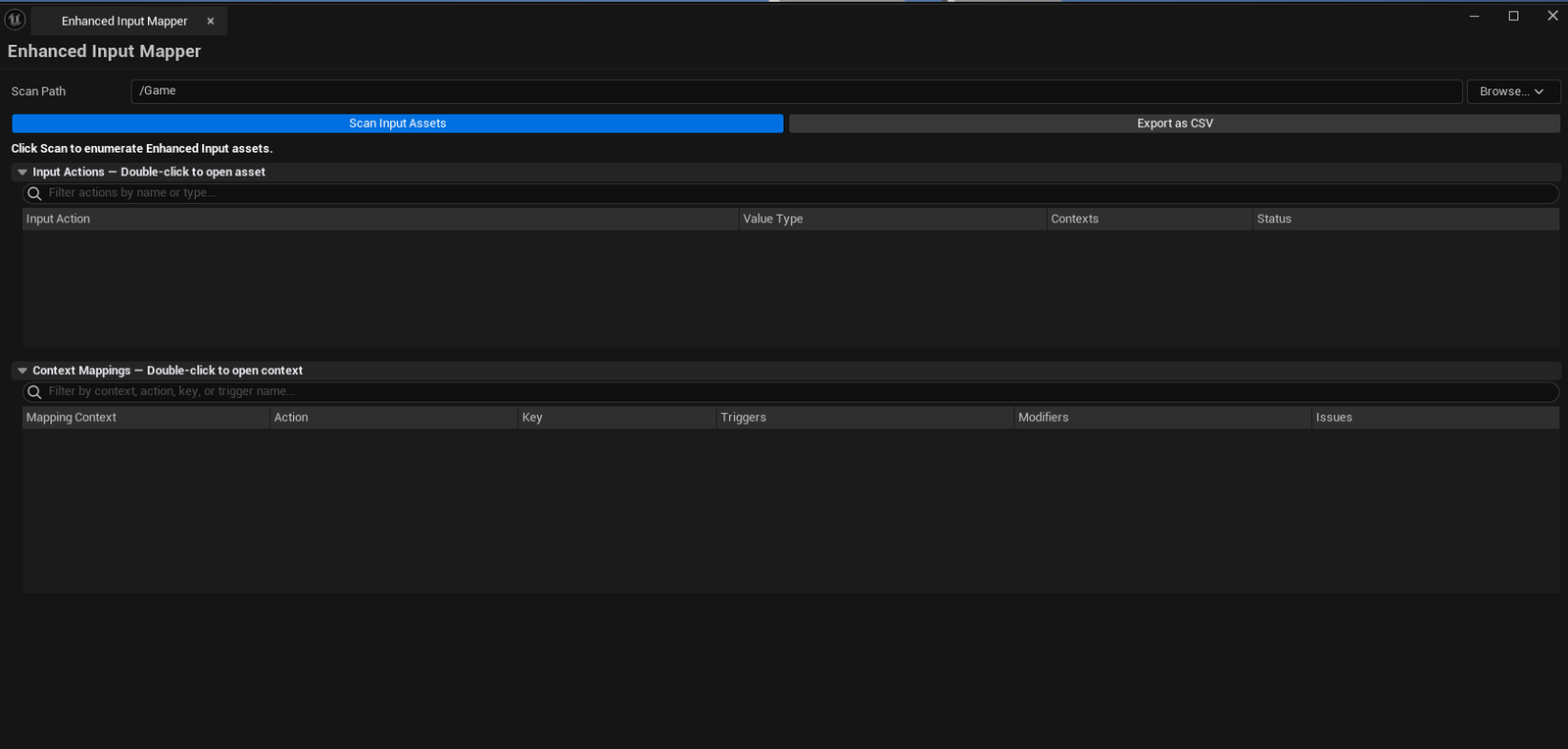
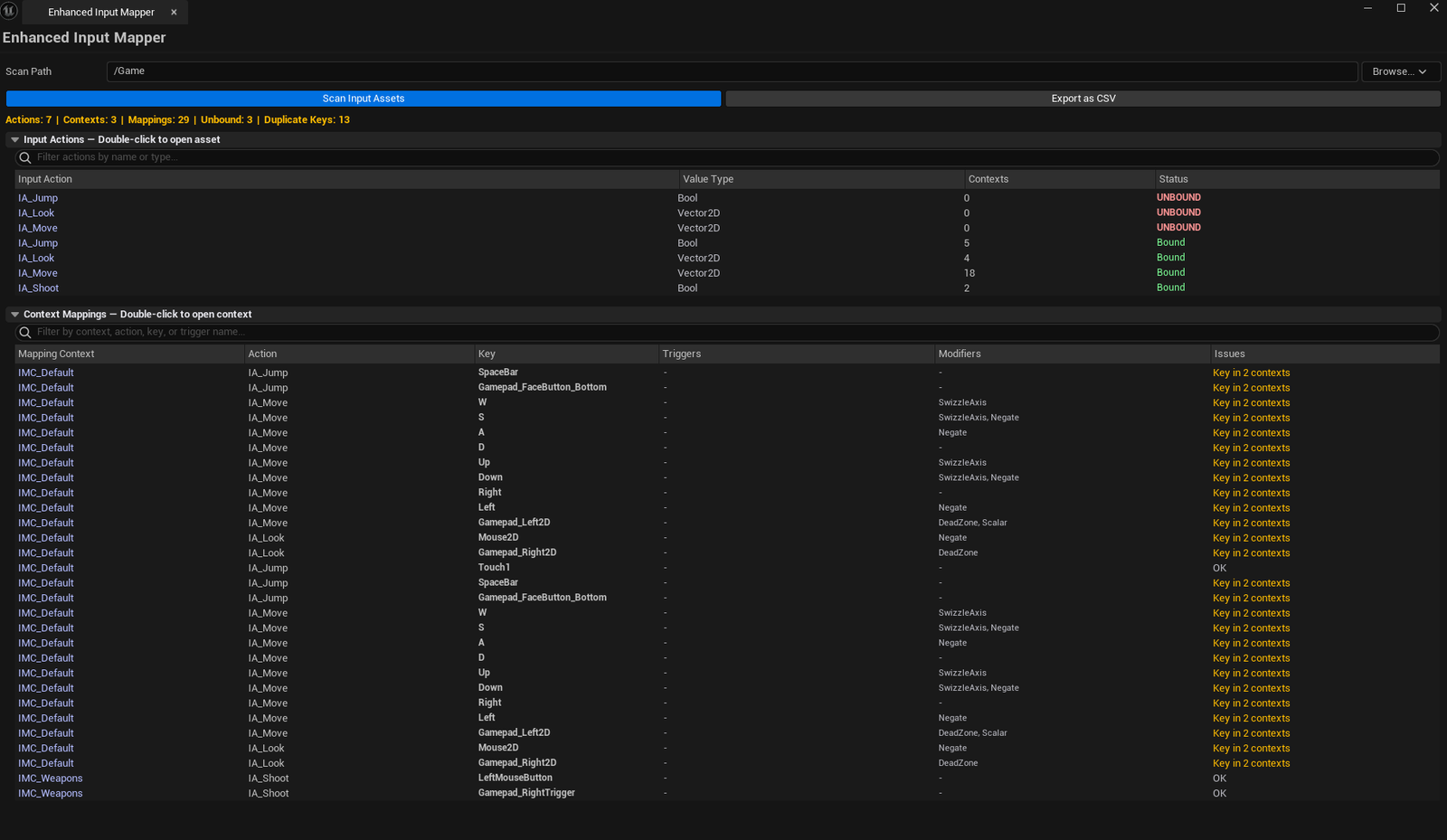
Two-list visualization of the project’s Enhanced Input setup. Actions list shows every Input Action with its value type and how many contexts reference it. Mappings list shows every key binding across all Input Mapping Contexts with trigger / modifier class names. Detects unbound actions and duplicate keys. Search both lists, export to CSV.
When to use it
Section titled “When to use it”- Inheriting a project — quickly seeing what controls are wired up
- Pre-shipping audit — confirming every action is referenced in at least one context
- Debugging “this binding doesn’t work” reports — usually a duplicate key
- Generating a CSV of bindings for documentation
When not to use it
Section titled “When not to use it”- Don’t use this to author input — bindings live in UE’s Input Action / Mapping Context editors
- Don’t expect runtime debugging — it’s asset-side analysis
Opening the tool
Section titled “Opening the tool”- Open the EQLabs Hub and search for
Input(or browse to Design → Systems) - Click the tool card
- Set Scan Path
- Click Scan Input Assets
Interface tour
Section titled “Interface tour”| Section | What it does | Default |
|---|---|---|
| Scan Path | Folder to scan | /Game |
| Scan Input Assets | Walks every UInputAction and UInputMappingContext | |
| Action filter | Substring filter on action name | |
| Mapping filter | Substring filter on mapping name / key | |
| Export CSV | Saves both lists to CSV | |
| Summary | Total actions / unbound / total contexts / total mappings / duplicate keys | |
| Actions list | Per-action row: name, value type, context count, unbound flag | |
| Mappings list | Per-mapping row: context name, action name, key binding, trigger names, modifier names, issues |
What gets flagged
Section titled “What gets flagged”- Unbound action: action exists but isn’t referenced by any mapping context
- Duplicate keys: same physical key bound to multiple actions (often a conflict)
Workflow
Section titled “Workflow”- Set Scan Path
- Click Scan Input Assets
- Filter the actions list by name (or toggle “Unbound Only” if you want to focus on stale actions)
- Walk the mappings list — duplicate keys are highlighted
- Optionally Export CSV for team review
Settings reference
Section titled “Settings reference”| Field | What it does | Default |
|---|---|---|
| Scan Path | Folder to scan | /Game |
| Action Filter | Substring filter | empty |
| Mapping Filter | Substring filter | empty |
Settings file:
[Project]/Saved/EQLabs/Settings/EnhancedInputMapper.json
Output
Section titled “Output”- In-panel actions + mappings lists
- CSV export
- No edits — read-only
Tips & gotchas
Section titled “Tips & gotchas”- Trigger and modifier names are full class names — useful for debugging but verbose; ignore the prefix
- Duplicate keys aren’t always conflicts — sometimes the same key is intentionally bound to multiple actions in different contexts
- Single-click pings the asset; double-click opens the editor
Related tools
Section titled “Related tools”- Console Variable Browser — for CVar-driven debug input toggles
Report an issue with this tool
Opens our feedback form in a new tab with the tool name pre-filled.