
No. 0442 AR ArtEQLabs Pro
EQSynth Lab
Type: Custom Asset Editor (Pattern B) · Asset class:
UEQSynthAsset· Category: Labs
A VFX texture authoring environment that combines a 2D fluid solver with a layered source-stack and chainable processing pipeline. Compose textures from multiple sources, route them into specific simulation fields (density, temperature, velocity), run chained processing modes (advect, liquify, diffuse, erode, grow, ripple, generate), apply non-destructive post-process (levels, contrast, edge detect, gradient remap), and export the result as a sprite-sheet flipbook or per-frame image sequence — all in-engine, without a round-trip to EmberGen, FluidNinja, Substance Designer, or Houdini Copernicus. Six fluid-sim presets (Torch, Campfire, Candle, Explosion, Smoke Plume, Rocket Plume) ship as one-click starting points; six stylization presets (Realistic, Cel-Shaded, Anime, Ink Wash, Pixel Art, Comic Book) re-skin the export non-destructively.
When to use it
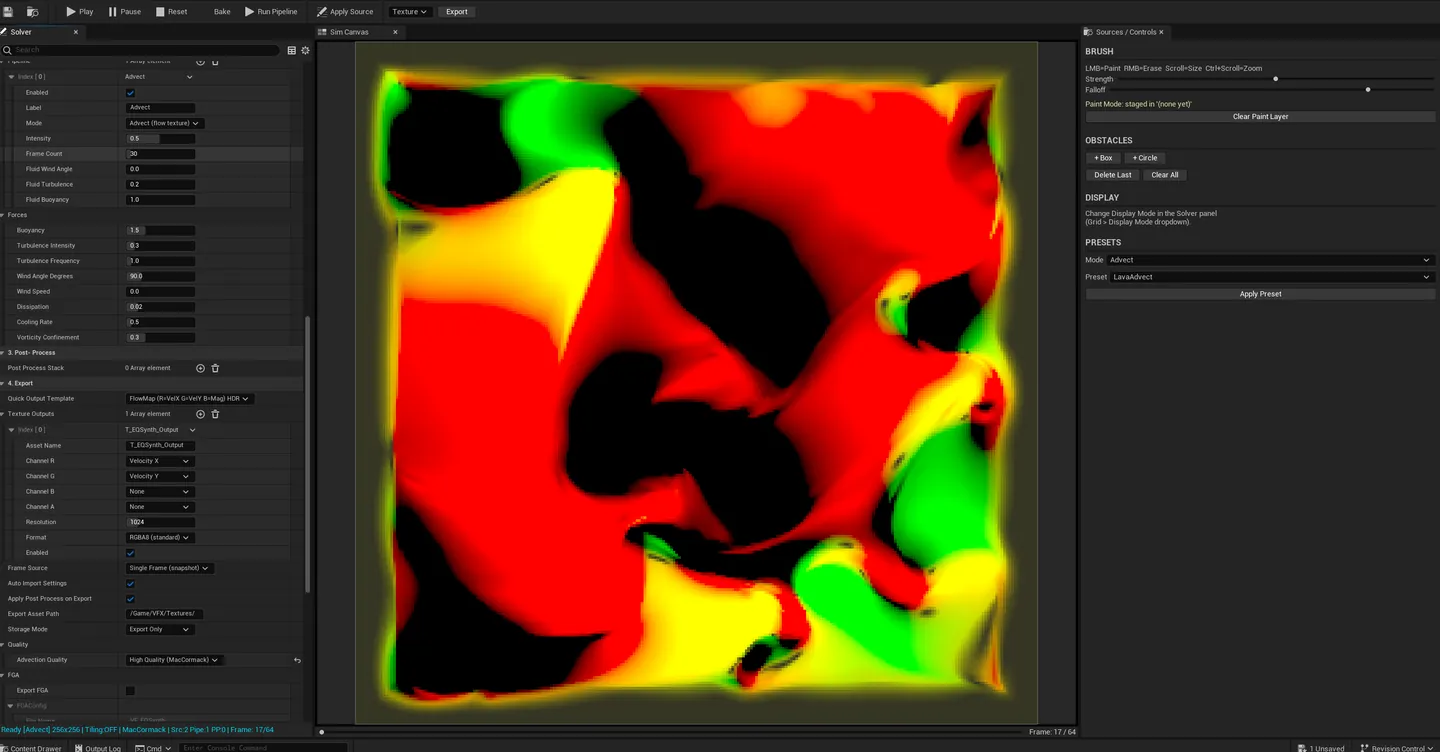
Section titled “When to use it”- Authoring flowmaps for water, lava, cloth ripple, hair: feed a noise source through Liquify + Advect, export the velocity field as RG flow texture
- Generating fire / smoke / explosion sprite sheets for Niagara flipbooks: start from a preset, refine with sliders, bake, export as 4×4 / 6×6 / 8×8 atlas
- Synthesizing distortion / displacement maps: combine voronoi + warped FBM noise, run through Diffuse and Edge Detect post-process
- Building erosion / wear masks procedurally: Erode + Grow processing modes drive realistic wear patterns from a base mask
- Producing reaction-diffusion patterns for stylized VFX: multiple sources writing to ConcentrationU/V fields, chained Generate steps
- Creating stylized 2D-aesthetic VFX: apply Cel-Shaded / Anime / Ink Wash / Pixel Art stylization at export
What it isn’t for
Section titled “What it isn’t for”- Don’t expect 3D volumetric fire / smoke. V1 is a 2D solver. 3D Eulerian solving and VDB / SparseVolumeTexture export are V2.
- Don’t use this as a runtime sim. EQSynth Lab is offline / authoring-side. The output is a baked texture that runtime emitters consume.
- Don’t expect Houdini / EmberGen feature parity. Those are dedicated AAA tools. EQSynth’s value is in-engine workflow + non-destructive layered authoring + zero round-trip cost.
- Don’t run 512×512 on low-VRAM GPUs. Sub-RTX 3060-class cards may stall. Drop to 128×128 or 256×256.
Creating the asset
Section titled “Creating the asset”From the Content Browser:
- Right-click in the Content Browser.
- Pick EQLabs → EQSynth Asset.
- Name it; double-click to open.
From the EQLabs Hub:
- Open Window → EQLabs Hub.
- Search
EQSynthor browse to Art → VFX. - Click the EQSynth Lab tile — pick Create New or open a recent asset.
The asset is a UEQSynthAsset .uasset. It stores every source layer, every pipeline step, every post-process op, plus optional baked frame data (LZ4 / Zlib compressed).
Editor layout
Section titled “Editor layout”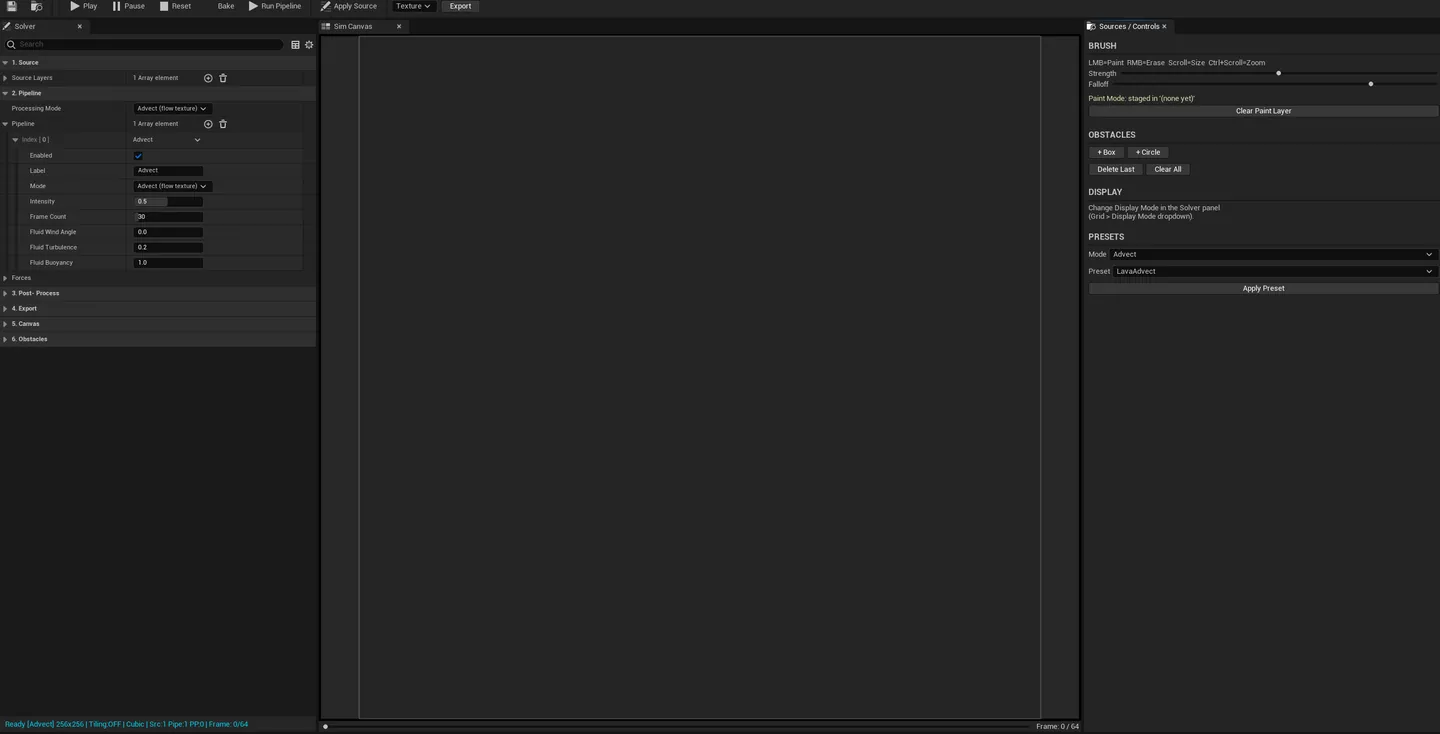
Toolbar (top)
Section titled “Toolbar (top)”| Control | What it does |
|---|---|
| Play / Pause / Reset | Drives the live simulation |
| Bake to RAM | Records the full simulation to memory for deterministic export |
| Export | Opens the export dialog |
| Display Mode | Density / Temperature / Velocity Vectors / Fuel / Pressure / Obstacle Map |
| Grid Resolution | 128×128 / 256×256 / 512×512 |
| Preset row | Torch / Campfire / Candle / Explosion / Smoke Plume / Rocket Plume |
Source Stack (left panel)
Section titled “Source Stack (left panel)”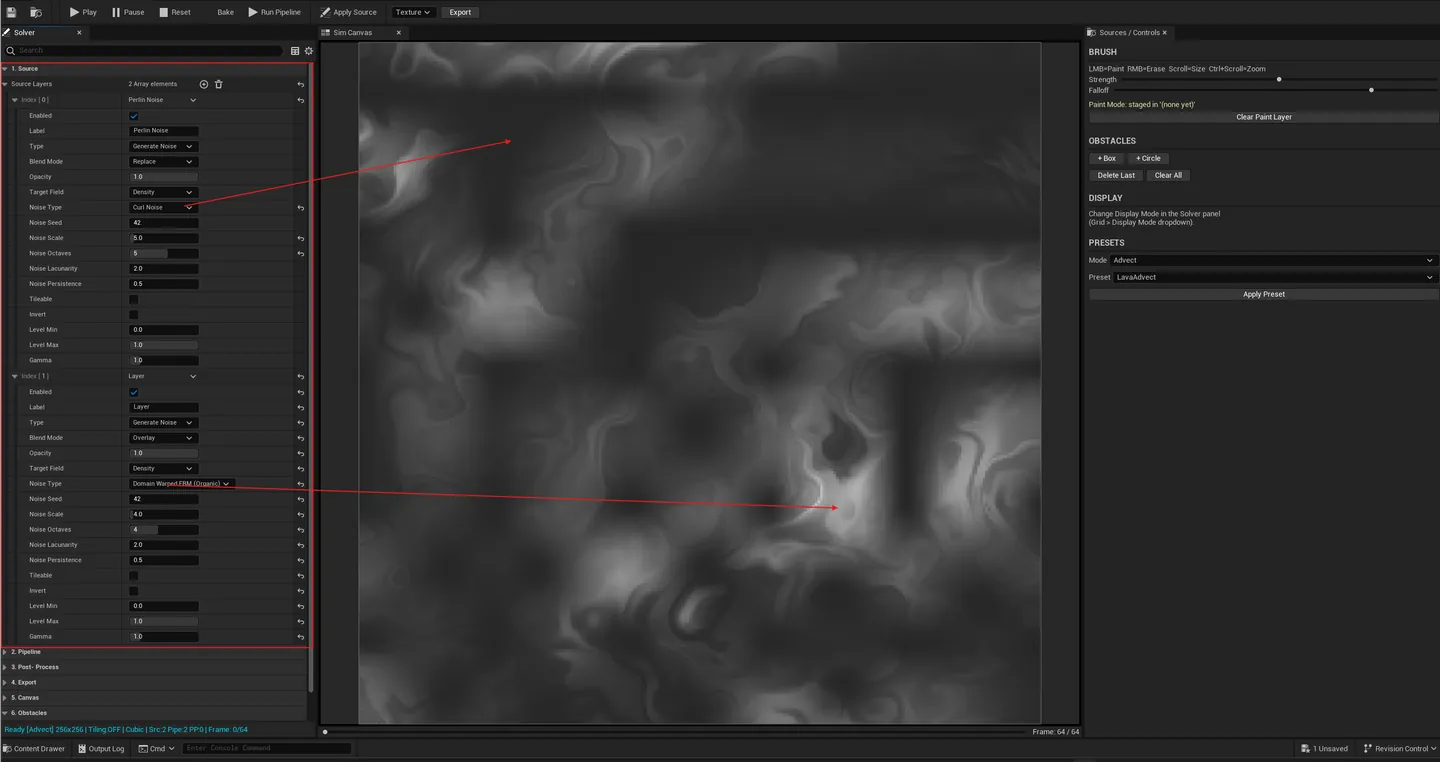
The source stack is the input system. Up to 6 layers, each with:
| Field | Options |
|---|---|
| Source Type | Noise (Perlin / Voronoi F1 / F2 / F1-F2 / DomainWarpedFBM) / Shape (circle / box / gradient) / Texture (imported UTexture2D) / Painted (in-tool brush — adapted from Painting Lab) |
| Blend Mode | Replace / Add / Subtract / Multiply / Screen / Overlay / Difference / Mask |
| Opacity | 0 – 1 |
| Target Field | Density / Temperature / VelocityXY / Fuel / ConcentrationU / ConcentrationV |
The target field routing is the key feature — different sources can feed different sim fields simultaneously. A noise into Density + a painted shape into Temperature + a gradient into VelocityXY produces emergent results no single-source tool reaches.
Six named source presets ship in V1 (e.g., Cumulus, EmberShower, FlowField, Vortex, ReactionDiffusion, Erosion). One click loads a known-good source stack.
Pipeline (middle panel: top)
Section titled “Pipeline (middle panel: top)”The pipeline is the processing chain. Up to N steps; each step’s output density field becomes the next step’s input. Velocity / pressure / temperature reset between steps so each operation gets a clean physical context.
Available processing modes:
| Mode | What it does |
|---|---|
| Advect | Velocity-driven displacement of density. Drives flow-map and smoke-trail look |
| Liquify | High-viscosity displacement — slow, dense fluid look |
| Diffuse | Density blur / spread |
| Erode | Mask-style erosion — reduces density at edges |
| Grow | Mask-style dilation — expands density |
| Ripple | Wave equation — circular / wavefront patterns |
| Generate | Pure synthesis (reaction-diffusion / Turing patterns) |
Six named pipeline presets ship — quick recipes like “Smoke Trail”, “Wear Mask”, “Voronoi Diffuse”, “Reaction Pattern”, “Wave Field”, “Erosion Field”. One click chains 2–4 steps with sensible defaults.
Post-Process Stack (middle panel: bottom)
Section titled “Post-Process Stack (middle panel: bottom)”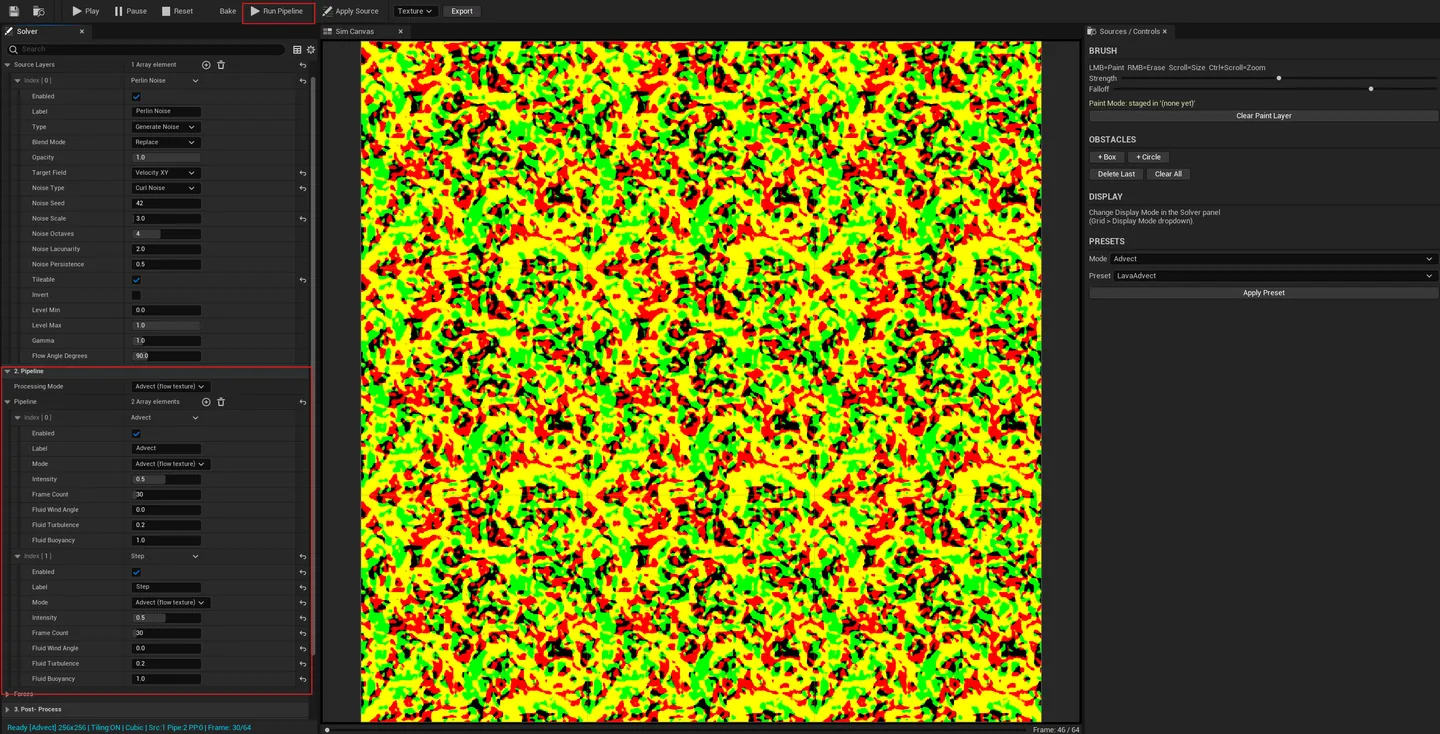
Non-destructive operations applied to the display buffer before export. Never writes back into the simulation fields — pure presentation pass.
| Op | What it does |
|---|---|
| Normalize | Rescales values to fill the 0-1 range |
| Levels | Black point / white point / midtone (gamma) |
| Remap | Curve remap of input → output values |
| Contrast | Linear contrast around midpoint |
| Power | Gamma-style power curve |
| Invert | 1 - x |
| Sharpen | Unsharp mask |
| Blur | Gaussian blur |
| Edge Detect | Sobel / Laplacian edge isolation |
| Gradient Remap | Maps grayscale through a UCurveLinearColor ramp |
2D Canvas (center)
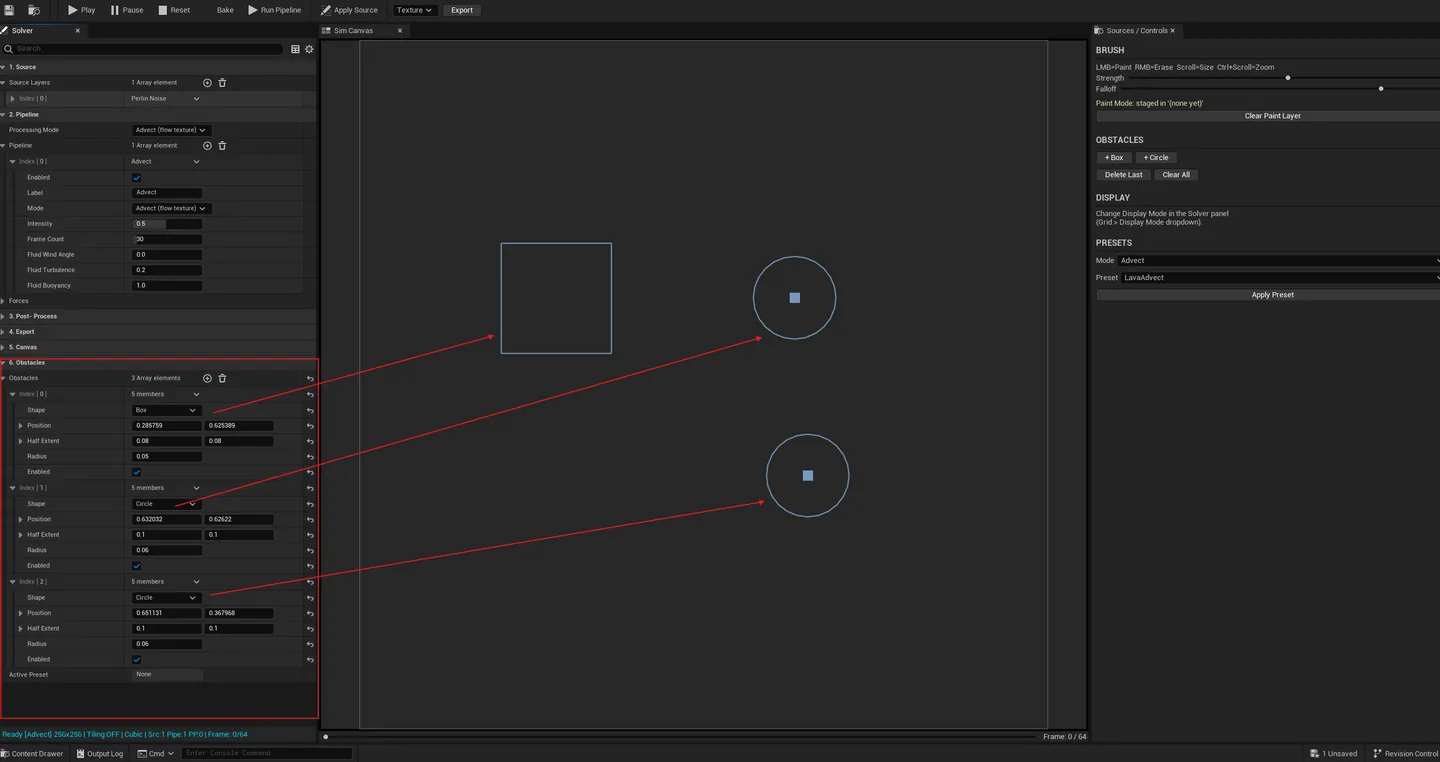
Section titled “2D Canvas (center)”The live simulation viewport. Color-mapped visualization of the active field with pan + zoom (scroll-wheel to zoom, alt-drag to pan). Tiled preview overlay (2×2 / 3×3) for evaluating tileable flowmaps. Emitter glyph is draggable for repositioning. Obstacles render as solid overlays. Sim-field injection brushes (Temperature / Force / Vortex) let you paint into the live simulation.
Emitter & Obstacles (right panel)
Section titled “Emitter & Obstacles (right panel)”| Section | What it does |
|---|---|
| Emitter Shape | Point / Circle / Box |
| Position | Drag glyph or set by value |
| Size / Direction / Velocity / Fuel Rate / Temperature | Slider per field |
| Obstacles | List of placed Box / Circle obstacles. Add / remove / reposition |
| Display Mode | Mirrors the toolbar dropdown |
Timeline + Status bar (bottom)
Section titled “Timeline + Status bar (bottom)”Play / Pause / Reset / Scrub / frame counter / total-frames spinner. Status bar shows live FPS, VRAM usage, baked frame count, and bake-to-RAM progress.
Asset model: what’s stored
Section titled “Asset model: what’s stored”UEQSynthAsset serializes:
- Source Stack.
TArray<FEQSynthSourceLayer>(up to 6, with type / blend / opacity / field routing). - Pipeline.
TArray<FEQSynthPipelineStep>(chained processing modes + parameters). - Post-Process Stack.
TArray<FEQSynthPostProcessStep>(non-destructive display ops). - Solver settings. Grid resolution, all combustion + emitter parameters.
- Emitter + obstacles. Shape / position / size / parameters.
- Color ramps. Fire ramp + smoke ramp (
UCurveLinearColorper asset). - Optional baked frame data. LZ4 / Zlib compressed for portable sharing.
Workflow
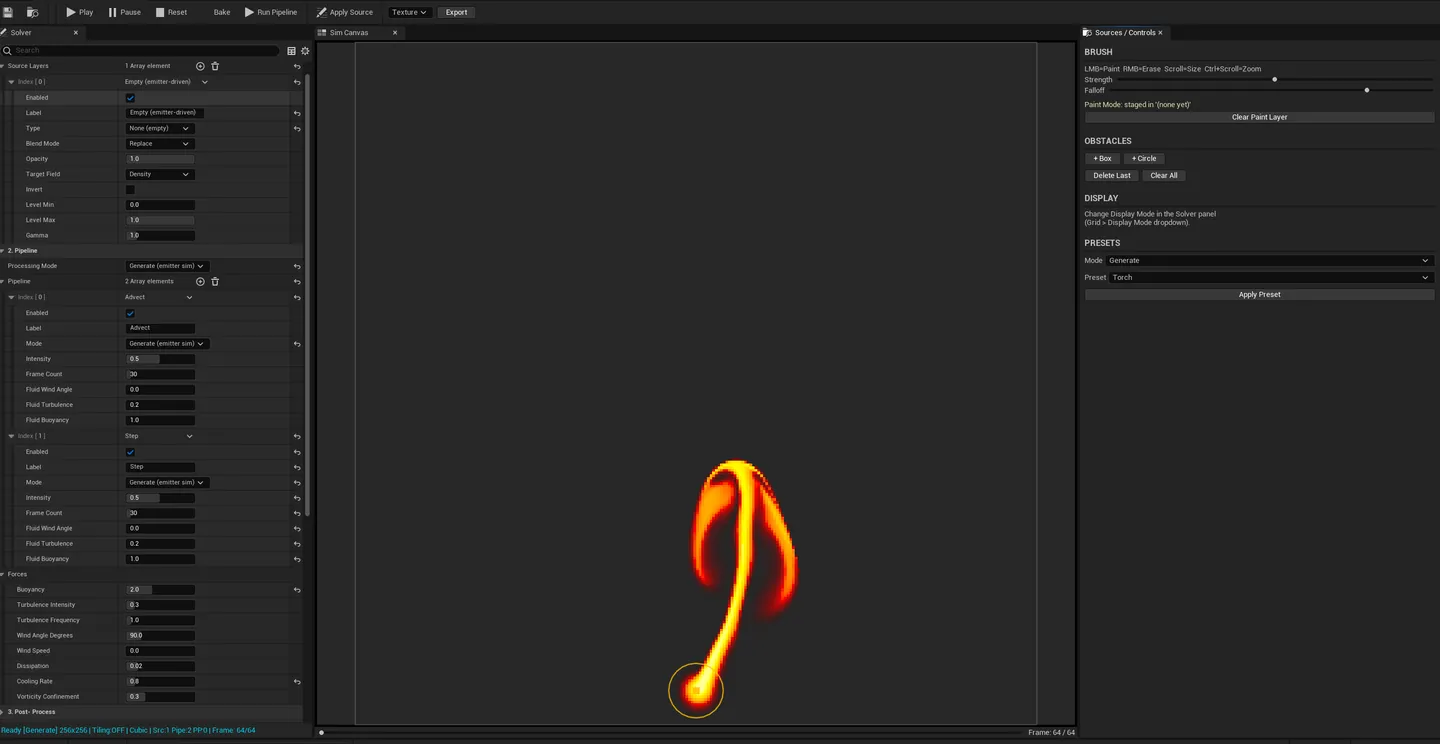
Section titled “Workflow”Pyro-style preset workflow (fastest path)
Section titled “Pyro-style preset workflow (fastest path)”- Create the asset, open it.
- Click a preset (Torch / Campfire / Candle / Explosion / Smoke Plume / Rocket Plume).
- Tweak buoyancy / turbulence / vorticity for the look you want.
- Reset → Bake to RAM to record frames deterministically.
- Export → Sprite Sheet → pick grid (4×4 / 6×6 / 8×8), resolution, stylization preset.
- The exported atlas appears in the Content Browser, ready for Niagara.
Synthesis workflow (composing a flowmap from scratch)
Section titled “Synthesis workflow (composing a flowmap from scratch)”- Add a Noise source (DomainWarpedFBM) → Target Field:
VelocityXY. - Add a Shape source (radial gradient) → Target Field:
Density→ Blend Mode: Multiply. - Add an Advect pipeline step (drives density via velocity field).
- Add a Diffuse step (smooths the result).
- Add a Normalize post-process op (rescales to 0-1).
- Bake → Export → Image Sequence (EXR for full precision).
Obstacle-driven art direction
Section titled “Obstacle-driven art direction”- Set up a fire preset.
- In the Obstacles panel, add Box obstacles.
- Drag them on the canvas to force flow through narrow channels / under arches.
- Bake + export — obstacles are baked into the simulation, not the export, so the result reflects them naturally.
Stylized export (same simulation, multiple looks)
Section titled “Stylized export (same simulation, multiple looks)”- Bake the simulation once.
- Click Export → pick Stylization Preset (Realistic / Cel-Shaded / Anime / Ink Wash / Pixel Art / Comic Book).
- Export.
- Repeat with a different preset — same source frames, different visual treatment, no re-bake.
Settings reference
Section titled “Settings reference”Solver
Section titled “Solver”| Field | Default | Range |
|---|---|---|
| Grid Resolution | 256×256 | 128 / 256 / 512 |
| Fuel Rate | 2.0 | 0 – 10 |
| Ignition Temperature | 0.3 | 0 – 1 |
| Burn Rate | 0.4 | 0 – 1 |
| Smoke Generation | 0.6 | 0 – 1 |
| Buoyancy Strength | 1.5 | 0 – 5 |
| Turbulence Intensity | 0.5 | 0 – 2 |
| Vorticity Confinement | 0.3 | 0 – 1 |
| Wind Angle | 0° | 0 – 360 |
| Wind Speed | 0.0 | 0 – 5 |
| Dissipation | 0.02 | 0 – 1 |
| Cooling | 0.05 | 0 – 1 |
| Timestep | 0.016 | float |
| Jacobi Iterations | 40 | 10 – 80 |
| Total Sim Frames | 64 | int |
| Advection Quality | MacCormack | Semi-Lagrangian / MacCormack |
Source Stack
Section titled “Source Stack”| Field | Range / Options |
|---|---|
| Layer count | 0 – 6 |
| Source Type | Noise / Shape / Texture / Painted |
| Noise Variants | Perlin / Voronoi F1 / F2 / F1-F2 / DomainWarpedFBM |
| Blend Mode | Replace / Add / Subtract / Multiply / Screen / Overlay / Difference / Mask |
| Opacity | 0 – 1 |
| Target Field | Density / Temperature / VelocityXY / Fuel / ConcentrationU / ConcentrationV |
Export
Section titled “Export”| Field | Default | Options |
|---|---|---|
| Format | Sprite Sheet | Sprite Sheet / Image Sequence |
| Sprite Grid | 8×8 | 4×4 / 6×6 / 8×8 |
| Output Resolution | 2048 | 1024 / 2048 / 4096 |
| Stylization | Realistic | Realistic / Cel-Shaded / Anime / Ink Wash / Pixel Art / Comic Book / Custom |
| Storage Mode | Export-Only | Export-Only / Embedded (LZ4 / Zlib) |
| Channel Mapping | Fire→R, Smoke→G, Temp→B, Alpha→A | configurable per channel |
Asset persistence: every parameter, source layer, pipeline step, post-process op, and (optionally) the full baked frame payload lives inside the
.uasset.
Engine integration
Section titled “Engine integration”- Sprite-sheet export produces a
UTexture2Datlas in the Content Browser, immediately assignable to a Niagara emitter as a flipbook texture or to a Material as aSubUVsample. - Image-sequence export writes per-frame PNG / EXR to disk, suitable for compositing pipelines (Nuke, AE, Resolve) or reimport as a Media texture.
- Embedded storage keeps the baked frames inside the
.uasset(LZ4 / Zlib), so the asset is self-contained and portable across collaborators without a re-bake. - No runtime cost. EQSynth Lab is editor-only. The output texture has zero solver dependency at runtime.
Tips and gotchas
Section titled “Tips and gotchas”- Bake before exporting. The export pipeline reads from the recorded frame buffer, not the live simulation. You’ll get an empty / partial export if you skip Bake to RAM.
- Density survives between pipeline steps; velocity does not. Each step starts with a fresh velocity field — design pipelines around that. Use Advect early (when velocity is fresh from sources) and Erode / Grow / Diffuse later (where they don’t depend on velocity).
- Source target-field routing is the killer feature. Multiple sources writing to different fields simultaneously creates emergent looks impossible in single-source tools. Try noise → Velocity + shape → Density + gradient → Temperature.
- Tiled preview is mandatory for tileable flowmaps. The 2×2 / 3×3 wrap overlay catches seam discontinuities while you’re authoring, not after you’ve exported and assigned the texture.
- Stylization is non-destructive. Bake once, export with three different stylization presets — same source frames, three different deliverables.
- Sub-256 grid resolution sacrifices obstacle fidelity. Box / Circle obstacles rasterize at grid scale; at 128×128 fine details disappear. 256×256+ for complex obstacle layouts.
- Rocket Plume preset has a known buoyancy / velocity imbalance. Reduce buoyancy strength manually for elongated directional plumes — fix scheduled for polish pass.
- Jacobi iterations under 20 produce visible divergence. Smoke drifting sideways unnaturally = pressure solver under-converged. Default of 40 is stable for most setups; raise toward 60-80 for high-accuracy work.
Related tools
Section titled “Related tools”- Flipbook Maker — Niagara capture-based flipbook authoring; EQSynth Lab is the procedural / simulation-based alternative
- Painting Lab — paint custom source masks for the EQSynth source stack (Painted source type)
- Niagara Profiler — profile the runtime cost of materials and emitters consuming EQSynth Lab outputs
- Texture Channel Packer — pack EQSynth EXR exports into combined channel-packed textures
- VAT Management Suite — VAT bakers and EQSynth Lab cover different VFX texture problems (geometry-cache vs flowmap / sprite-sheet); both feed Niagara
Opens our feedback form in a new tab with the tool name pre-filled.