
No. 1074 AN AnimationEQLabs Pro
Smear FX
Module: Animation · Category: Stylization · Tool ID:
SmearFX
Anime-style motion exaggeration, baked from real animation data. The tool samples per-frame bone velocities out of an AnimSequence and uses them to drive three distinct effects: elongated stretch meshes, ghost pose trails, and swept motion ribbons. Everything it produces is a plain UStaticMesh you can inspect, edit, or throw away — nothing is hidden behind a runtime-only shader.
Clean-room implementation inspired by SMEAR — Stylized Motion Exaggeration (Basset, Bénard, Barla — SIGGRAPH 2024).
When to use it
Section titled “When to use it”- Attack and impact animations that need an anime-style stretch on the contact frame
- Fast limb motion where 30 fps sampling reads as strobing rather than speed
- Stylised games that want smears as authored, reviewable assets rather than a post-process
- Motion trails behind a weapon, hand, or foot during a dash
What it isn’t for
Section titled “What it isn’t for”- Don’t use it for subtle realism. This is deliberate exaggeration. For motion blur, use the engine’s.
- Don’t bake before the animation is final. Every bake is tied to a specific frame range of a specific AnimSequence; re-timing the animation invalidates the meshes.
- Don’t bake a long range “just in case”. The elongated bake writes one StaticMesh per frame. A 60-frame range is 60 assets.
Opening the tool
Section titled “Opening the tool”- Open the EQLabs Hub and search for smear (or browse to Animation → Stylization).
- Click the tool card.
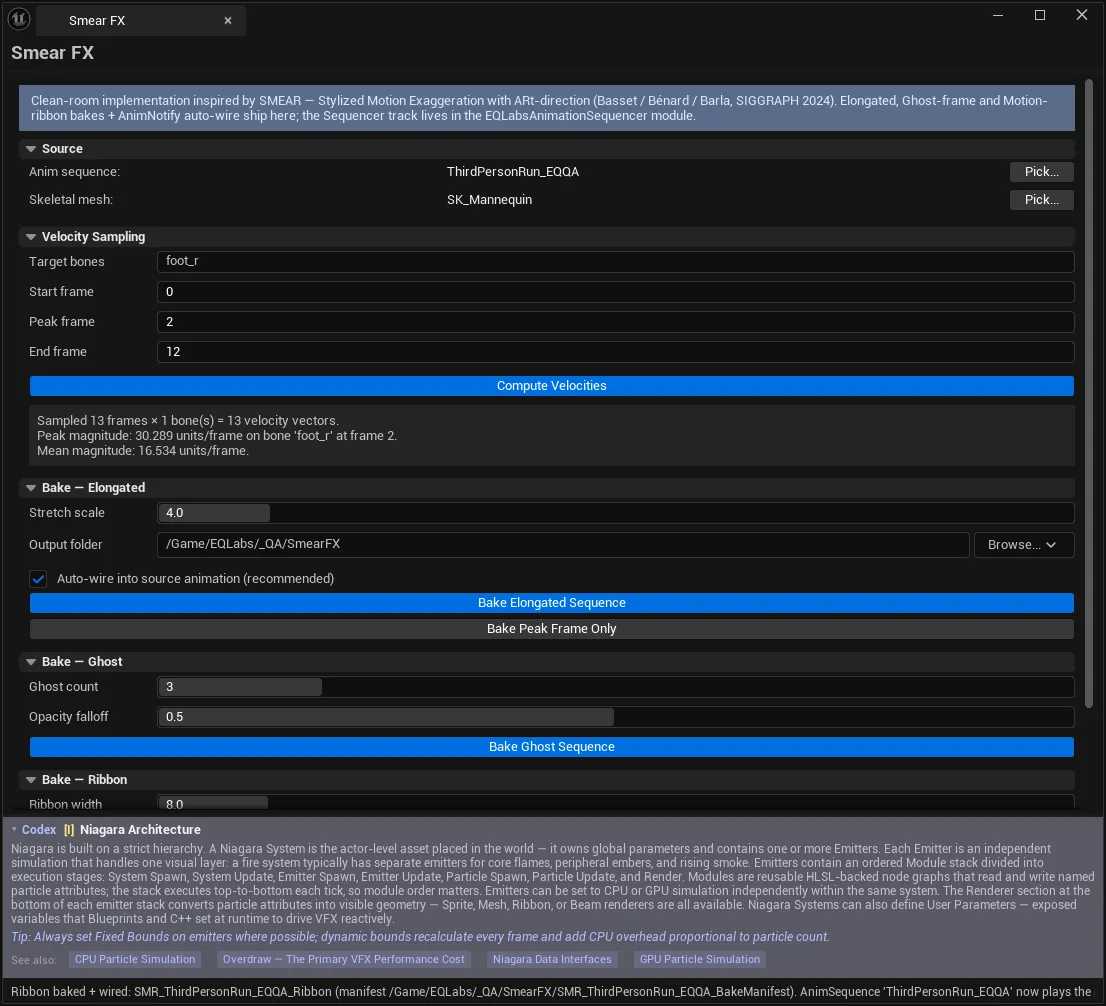
- Work top to bottom: Source → Velocity Sampling → Compute Velocities → a Bake section.
The bake sections are gated on the velocity cache. Compute Velocities must succeed first — every bake reads the frame window and per-frame velocities from that cache.
Source
Section titled “Source”| Control | Notes |
|---|---|
| Anim sequence | The AnimSequence to sample velocities from |
| Skeletal mesh | The SkeletalMesh whose proportions drive pose evaluation |
Both are required. The skeletal mesh matters because velocities are evaluated against that mesh’s proportions — sampling with the wrong one gives plausible-looking but incorrect displacement.
Velocity Sampling
Section titled “Velocity Sampling”| Control | Notes |
|---|---|
| Target bones | Comma-separated bone names whose velocities drive the smear. A single bone is fine; a chain gives a broader effect |
| Start frame | First frame sampled. Velocity is computed as frame F+1 minus frame F |
| Peak frame | Frame of maximum stretch — the impact frame in an attack |
| End frame | Last frame sampled, inclusive. The animation must have frame F+1 available |
| Compute Velocities | Evaluates the sequence across [Start, End] and fills the velocity cache |
Examples of a target-bone entry:
foot_rhand_r, lowerarm_r, upperarm_rOn success the panel reports the shape of what it sampled — frame count, bone count, total vectors, and which bone peaked at which frame:
Computed 12 frames × 1 bone — peak 842.3 on 'hand_r' @ frame 7That peak line is the useful one: if the reported peak frame is not the frame you consider the impact, your Peak frame setting is wrong and the stretch envelope will be anchored in the wrong place.
An empty cache means the bone name does not exist on the skeleton — the most common single mistake, usually a left/right or naming-convention mismatch.
Bake: Elongated
Section titled “Bake: Elongated”Stretches mesh vertices along per-frame bone velocity. This is the classic smear.
| Control | Notes |
|---|---|
| Stretch scale | Multiplier on per-frame bone velocity → vertex displacement. Larger = longer smear |
| Output folder | /Game-rooted path for baked StaticMesh assets + manifest |
| Auto-wire into source animation (recommended) | Adds an AnimNotifyState_SmearFX to the source AnimSequence so the effect plays automatically |
| Bake Elongated Sequence | One StaticMesh per frame across [Start, End], each modulated by the stretch envelope |
| Bake Peak Frame Only | Quick test bake — peak frame only, full displacement, no envelope |
Use Bake Peak Frame Only while dialling in Stretch scale. It produces one asset instead of dozens, and the peak frame is where the effect is most visible. Only run the sequence bake once the look is right.
Sub-threshold frames are skipped rather than written, and the panel reports how many:
Sequence baked: 14 frames (3 skipped sub-threshold). Manifest: /Game/...Bake: Ghost
Section titled “Bake: Ghost”Pose snapshots trailing behind the motion.
| Control | Notes |
|---|---|
| Ghost count | How many pose snapshots to bake, distributed evenly across [Start, End] |
| Opacity falloff | Per-ghost opacity decay — ghost i gets opacity = pow(1 - falloff, i) |
| Bake Ghost Sequence | Bakes the snapshots and a manifest |
Because falloff is exponential, small changes bite hard: a falloff of 0.5 leaves the fourth ghost at ~6% opacity. For a long, readable trail, keep falloff low and raise ghost count instead.
Bake: Ribbon
Section titled “Bake: Ribbon”A single swept surface tracing a bone’s path — the classic motion line.
| Control | Notes |
|---|---|
| Ribbon width | Width of the swept surface in component units. ~8 for character-scale work |
| Trail bone (optional) | Bone whose world path the ribbon traces. Leave blank to use the velocity peak bone |
| Bake Motion Ribbon | Bakes one swept-surface StaticMesh |
Leaving the trail bone blank is the right default — it uses whichever bone actually peaked, which is usually the one the eye follows.
Auto-wiring and playback
Section titled “Auto-wiring and playback”With Auto-wire enabled, a bake adds an AnimNotifyState_SmearFX to the source AnimSequence, and the panel confirms it:
Sequence baked + wired: 14 frames, manifest /Game/... .AnimSequence 'A_Attack_01' now plays the smear automatically —add a USmearFXSequenceComponent to your character BP.The notify alone is not enough. The character Blueprint needs a USmearFXSequenceComponent; the notify drives that component. Without it the notify fires into nothing and you see no smear — which reads as a failed bake but is not one.
Output
Section titled “Output”Each bake writes StaticMesh assets plus a manifest under the output folder. The manifest is what ties a set of per-frame meshes to the sequence and range they came from, and it is what a future cleanup pass will read.
Not yet shipped
Section titled “Not yet shipped”The panel shows a Coming soon banner for:
Profile:
USmearFXProfilepicker + 3 starter presets + bake-manifest cleanup (Phase 3)
Until that lands there is no preset system and no automated manifest cleanup — baked assets are removed by hand. Plan for that if you are iterating heavily, because each sequence bake writes a fresh set of per-frame meshes.
Tips and gotchas
Section titled “Tips and gotchas”- Compute Velocities before every bake. All three bake sections read the cache; if you change the frame range or bones, re-compute or you will bake against stale data.
End frameneedsEnd + 1to exist, since velocity is a forward difference. Setting End to the last frame of the sequence fails.- An empty cache almost always means a wrong bone name. Check the skeleton’s actual naming.
- One StaticMesh per frame adds up fast. Keep ranges tight — the smear only needs to exist around the impact.
- Re-timing the source animation invalidates every bake tied to it. Bake late.
- No smear at runtime despite a “wired” message? The
USmearFXSequenceComponentis missing from the character BP. - Peak frame drives the envelope. If the reported peak bone/frame disagrees with your intent, fix that before touching Stretch scale.
Related tools
Section titled “Related tools”- Anim Notify Manager — audit the
AnimNotifyState_SmearFXentries auto-wiring adds - Motion Cleanup & Foot Locking — clean the motion before exaggerating it
- Corrective Blendshape Authoring — deformation fixes, where this is deliberate distortion
- Animation Auditor — confirm the source sequence is sane first
Opens our feedback form in a new tab with the tool name pre-filled.