
No. 0081 TE TechEQLabs Pro
Cymatics FX
Module: Tech · Category: Texture Generators · Tool ID:
CymaticsFX
A library of wave-noise Material Functions built on spectral control rather than the usual Perlin/Worley/Voronoi primitives. Drag one into any material graph and you get watercolour bleed, manga paper grain, hatching, magic dissolve, foliage variation, cloth weave, volumetric mist, or a flowmap basis — patterns that are genuinely hard to reach by stacking legacy noise nodes.
Three tabs: Library browses and regenerates the starters, Design tunes a custom variant and exports it as a new Material Function, and Bake renders any of them to a static Texture2D.
When to use it
Section titled “When to use it”- Stylised rendering: watercolour, manga, hatching, ink
- Dissolve and reveal effects that need organic structure
- Per-instance foliage variation without extra textures
- Cloth weave and fabric detail
- Volumetric mist
- Flowmap bases for advection
- Anywhere legacy noise nodes look synthetic
What it isn’t for
Section titled “What it isn’t for”- Don’t use it where a plain texture is cheaper. These are procedural functions evaluated per pixel; bake them if the cost matters.
- Don’t expect 3D output from the bake. V1.0 bakes 2D only — see below.
Opening the tool
Section titled “Opening the tool”- Open the EQLabs Hub and search for cymatics or
noise(or browse to Tech → Texture Generators). - Click the tool card.
- On first use, click Regenerate Library.
The starter functions are generated into your project, not shipped as fixed assets. If the Library shows ”⚠ Asset missing — click Regenerate Library”, that is what it means. Regenerating is also how you pick up updated maths after an upgrade.
Library tab
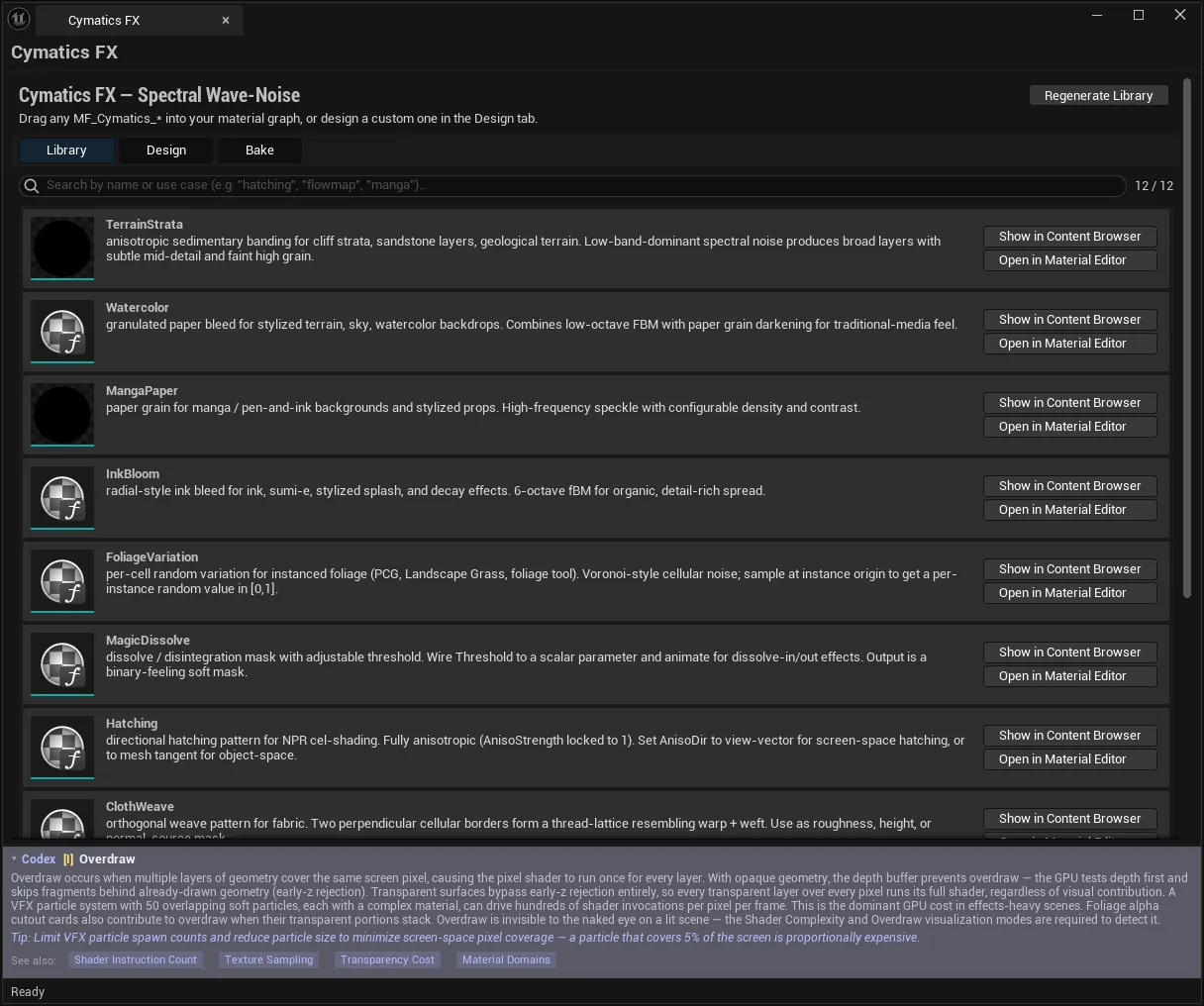
Section titled “Library tab”A searchable browser over the 12 starter Material Functions:
| Function | Use |
|---|---|
MF_Cymatics_TerrainStrata | Layered rock strata |
MF_Cymatics_Watercolor | Watercolour bleed |
MF_Cymatics_MangaPaper | Manga paper grain |
MF_Cymatics_InkBloom | Ink bloom |
MF_Cymatics_FoliageVariation | Per-instance foliage variation |
MF_Cymatics_MagicDissolve | Dissolve / reveal |
MF_Cymatics_Hatching | Cross-hatching |
MF_Cymatics_ClothWeave | Fabric weave |
MF_Cymatics_PixelDither | Dither patterning |
MF_Cymatics_VolumetricMist | Volumetric mist |
MF_Cymatics_FlowmapBasis | Flowmap basis |
MF_Cymatics_CustomSpectral | Open spectral base for custom work |
| Control | Notes |
|---|---|
| Search | Filters by name, description or use-case keywords |
| Show in Content Browser | Reveals the asset |
| Open in Material Editor | Opens the function |
| Regenerate Library | Re-creates the starter functions |
Assets are written under /EQLabs/EQLabs/Cymatics/Functions/.
Note (v2.0.2): in 2.0.2 the Regenerate button’s tooltip says “all 11 starter Material Functions”. The generator defines 12, and 12 is what you get - the search counter above the list reads
12 / 12. Fixed in the next release, where the tooltip derives the number from the spec table.
Usage is simply drag-and-drop: put any MF_Cymatics_* into a material graph in place of a noise node.
Design tab
Section titled “Design tab”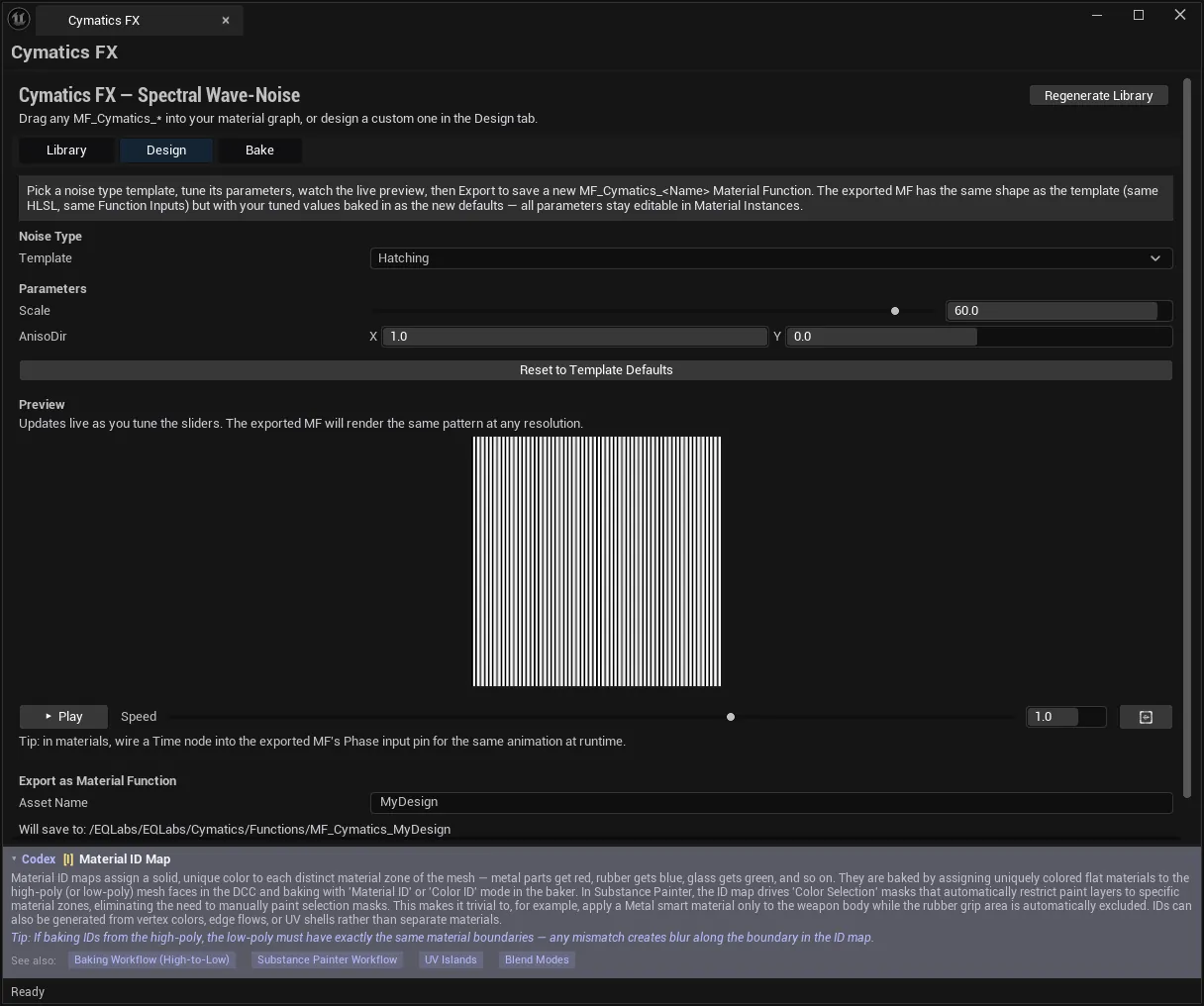
Build a custom variant from a starter template and export it as its own Material Function.
| Control | Notes |
|---|---|
| Noise Type | The underlying wave-noise family |
| Template | A starter library function used as the base |
| Parameters | Tunable values for the chosen template |
| Reset to Template Defaults | Restores the template’s original values |
| Preview | Updates live as you tune |
| Asset Name | Saved as MF_Cymatics_<name> |
| Export as Material Function | Generates the new function |
The preview is resolution-independent: “The exported MF will render the same pattern at any resolution.”
Exports go to /EQLabs/EQLabs/Cymatics/Functions/MF_Cymatics_<AssetName>, and the panel shows the exact destination path before you commit.
Two guards worth knowing:
- Export refuses to overwrite a starter. “Export refused — ‘X’ is a starter library function. Pick another Asset Name (e.g. X_Custom).” Your custom work cannot silently replace a library function, and a Regenerate cannot silently destroy your custom work.
- Export requires a template. “Export failed — no template selected.”
Animating a Cymatics function
Section titled “Animating a Cymatics function”The panel’s tip is the thing most people need: wire a Time node into the exported MF’s Phase input pin to animate the pattern in a material. The Design tab’s Play button and Speed slider animate the preview only — the animation in your shipped material comes from that Time node.
Bake tab
Section titled “Bake tab”Renders any Cymatics function to a static Texture2D — for mobile, VFX graphs, or anywhere per-pixel evaluation is too expensive.
| Setting | Notes |
|---|---|
| Source Material Function | Pick the MF to bake |
| Resolution | Square, N × N px |
| Compression | See below |
| Output Name | Saved as T_Cymatics_<name> |
| Overwrite existing texture | Off by default — a bake refuses to replace an existing texture unless ticked |
| Bake to Texture2D | Runs the bake |
Compression formats
Section titled “Compression formats”| Format | Engine setting | Use |
|---|---|---|
| Grayscale R8 | TC_Grayscale | Uncompressed single channel — mobile-friendly |
| Mask BC4 | TC_Masks | Compressed single channel |
| Color BC7 | TC_BC7 | High-quality compressed RGB |
Single-channel patterns — dissolve masks, hatching, dither — should use BC4 rather than BC7, which spends three channels storing the same greyscale.
Output goes to /EQLabs/EQLabs/Cymatics/BakedTextures/T_Cymatics_<name>.
Limitations, stated by the tool
Section titled “Limitations, stated by the tool”- The baked Texture2D is static. “Animation runs purely in preview.”
- 2D bake only in V1.0.
VolumetricMist(Wave3D) is noted as producing 3D output in a later version. - Baking needs a CPU bake function for the selected MF; where none exists the tool says so rather than producing an empty texture.
Workflow: a custom dissolve
Section titled “Workflow: a custom dissolve”- Library → Regenerate Library (first run).
- Find
MF_Cymatics_MagicDissolve→ Open in Material Editor to see how it is wired. - Design → select it as Template.
- Tune parameters against the live preview.
- Set Asset Name to
MagicDissolve_Custom(it will refuse the starter’s own name). - Export as Material Function.
- Drag it into your material; wire Time in to animate.
- If the cost is too high on your target platform: Bake → Mask BC4 at a suitable resolution.
Tips and gotchas
Section titled “Tips and gotchas”- Regenerate Library first. Missing-asset warnings in the Library mean the functions were never generated in this project.
- In v2.0.2 the Regenerate tooltip says 11; there are 12. Trust the
12 / 12counter. Corrected in the next release. - Exports cannot overwrite starters. By design, and it protects both directions.
- Animation in a material comes from a
Timenode wired to thePhasepin, not from the Design tab’s Play button. - Baked textures are static. Animated patterns must stay procedural or be baked as a flipbook by another tool.
- Use BC4 for single-channel patterns, not BC7.
- Bake overwrite is off by default. A name clash refuses rather than replacing.
- Regenerating replaces the starters, so keep custom variants under their own names (which the export guard enforces).
Related tools
Section titled “Related tools”- EQSynth Lab — the broader procedural texture synthesiser
- Smart Mask & Texture Processor — process the masks these functions produce
- Material Layer Studio — compose layered materials using these functions
- Flowmap Painter — hand-authored flow, where
FlowmapBasisis procedural
Opens our feedback form in a new tab with the tool name pre-filled.