
No. 0241 TE TechEQLabs Pro
PSO Precache Auditor
Module: Tech · Category: Performance · Tool ID:
PSOPrecacheAuditorTab
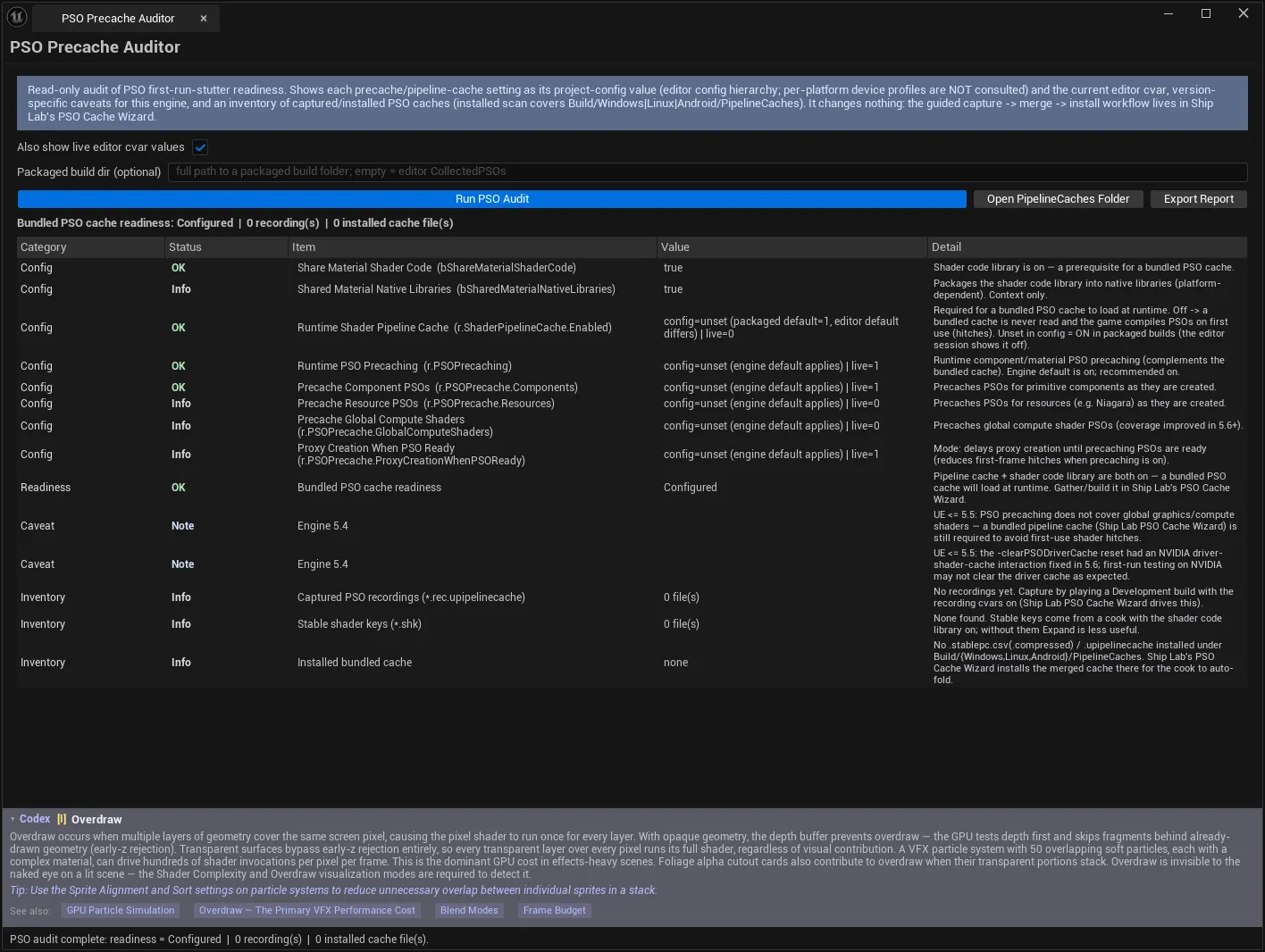
First-run shader stutter is one of the most visible problems a shipped game can have, and the configuration that prevents it is spread across several settings that must all agree. This tool audits whether your project is actually set up so a bundled PSO cache loads at runtime — showing each setting’s shipped value and live cvar, engine-version caveats, and an inventory of the cache files you have captured or installed.
It is strictly read-only. The guided capture → merge → install workflow lives in Ship Lab’s PSO Cache Wizard.
When to use it
Section titled “When to use it”- Before shipping, to confirm a bundled PSO cache will actually load
- Diagnosing first-run stutter in a packaged build
- Checking whether a captured recording made it into the right folder
- Confirming config after an engine upgrade, where PSO behaviour has changed repeatedly
What it isn’t for
Section titled “What it isn’t for”- Don’t use it to capture or install caches. It audits. Ship Lab’s PSO Cache Wizard does the workflow.
- Don’t use it to measure shader compile time. It checks configuration and inventory, not runtime cost.
Opening the tool
Section titled “Opening the tool”- Open the EQLabs Hub and search for pso or
precache(or browse to Tech → Performance). - Click the tool card.
- Click Run PSO Audit.
Settings
Section titled “Settings”| Control | Notes |
|---|---|
| Also show live editor cvar values | Shows the current editor-session cvar next to the project-config value. Applies on the next Run PSO Audit |
| Packaged build dir (optional) | Full path to a packaged build folder. Empty = editor CollectedPSOs |
| Run PSO Audit | Audits config, version caveats and inventory (read-only) |
| Open PipelineCaches Folder | Opens Build/Windows/PipelineCaches |
| Export Report | Writes the audit (JSON/CSV/HTML) |
Config value vs live cvar is the distinction that catches people. A project can be configured correctly and still behave differently in your editor session because something set the cvar at runtime. Showing both side by side is how you tell “shipped config is wrong” from “my session is unusual”.
Open PipelineCaches Folder goes to Build/Windows/PipelineCaches — where a bundled cache must live for the cook to auto-fold it in. A cache in the wrong folder is silently ignored, and that path is the single most common reason a correctly captured cache does nothing.
Readiness verdict
Section titled “Readiness verdict”| Readiness | Meaning |
|---|---|
| Not Configured | Neither the pipeline cache nor the shader code library is on → a bundled cache cannot work |
| Partial | One prerequisite (or only runtime precaching) is on → bundled cache incomplete |
| Configured | Prerequisites are in place |
Summary line:
Bundled PSO cache readiness: Partial | 3 recording(s) | 1 installed cache file(s)Partial is the dangerous state, because things appear to be set up — there are recordings, there is a cache file — while the runtime prerequisites mean none of it loads. The verdict names which prerequisite is missing.
Results
Section titled “Results”| Column | Meaning |
|---|---|
| Category | Which part of the configuration |
| Status | See below |
| Item | The setting or file |
| Value | Measured value |
| Detail | Why it matters |
Status meanings
Section titled “Status meanings”| Status | Meaning |
|---|---|
| Good | Measured value meets a real engine requirement or best practice |
| Attention | Measured value gates functionality that is currently off |
| Info | Shown for context — not an error |
| Advisory | Guidance |
The Attention definition is the useful one: it does not mean “wrong”, it means “this setting is switching something off”. Those are the rows that turn a Configured-looking project into a Partial one.
What the audit covers
Section titled “What the audit covers”- Precache configuration — each setting’s shipped value and, optionally, its live cvar, each with its source.
- Engine-version caveats — version-specific behaviour for the engine you are on.
- Captured recordings —
.rec.upipelinecachefiles, from the editor’sCollectedPSOsor a packaged build folder you point at. - Installed bundled caches — what is actually in place.
Knowing the source of each value matters when config is layered across DefaultEngine.ini, platform ini files and command line — “where is this coming from?” is usually the real question.
The engine-version caveats section exists because PSO caching has changed meaningfully across UE versions; advice that was correct two versions ago is a common source of misconfiguration.
Workflow: pre-ship PSO check
Section titled “Workflow: pre-ship PSO check”- Run PSO Audit with live cvar values enabled.
- Read the readiness verdict first — it is the headline.
- Work the Attention rows: each names something currently switched off.
- Check the recordings count — zero means nothing was ever captured.
- Check installed cache files — and use Open PipelineCaches Folder to confirm the location.
- Read the version caveats for your engine.
- If the workflow needs running, go to Ship Lab → PSO Cache Wizard.
- Re-audit until readiness is Configured.
- Export Report for the release record.
Tips and gotchas
Section titled “Tips and gotchas”- Partial readiness is the trap. It looks configured and does not work.
- The cache must live in
Build/Windows/PipelineCachesfor the cook to fold it in. Elsewhere it is ignored silently. - Config and live cvar can differ. Enable the live column before concluding anything about a session.
- The live-cvar toggle applies on the next run, not immediately.
- Recordings are not an installed cache. Capturing is one step; merging and installing are others — that is Ship Lab’s job.
- Check version caveats after an engine upgrade. PSO behaviour has changed across versions more than once.
- This tool changes nothing. It is read-only by design, so it is safe to run at any point in a release.
Related tools
Section titled “Related tools”- Ship Lab — the guided capture → merge → install PSO Cache Wizard
- Shader Diagnostics Suite — shader compilation and cost
- HitchScope — catches the shader-compile hitches a missing cache causes
- Validation Gate Hub — gate a release on readiness checks
Opens our feedback form in a new tab with the tool name pre-filled.