
Pivot Painter Lab (standalone)
Fab product: EQLabs Pivot Painter Lab · Version: 1.0.1 · Engine: UE 5.4 – 5.8 Modules: 4 (3 Editor + 1 Runtime) · Requires: Niagara
Foliage sways by rotating each branch and leaf around its pivot — the point where it joins its parent. Pivot Painter stores each element’s pivot, rotation axis, size and parent link, either in lookup textures (PP2) or in the mesh’s own vertex data (PP1), and a wind material reads them in the vertex shader.
Authoring that data normally means a 3ds Max round-trip. Pivot Painter Lab computes all of it inside Unreal: it analyses the mesh, splits it into wind elements, builds the hierarchy, computes the pivots, bakes, and generates the wind materials. Bakes are drop-in compatible with Epic’s stock Pivot Painter 2 shader, or you can use the richer built-in EQLabs wind material.
When to use it
Section titled “When to use it”- You have static-mesh vegetation (bought, scanned, or modelled) and want it moving in wind without going back to a DCC.
- You need a whole forest to sway believably: per-instance variation so trees don’t move in lockstep, and one global wind control for the scene.
- You want seasons: a scene-wide, luminance-preserving leaf tint you can animate from Sequencer.
- You want falling leaves or foliage that bends away from the player, both shipping in the packaged game.
What it isn’t for
Section titled “What it isn’t for”- Not for skeletal-mesh foliage. This bakes static meshes; a rigged plant belongs in an animation pipeline.
- Not a substitute for good UVs and material work. It generates a wind material and harvests the mesh’s own textures — it does not author the look.
- Interactive bending is for grass and bush height. On tall trees the root-planted weighting makes it negligible by design.
Install and first bake
Section titled “Install and first bake”- Enable Pivot Painter Lab (Edit → Plugins → search “Pivot Painter”), restart the editor.
- The fastest possible result: right-click any tree Static Mesh in the Content Browser →
Pivot Painter → Bake. The plugin analyses the mesh, splits it into wind elements, bakes, and
drops a ready swaying mesh (
<Name>_PP2) next to the original. Place it in a level — it is already moving.
That is the whole loop. Everything below is about getting better results and using the extra features.
The launcher
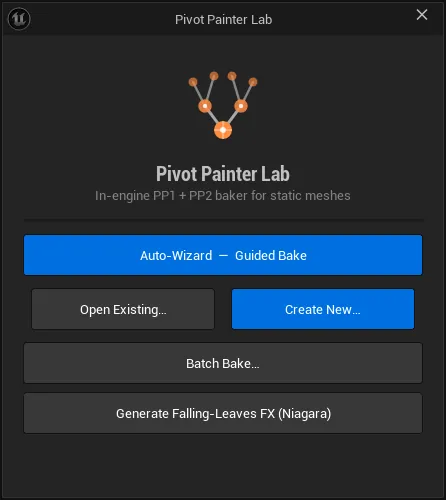
Section titled “The launcher”Tools → Pivot Painter opens a launcher with five entry points:
| Button | What it does |
|---|---|
| Auto-Wizard — Guided Bake | The recommended five-step flow |
| Create New… | A blank Pivot Painter project for the Full Lab |
| Open Existing… | Reopen a saved project |
| Batch Bake… | Run a saved preset across many meshes |
| Generate Falling-Leaves FX (Niagara) | Build the leaf system |
The Auto-Wizard
Section titled “The Auto-Wizard”A guided five-step flow that gets a beginner to a good bake in a handful of clicks:
-
Pick a mesh — your tree or bush.
-
Assess — a plain-English complexity read-out (Simple / Moderate / Complex / Advanced) with the reasons: triangle count, connected pieces, leaf-versus-wood ratio.
-
Four questions, all pre-filled from the analysis so you can click straight through:
- What is this? Auto / Tree / Bush / Grass-cards / Rocks / Solid sculpt / Prop / Mechanical.
- How much wind? Still / Gentle / Normal / Strong.
- Quality vs Performance
- Orientation. Auto Z-up, lying along X, lying along Y.
An Advanced expander exposes the detection backbone, hierarchy algorithm and minimum element size.
-
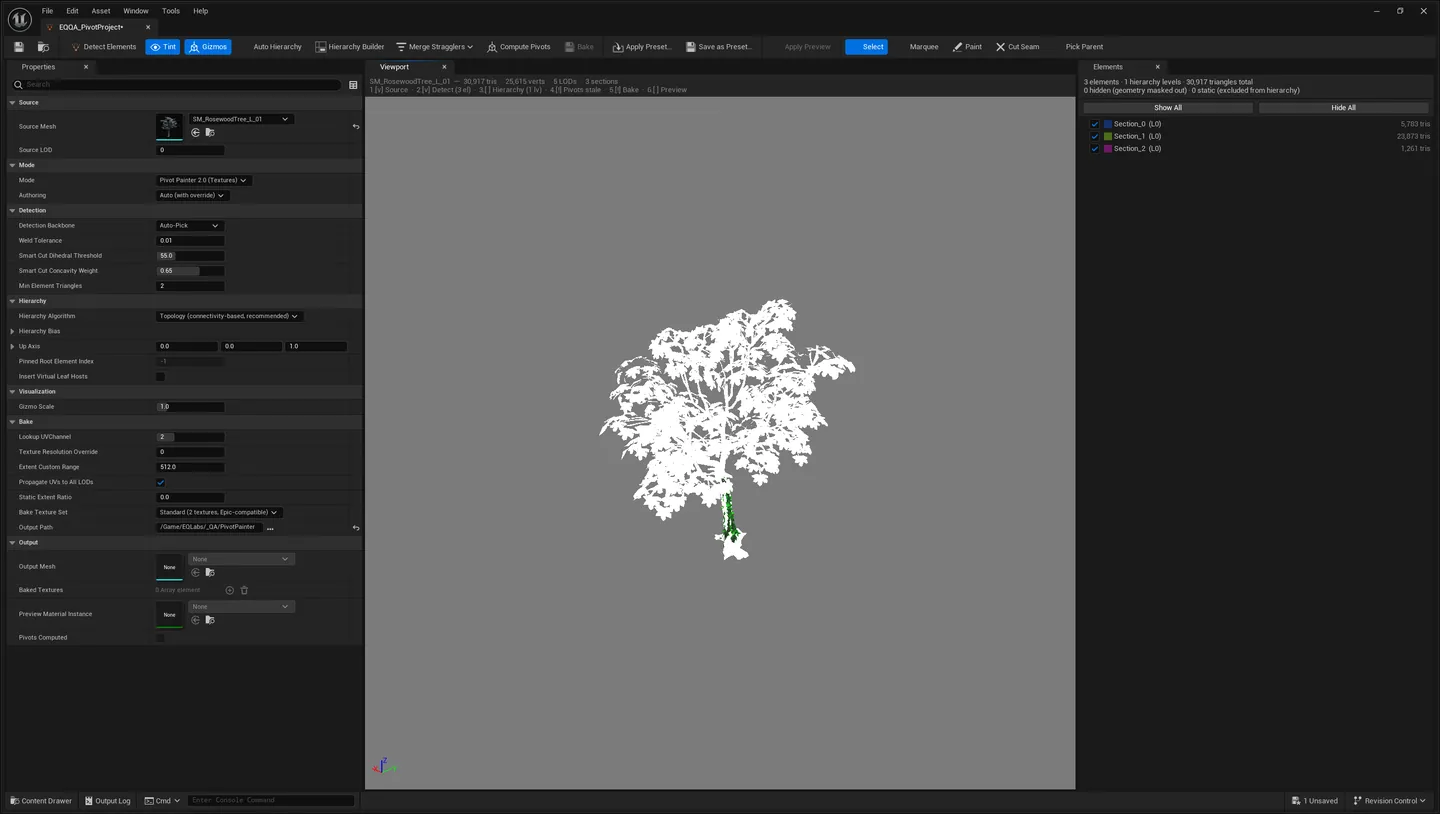
Preview the split — the mesh tints by detected element so you can see the segmentation before committing. Re-run if you change the backbone.
-
Bake — watch the result sway live in the preview, then Save as Preset, open it in the Content Browser, or hand off to the Full Lab.
The bake step has four opt-in checkboxes: Generate impostor LOD, Prep for falling-leaf FX, Interactive bending, and Use Epic’s stock Pivot Painter 2 shader.
One-click bake
Section titled “One-click bake”Right-click a Static Mesh (or a multi-selection) → Pivot Painter → Bake. Same intelligence as the wizard with default answers: probe the archetype, pick a detection + hierarchy recipe, bake, apply the wind material with the mesh’s own textures harvested automatically. Bake (Options…) gives the non-guided dialog. Good for batch-processing a folder of vegetation.
Archetype routing (deterministic)
Section titled “Archetype routing (deterministic)”| Archetype | Detection + hierarchy |
|---|---|
| Complex tree | Islands + Skeleton-First |
| Bush | Islands + Topology |
| Grass cards & scatter | Islands + FlatRoots — every card its own level-0 root |
| Welded solid | Smart-Cut + Skeleton or Topology |
| Single piece | Whole-mesh L0 |
| Prop / assembly | Sections or Smart-Cut + Topology, near-still wind |
The validation gate stays hard: a failed route falls back down the chain and the fallback is reported rather than hidden.
The Full Lab
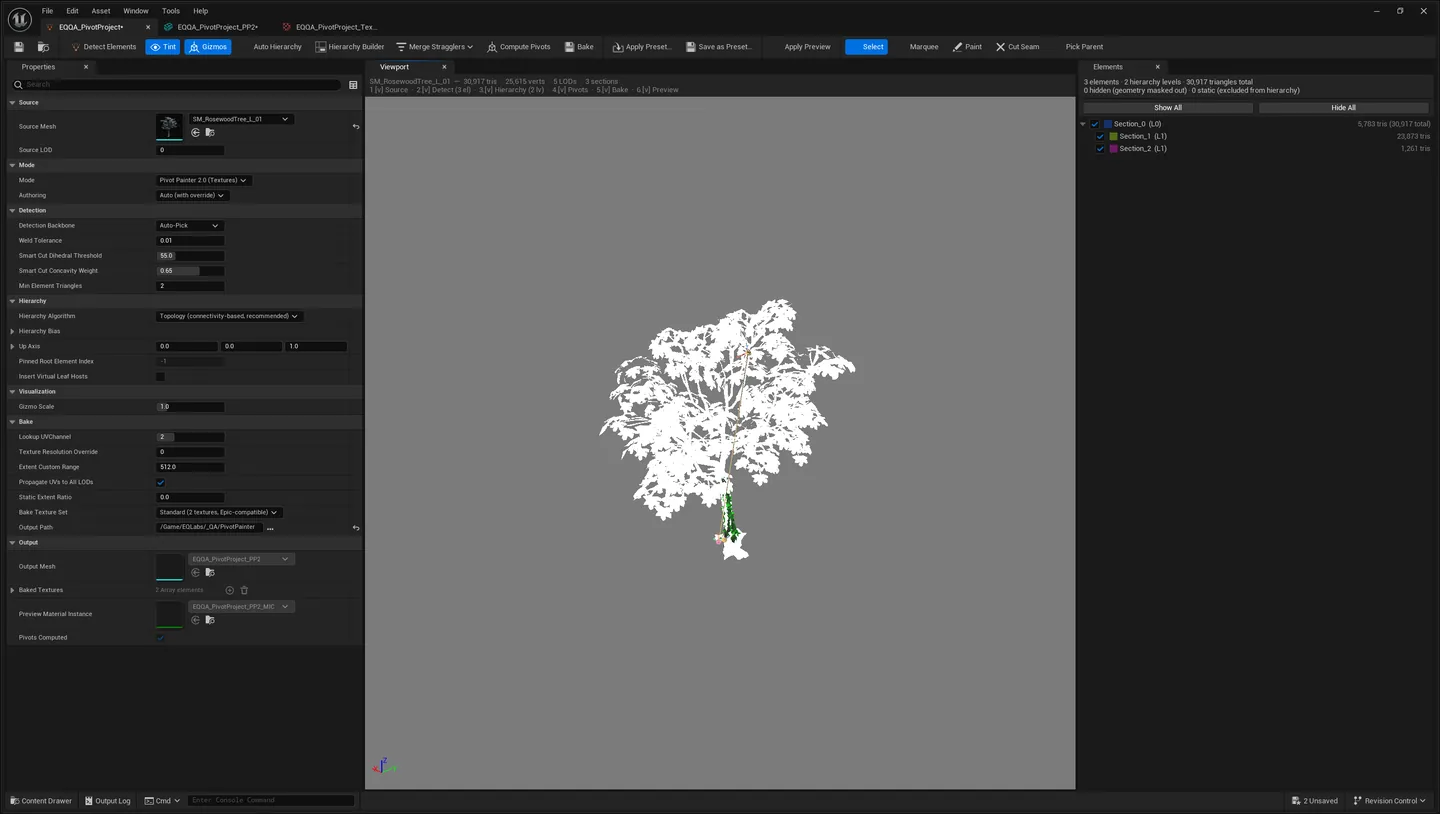
Section titled “The Full Lab”Double-click a Pivot Painter project, or Open in Lab from the wizard, for the complete editor: a 3D viewport, the element list, the hierarchy tree and manual tools.
- Detect sub-elements with a chosen backbone:
- Sections. Split by material section (artist-curated).
- Islands. Split by connected geometry (separate leaf cards, modular kits).
- Smart-Cut. Split a welded sculpt by surface angle and concavity (trunk vs branches).
- Auto-Pick. Tries the above in order and keeps the best, cleaning up tiny fragments.
- Paint roles. Mark elements as Support Wood / Leaf / Vine / Flower / Static / Ignore. The. classifier guesses from slot names and geometry; you correct where needed.
- Build the hierarchy. Topology or Skeleton-First; pin a root, lock a parent link.
- Compute pivots. Junction pivots and PCA rotation axes, computed automatically.
- Bake PP1 or PP2, always to a non-destructive duplicate. Your source asset is never. modified.
Every manual choice (roles, locks, pinned root, backbone) can be saved as a Preset and reused in the Batch Bake window across many meshes.
Tuning the wind
Section titled “Tuning the wind”After baking, select the mesh’s Material Instance (<Name>_PP2_MIC…). All wind controls live in
the EQ Pivot Wind and EQ Foliage Surface parameter groups:
| Parameter | Effect |
|---|---|
EQ Wind Direction | World-space direction the foliage leans |
EQ Max Rotation L0…L3 | How far each hierarchy level (trunk → leaves) bends |
EQ Speed Mul L0…L3 | Per-level sway speed |
EQ Gust * | Gust strength / scale / speed for the wandering gust layer |
EQ Leaf Wander * | Fine leaf flutter amount and speed |
EQ Instance Variation | 0–2: how much each placed copy differs in phase, amplitude and speed, so a forest doesn’t sway in lockstep |
EQ Bend Falloff, EQ Shelter | Stiffness shaping |
EQ Manual Time + EQ Use Manual Time | Drive wind time from Sequencer or a synced render instead of game time |
For animated normals (leaves catch light as they bend) enable the EQ Animate Normals static
switch on the MIC.
Global wind and seasons
Section titled “Global wind and seasons”One asset drives all foliage at once:
Content/PivotPainterLab/Material/MPC_EQLabsWind, a Material Parameter Collection. Edit it
directly, or drive it from a Blueprint or a WindDirectionalSource, and every baked mesh in the
scene responds.
Global wind:
| MPC parameter | Effect | Default |
|---|---|---|
GlobalWindStrength | Master multiplier on all bend | 1 |
GlobalWindSpeed | Master multiplier on all speed | 1 |
GlobalWindDirection | Scene-wide wind lean — supersedes per-mesh direction | — |
Seasonal colour:
| MPC parameter | Effect |
|---|---|
GlobalSeasonTint | Target season colour |
GlobalSeasonBlend | 0 = summer / off … 1 = full season |
GlobalSeasonVariation | Per-instance spread, so trees turn at slightly different times |
The tint is luminance-preserving — it recolours leaves while keeping their light and dark detail
— and applies to leaf slots only, so bark and trunks never tint. Animate GlobalSeasonBlend
from a Blueprint or Sequencer for a live season transition across the scene.
Season quick-set (console). These set the MPC and preview immediately; save the MPC to keep it:
EQLabsSeason.Summer EQLabsSeason.Spring EQLabsSeason.Autumn EQLabsSeason.WinterSeasonal colour needs the baked material to have
EQ Enable Season Coloron. New bakes enable it automatically on leaf slots; older bakes can toggle it on the MIC.
Octahedral impostor (far LOD)
Section titled “Octahedral impostor (far LOD)”An octahedral impostor is a single camera-facing billboard that looks like the tree from any angle — the cheapest possible far-distance representation. Check Generate impostor LOD on the wizard’s bake step (or in the one-click options) and it is attached as the mesh’s final LOD, replacing any existing card LOD.
| Field | What it controls |
|---|---|
| Frames (NxN) | Atlas grid size. 12 is a good default; more = smoother angle transitions |
| Atlas (px) | Texture resolution. 2048 suits ~12 frames; 4096 for 16+ frames or hero trees |
Deployment note — this one bites
Section titled “Deployment note — this one bites”The impostor is a camera-facing billboard driven by World Position Offset, and Unreal can disable WPO at distance, which flattens the card. On placed instances, set
World Position Offset Disable Distance = 0(Static Mesh Component → Rendering). This is a per-component setting — it cannot be baked into the asset.
Falling-leaf FX
Section titled “Falling-leaf FX”Wind-driven leaves that spawn from the tree’s canopy and drift with the global wind, tinting with the season. This is a runtime feature — it ships in packaged games — built on Niagara.
Setup:
- Bake the tree with Prep for falling-leaf FX checked. This sets
Allow CPU Accesson the mesh (required — without it Niagara spawns zero particles in a cooked build) and records which section is the leaves. - Place an EQLabs Foliage actor, or add a
UEQLabsFoliageFXComponentto any actor with a Static Mesh Component. Assign your baked mesh and a leaf Niagara System. - Play. Leaves spawn from the canopy, fall and drift along the wind. Run
EQLabsSeason.Autumnand they fall orange.
The component reads MPC_EQLabsWind each frame and pushes wind and season into the emitter as
User.* parameters, skipping off-screen trees automatically.
Emitter contract: the User. parameters
Section titled “Emitter contract: the User. parameters”The plugin ships NS_EQLabs_FallingLeaves, but any Niagara system that exposes these System User
parameters works. Names must match exactly; missing parameters are simply ignored by Niagara, so a
partial implementation still runs — it just won’t react to that input.
| User parameter | Type | Meaning | Written |
|---|---|---|---|
User.WindDirection | Vector | World-space wind direction, from MPC_EQLabsWind.GlobalWindDirection | Every tick, if Bind To Wind |
User.WindStrength | Float | Global wind strength multiplier | Every tick |
User.WindSpeed | Float | Global wind speed multiplier | Every tick |
User.SeasonTint | Linear Color | Season colour, from GlobalSeasonTint | Every tick, if Bind To Season |
User.SeasonBlend | Float | 0 = summer / off … 1 = full season | Every tick |
User.Density | Float | Spawn-rate multiplier | Once at spawn |
User.LeafSection | Int | LOD0 section index holding the leaves (-1 = whole mesh) | Once at spawn |
Tuning the shipped leaf system
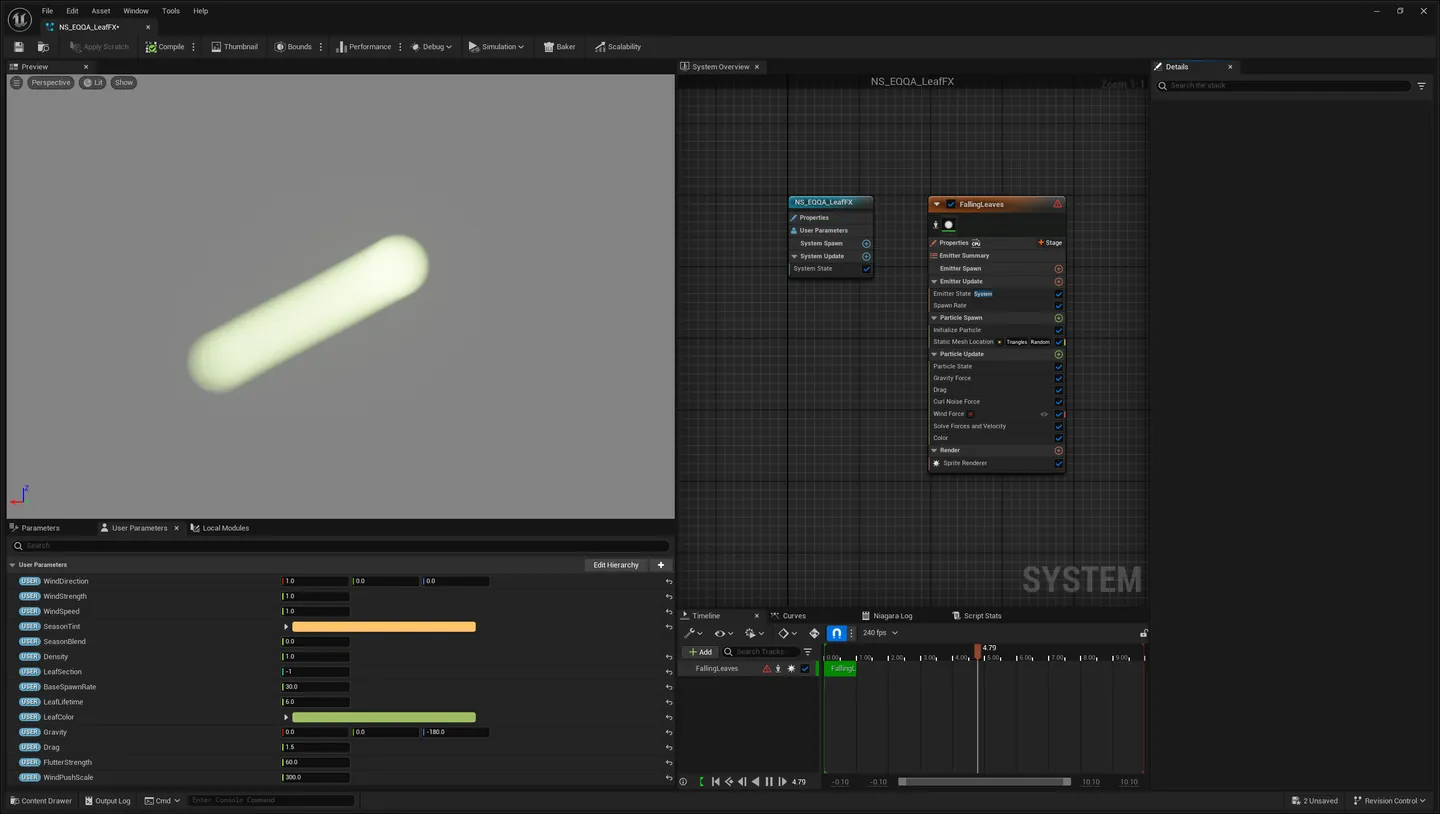
Section titled “Tuning the shipped leaf system”Generate Falling-Leaves FX (Niagara) on the launcher builds a system that satisfies the contract above and adds seven more User parameters you can tune directly in the Niagara editor:
| User parameter | Type | Default | What it does |
|---|---|---|---|
User.BaseSpawnRate | Float | 30 | Leaves per second before User.Density scales it |
User.LeafLifetime | Float | 6.0 | Seconds a leaf lives |
User.LeafColor | Linear Color | (0.35, 0.50, 0.12) | Base leaf colour, before the season lerp |
User.Gravity | Vector | (0, 0, -180) | Downward acceleration — deliberately far below real gravity so leaves flutter |
User.Drag | Float | 1.5 | Air resistance |
User.FlutterStrength | Float | 60 | Curl-noise amount driving the sideways drift and spin |
User.WindPushScale | Float | 300 | How hard User.WindDirection × User.WindStrength pushes a leaf |
User.SeasonTint defaults to (1.0, 0.55, 0.15) — the autumn orange — with User.SeasonBlend at
0, so the system ships looking like summer until the MPC drives the blend up.
Authoring your own leaf system — the recipe the shipped one follows:
- Emitter Spawn: a Static Mesh Location data interface with Source Mode: Attach Parent
(samples whatever tree the component attached to — do not hard-assign a mesh). Drive the section
filter from
User.LeafSectionso leaves emit from the canopy rather than the trunk. Sample the mesh surface, area-weighted, for spawn position and normal. - Update: spawn rate = base ×
User.Density; light downward acceleration plus drag so leaves flutter rather than drop; wind push addsnormalize(User.WindDirection) × User.WindStrength × kto velocity; a Curl-Noise force scaled byUser.WindSpeedgives the sideways drift; random initial rotation plus a slow spin. Kill below the tree’s base Z or on ground collision. - Render: sprite or low-poly leaf mesh; multiply leaf colour by
lerp(1, User.SeasonTint, User.SeasonBlend)— the same maths the foliage master uses, so a falling leaf and the tree it left agree.
Performance. Assign a Niagara Effect Type to the system for distance culling and pooling.
The component’s bOnlyWhenRendered already skips the MPC push for off-screen trees, but the Effect
Type is what culls the simulation — both matter at forest scale. Instanced foliage (HISM) cannot
carry a per-instance Niagara system economically, so gate the FX to hero trees.
Interactive bending
Section titled “Interactive bending”Foliage that bends away from the player and anything you tag. Also runtime.
- Bake with Interactive bending checked, which enables the gated bend branch on the baked materials.
- In game or PIE the first player pawn automatically pushes nearby foliage. To add more pushers — a rolling boulder, an NPC, a vehicle — drop an EQLabs Foliage Interactor component on the actor and set its Radius.
Limit, stated plainly: interaction runs through four concurrent slots in the material parameter collection. With more than four interactors in range, the four nearest to the player win and the rest are ignored for that moment, picking back up as distances change. This is a design constraint of the 2-MPC / 4-slot material budget, not a bug. Dense-trample scenarios with hundreds of persistent trails are render-target territory, and are not what this does.
Tuning (on the MIC, EQ Interaction group):
| Parameter | Effect |
|---|---|
EQ Interaction Push | How hard foliage is shoved aside, horizontally |
EQ Interaction Flatten | Downward press when very close |
EQ Interaction Bend Height | Below this height the bend fades to nothing, keeping roots planted. Lower = stiffer base |
The bend adds on top of the wind — both animate together.
Standard vs Extended bakes
Section titled “Standard vs Extended bakes”Chosen by the wizard’s Quality vs Performance question, or a preset’s Bake Texture Set:
- Standard (2 textures). Pivot + Parent, Axis + Extent. Drop-in compatible with Epic’s stock.
PivotPainter2FoliageShaderand any third-party PP2 shader. Uses Epic’s top-left texture convention exactly. Pick this for maximum compatibility or to use your own PP2 material. - Extended (4 textures). Adds Origin/Order and Extents/Level, unlocking the full EQLabs wind. material: semantic wind buckets, per-instance variation, seasons, gusts, leaf wander, animated normals, interactive bending. This is the default.
Both come from the same pipeline; Extended is a superset.
“Use Epic’s stock Pivot Painter 2 shader” builds the baked materials on Epic’s engine
PivotPainter2FoliageShader function itself. Your harvested textures (albedo / normal / ORM) and the
seasonal colour still apply, and wind is tuned through Epic’s own MIC parameters (Animate Level 1–4, Wind Speed, custom range). EQLabs-only extras — per-instance variation, global MPC wind,
gusts, leaf wander, interactive bending — are not available on that shader. Pick it when you need
guaranteed interop with existing PP2 content or tools; otherwise the default EQLabs material gives
richer motion. Generated assets use an _Epic name family (<Name>_EpicMIC…), so both variants can
live side by side.
PP1 (vertex-data) bakes
Section titled “PP1 (vertex-data) bakes”PP1 is the original Pivot Painter format. Instead of lookup textures it packs everything onto the
mesh itself — vertex colour plus two UV channels. Choose it in the Lab’s Mode dropdown, or a
preset’s Mode field.
| Channel | Contents | Notes |
|---|---|---|
| Vertex Colour RGB | Element’s forward (X) axis, remapped [-1,1] → [0,1] | sRGB pre-cancelled — see below |
| Vertex Colour A | Extent.X / Extent Custom Range, clamped to [0,1] | Stays linear; drives bend amplitude |
| UV2 | Pivot.X, Pivot.Y | Centimetres, mesh-local |
| UV3 | Pivot.Z, ShaderLevel / 3 | Same fixed /3 semantic scale as PP2’s Tex4.A |
PP1 or PP2?
Section titled “PP1 or PP2?”PP1 when you want zero texture samples per element, the asset needs only one level of rotation (grass tufts, scatter debris, small props, card foliage with a single sway), or you are targeting very constrained hardware or writing your own shader.
PP2 when (the default, and usually right) you need hierarchical motion — trunk → branch → twig → leaf. PP1 cannot traverse parents; that is exactly what the texture lookup buys. Also for every EQLabs extra: semantic wind buckets, per-instance variation, global MPC wind and seasons, gusts, leaf wander, animated normals, interactive bending. And past roughly 3000 elements, PP1’s per-vertex precision caps out around Epic’s documented sub-object limit — the Lab warns and you should switch.
PP1 covers LOD0; enable Propagate to all LODs to carry the payload down by nearest-vertex match.
Two things worth knowing about PP1
Section titled “Two things worth knowing about PP1”Vertex colour and sRGB. The static-mesh build applies sRGB gamma encoding when it packs vertex
colours for the GPU, but a material’s VertexColor node reads those bytes back without decoding.
Left alone, that corrupts the axis data. The baker pre-applies the inverse curve so the build’s
encoding cancels out and your shader receives what was authored. Alpha skips the gamma path and is
stored linear. You don’t need to do anything — but if you write your own PP1 shader, read the vertex
colour raw; do not decode it again.
Lightmap UVs can eat the payload. PP1 lives in UV2 and UV3. If the source mesh has Generate Lightmap UVs pointed at either channel, a rebuild would regenerate it and silently overwrite the pivot data — the mesh would then animate from packed lightmap coordinates. The baker detects this and moves the generated lightmap to a free higher channel (disabling generation if none is free), logging a warning either way. If you see that warning, nothing is wrong: it means the guard did its job.
Troubleshooting
Section titled “Troubleshooting”“My foliage isn’t moving.”
Confirm the placed mesh uses the baked _PP2 material instance, not the original material. The wind
master rebuilds itself when the plugin updates — if you baked on an older version, re-bake so the
mesh’s lookup UVs match the current material.
“The impostor card goes flat or white at distance.”
Set World Position Offset Disable Distance = 0 on the placed component.
“No leaves spawn in my packaged build.”
Re-bake with Prep for falling-leaf FX checked — it sets Allow CPU Access, which the Niagara
mesh sampler needs in cooked builds.
“Seasons don’t do anything.”
Raise GlobalSeasonBlend above 0 on MPC_EQLabsWind, and make sure the mesh was baked with season
colour enabled on its leaf slots.
“The whole forest sways identically.”
Raise EQ Instance Variation on the MIC (0–2) for per-instance phase, amplitude and speed offsets.
“Detection split my tree into one giant element.” Try the Smart-Cut backbone (welded sculpts) or Islands (separate cards) in the wizard’s Advanced expander, or add manual seams in the Full Lab.
“A leaf rotates around the wrong point.” Open the Full Lab, select the element, and lock its parent to the correct branch — the pivot follows the locked parent.
Verifying your install
Section titled “Verifying your install”The plugin deliberately ships its regression suite (PivotPainterLabTests, editor-only — it never
cooks into a game). If you suspect a broken install or a corrupted bake, run the same checks the
releases are gated on, headlessly:
UnrealEditor-Cmd.exe <YourProject>.uproject -run=PivotPainterValidate -nullrhiExit code 0 means every case passed — the code is the number of failures, which is CI-friendly.
The v1.0.1 release was cut with 44 of 44 cases passing.
It also bundles bake forensics: -DiagnoseBake=<path base> decodes a bake set on disk and reports
element counts, parent sanity and dead texels — useful when a mesh animates strangely and you want
to know whether the bake or the scene is stale.
Honest caveats
Section titled “Honest caveats”- Interactive bending is capped at four simultaneous interactors. See the section above. This. is a material-budget constraint, not a temporary limit.
- Falling leaves need
Allow CPU Access. If you bake without Prep for falling-leaf FX, the effect works in the editor and produces nothing in a cooked build. - The impostor needs a per-component setting (
World Position Offset Disable Distance = 0) that cannot be baked into the asset. - Epic-shader bakes lose the EQLabs extras. That is the trade for stock-shader interop, and it is not recoverable by tweaking the MIC.
LeafFX.EditorUI.QAPassis unreliable in a cold clean host. The plugin’s own falling-leaf UI test passes on a warmed editor but not consistently on a first cold launch — a known weakness of the test, not of the feature, which the release gate handles by comparing against a recorded baseline rather than demanding green.
Pivot Painter Lab in EQLabs Pro
Section titled “Pivot Painter Lab in EQLabs Pro”Pivot Painter Lab is a standalone-only product — it is not part of EQLabs Pro. Buying Pro does not include it.
Opens our feedback form in a new tab with the tool name pre-filled.