
No. 0051 TE TechEQLabs Pro
Blueprint Tick Auditor
Module: Tech · Category: Performance · Tool ID:
BlueprintTickAuditorTab
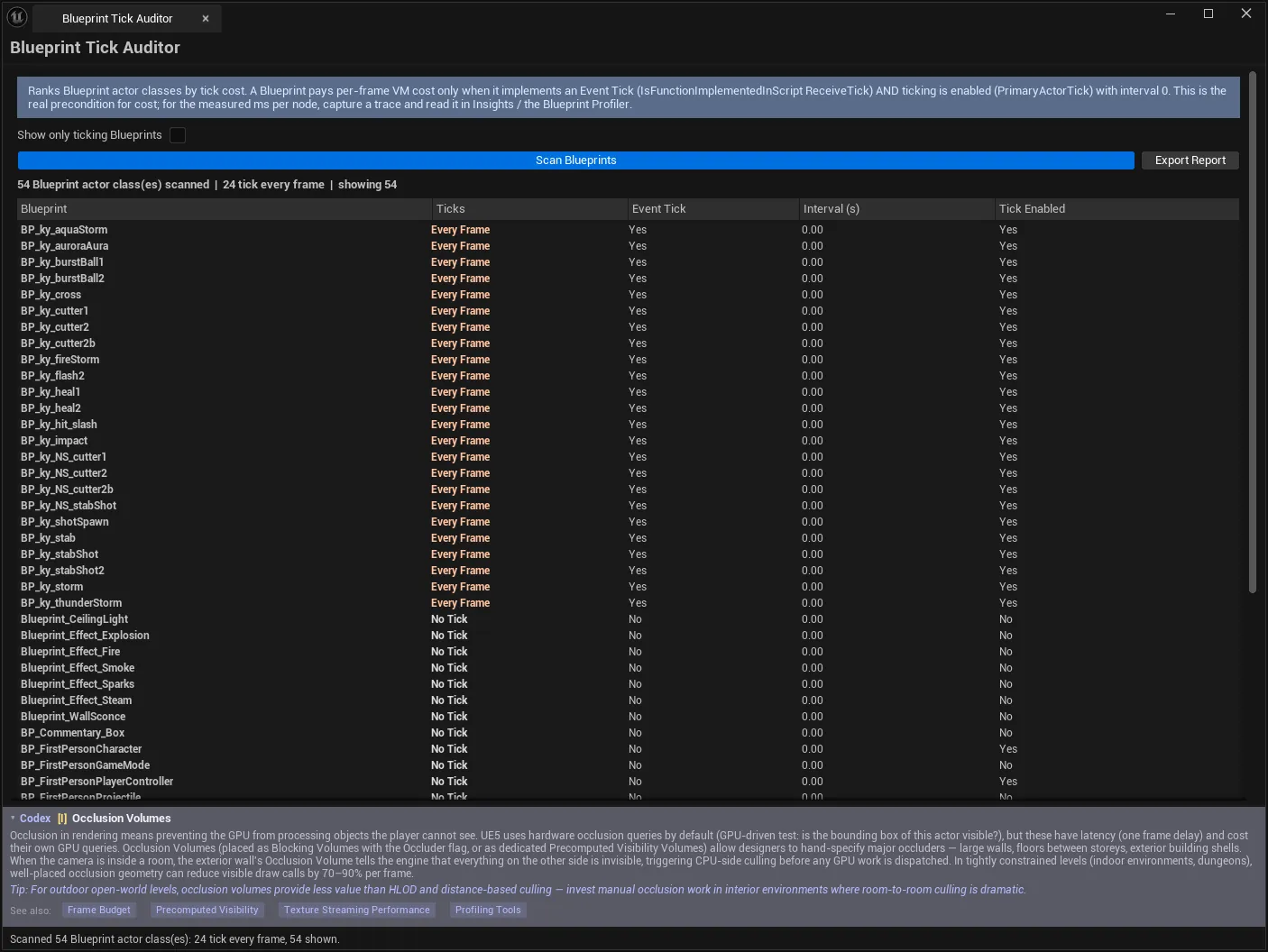
A Blueprint pays per-frame VM cost only when two things are both true: it implements an Event Tick, and ticking is enabled on it. This tool checks both conditions against the real class data and ranks the every-frame tickers — the actual cost drivers.
It is a precondition audit, not a profiler, and it is careful about that distinction.
When to use it
Section titled “When to use it”- Auditing a project for Blueprints that tick when they don’t need to
- Finding the cost drivers before opening a profiler
- Enforcing a “no unnecessary tick” standard across a team
- Checking that Blueprints converted to interval ticking actually got the interval
What it isn’t for
Section titled “What it isn’t for”- Don’t expect per-node cost in milliseconds. That is a runtime measurement — see below.
- Don’t assume every-frame tick is automatically bad. Some Blueprints need it. The tool ranks; you judge.
Opening the tool
Section titled “Opening the tool”- Open the EQLabs Hub and search for tick or
blueprint(or browse to Tech → Performance). - Click the tool card.
- Click Scan Blueprints.
The scan loads every
/GameBlueprint actor class. That is why it is not instant, and why the results are real rather than inferred — the status line says so: “Auditing Blueprint tick usage (loads each Blueprint)…”
What it checks
Section titled “What it checks”| Check | Source |
|---|---|
| Does the class implement an Event Tick? | UClass::IsFunctionImplementedInScript("ReceiveTick") |
| Is ticking enabled? | CDO PrimaryActorTick.bCanEverTick |
| Is it throttled? | CDO PrimaryActorTick.TickInterval |
Both conditions matter, and checking only one is how audits get this wrong. A Blueprint with an Event Tick node but bCanEverTick false costs nothing per frame; a Blueprint with ticking enabled but no Event Tick implemented costs nothing in the Blueprint VM.
Results
Section titled “Results”| Column | Meaning |
|---|---|
| Blueprint | The actor class |
| Ticks | The classification |
| Event Tick | Whether ReceiveTick is implemented |
| Interval (s) | Tick interval, if any |
| Tick Enabled | Whether bCanEverTick is set |
Classifications
Section titled “Classifications”| Class | Meaning |
|---|---|
| No Tick | No Event Tick implemented, or ticking disabled → no per-frame BP VM cost |
| Throttled | Event Tick + ticking enabled, but on an interval (> 0 s) |
| Every Frame | Event Tick + ticking enabled + no interval → the cost drivers |
Summary line:
412 Blueprint actor class(es) scanned | 37 tick every frame | showing 37| Control | Notes |
|---|---|
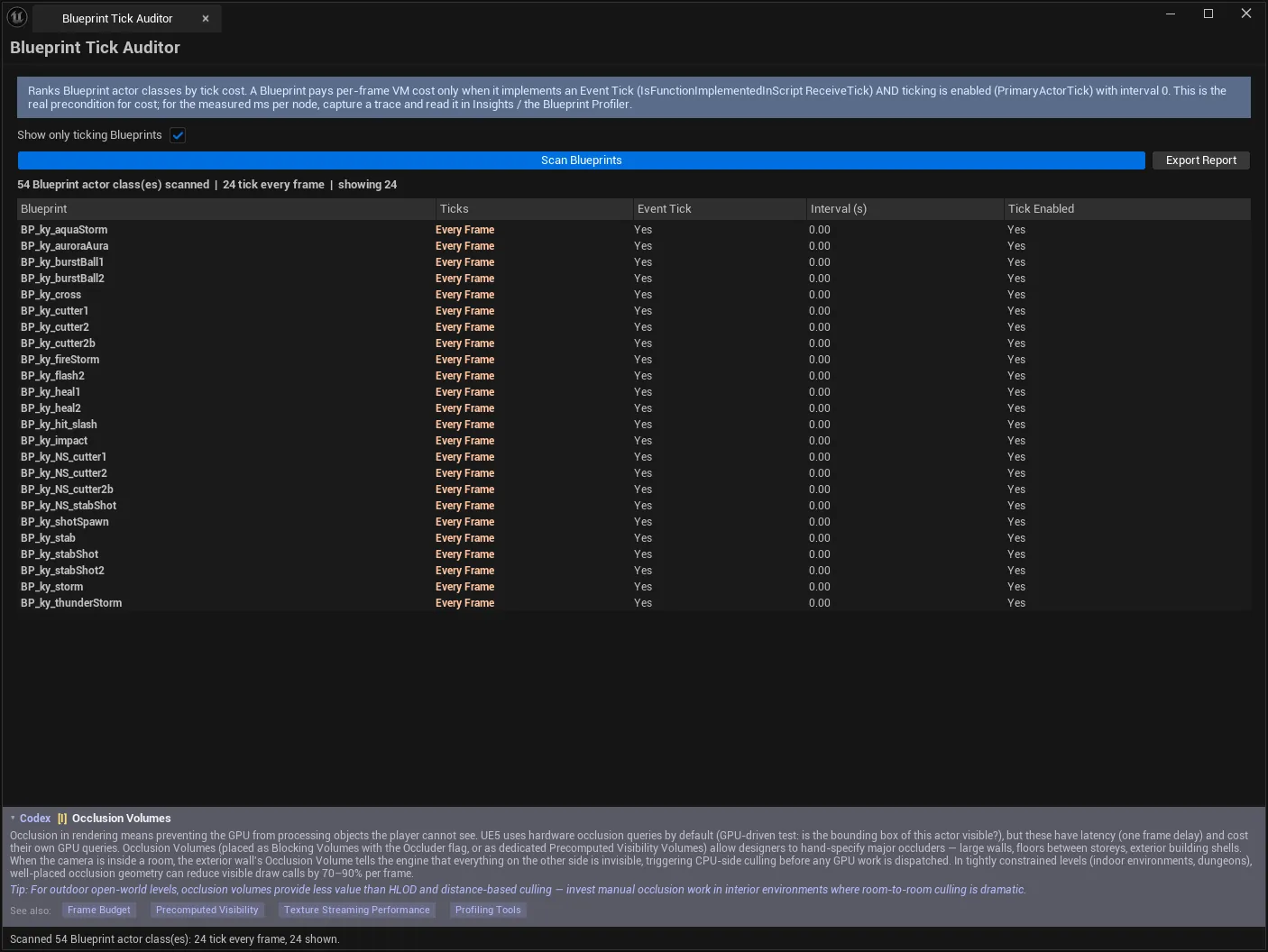
| Show only ticking Blueprints | Hides Blueprints that never run an Event Tick |
| Scan Blueprints | Load and audit all /Game Blueprint actor classes |
| Export Report | Writes the audit as an EQLabs report (JSON/CSV/HTML) |
What it deliberately does not do
Section titled “What it deliberately does not do”Per-node VM cost in milliseconds is a runtime measurement. It requires capturing a trace and reading it in Unreal Insights, or using the Blueprint Profiler. That attribution is deferred, not faked.
The distinction is worth being precise about, because it defines how to use the tool: it tells you which Blueprints can cost you — a static, complete, project-wide answer — and the profiler tells you which ones actually do, on your content, in your scenario. Running the profiler first over four hundred Blueprints is the slow way round; this narrows it to thirty-seven.
Workflow: reducing tick load
Section titled “Workflow: reducing tick load”- Scan Blueprints.
- Enable Show only ticking Blueprints.
- Sort to bring Every Frame to the top — that is the candidate list.
- For each, ask whether it genuinely needs per-frame work:
- Event-driven instead? Timers, delegates, and overlap events replace most polling
- Interval acceptable? Setting a tick interval moves it to Throttled
- Genuinely per-frame? Movement, interpolation, input — leave it
- Re-scan to confirm the classification changed.
- Profile the survivors in Insights or the Blueprint Profiler.
- Export Report as the record.
Tips and gotchas
Section titled “Tips and gotchas”- Both conditions are required for cost. An Event Tick node in a class with ticking disabled is free.
- The scan loads every Blueprint, so it takes real time on a large project — and that cost is what makes it accurate.
- A tick interval does not make a Blueprint free, only cheaper. Throttled still runs.
- Every Frame is not automatically wrong. Movement and interpolation need it; the ranking exists so you spend judgement where it matters.
- Re-scan after changes. The classification comes from the CDO, so it updates only when the Blueprint is recompiled and re-scanned.
- Native C++ tick is out of scope. This audits the Blueprint VM precondition specifically.
Related tools
Section titled “Related tools”- Widget Blueprint Auditor — the same real-detection approach for UMG
- HitchScope — catches game-thread-bound frames that tick load contributes to
- Subsystem Viewer — inspect what else runs per frame
- Project Health Dashboard — project-wide health context
Opens our feedback form in a new tab with the tool name pre-filled.