
No. 0101 TE TechEQLabs Pro
GC Pulse
Module: Tech · Category: Performance · Tool ID:
GCPulseTab
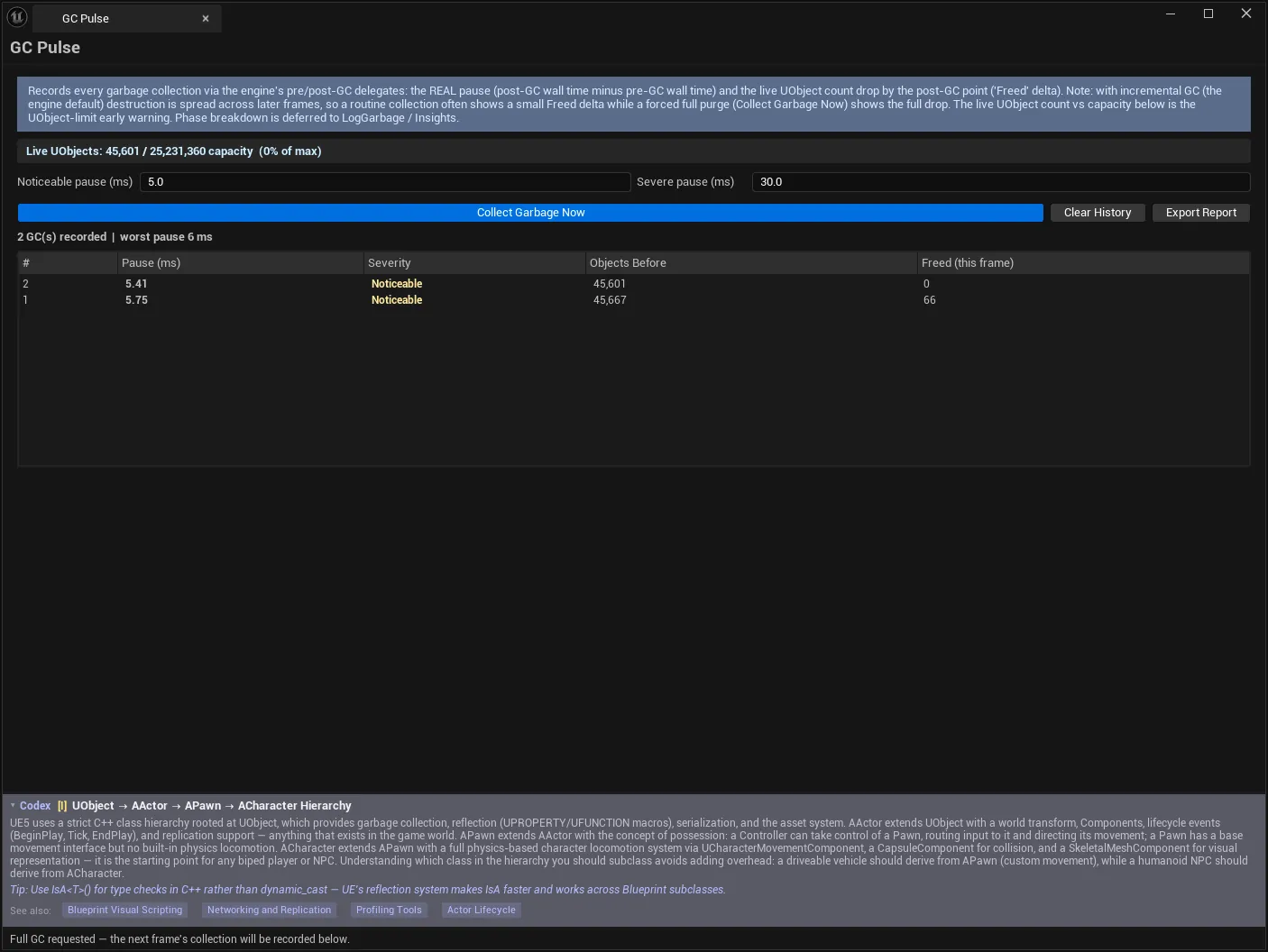
Hooks the engine’s real GC delegates and records every garbage collection: the actual pause duration measured as post-GC wall time minus pre-GC wall time, how many objects were destroyed, and a running readout of how close the project is to the UObject limit.
That last number is the one that catches teams out. Projects that spawn objects freely can approach the UObject capacity ceiling long before anyone is looking for it, and the failure when it arrives is abrupt.
When to use it
Section titled “When to use it”- Following up a Garbage Collection verdict from HitchScope
- Measuring how long GC actually pauses your project, rather than assuming
- Watching UObject count against capacity on object-heavy projects
- Checking whether a change to allocation patterns reduced GC cost
What it isn’t for
Section titled “What it isn’t for”- Don’t expect a reachability-vs-purge phase breakdown. It is deliberately not provided — see below.
- Don’t use it to find what is being allocated. That is MemSnap’s job; this measures the collection.
Opening the tool
Section titled “Opening the tool”- Open the EQLabs Hub and search for gc or
garbage(or browse to Tech → Performance). - Click the tool card.
- Recording is automatic — “Recording GCs… (trigger one with ‘Collect Garbage Now’, or just work in the editor)”.
What it measures
Section titled “What it measures”| Measurement | Source |
|---|---|
| Pause duration | Post-GC wall time minus pre-GC wall time — FPlatformTime::Seconds around FCoreUObjectDelegates pre/post GC delegates |
| Objects destroyed | Live UObject count delta across the GC — GUObjectArray |
| UObject count vs capacity | Live readout from GUObjectArray |
Every number is a named engine API. Nothing here is modelled or estimated.
The GC list
Section titled “The GC list”| Column | Meaning |
|---|---|
| Pause (ms) | Real measured pause |
| Severity | Minor, Noticeable, Severe |
| Objects Before | Live UObject count before the collection |
| Freed (this frame) | Objects destroyed |
Summary line:
23 GC(s) recorded | worst pause 41.2 msSeverity bands
Section titled “Severity bands”| Band | Meaning |
|---|---|
| Minor | Below the noticeable threshold — likely incremental or small |
| Noticeable | At or above the noticeable threshold |
| Severe | At or above the severe threshold — a visible hitch |
| Setting | Notes |
|---|---|
| Noticeable pause (ms) | Pauses at/above this are banded Noticeable |
| Severe pause (ms) | Pauses at/above this are banded Severe |
Set these against your frame budget. A 16 ms pause is a dropped frame at 60 fps and merely a blip at 30 — the bands are yours to define, and the classification follows them honestly.
The UObject capacity readout
Section titled “The UObject capacity readout”Live UObjects: 1,842,110 / 2,162,688 capacity (85% of max)This is the early warning. The UObject array has a hard capacity; a project that keeps growing toward it will eventually fail, and the percentage is the only advance notice you get. 85% is a number to act on, not to note.
It is also a useful sanity check after a level transition — if the count does not come back down, something is holding objects alive, which is where MemSnap takes over.
Actions
Section titled “Actions”| Control | Effect |
|---|---|
| Collect Garbage Now | Requests a full GC (GEngine->ForceGarbageCollection) and records it |
| Clear History | Discards recorded events — recording continues |
| Export Report | Writes recorded GCs as an EQLabs report (JSON/CSV/HTML) |
Collect Garbage Now is how you get a measurement on demand rather than waiting for the engine to decide. Useful for before/after comparisons: force one, change something, force another.
What it deliberately does not do
Section titled “What it deliberately does not do”The tool does not fabricate:
- a reachability-vs-purge phase breakdown
- an incremental-GC A/B verdict
Both need GC-internal instrumentation — LogGarbage and Unreal Insights — and are deferred, not faked. If you need the phase split, that is where to get it.
This is worth stating because a tool that showed those numbers without the instrumentation to measure them would be guessing, and a guessed phase breakdown is worse than none: you would optimise against it.
Workflow: measuring GC cost
Section titled “Workflow: measuring GC cost”- Open the tool and work normally, or run PIE.
- Set Noticeable and Severe thresholds to your frame budget.
- Let collections accumulate — or force them with Collect Garbage Now.
- Read the worst pause and the severity distribution.
- Watch the UObject capacity percentage as you go.
- If pauses are Severe, the fix is upstream — fewer objects, or fewer that survive collection.
- Export Report to compare against a later session.
Tips and gotchas
Section titled “Tips and gotchas”- The pause is real wall time, so it includes whatever else the frame was doing. That is the number the player feels.
- Thresholds are yours to set. The severity bands mean nothing until they match your frame budget.
- Clear History does not stop recording. It only discards what has been collected so far.
- Rising UObject count across level loads means retention, not GC failure. Diff it in MemSnap.
- Forcing a GC is a measurement tool, not a fix. Forcing collections in shipping code trades one hitch for another.
- No phase breakdown here by design. Use
LogGarbage/Insights when you need it.
Related tools
Section titled “Related tools”- HitchScope — identifies GC as the cause of a hitch in the first place
- MemSnap — find what is accumulating between collections
- StreamDoctor — streaming and async load pressure
- Project Health Dashboard — project-wide health context
Opens our feedback form in a new tab with the tool name pre-filled.