
No. 0321 TE TechEQLabs Pro
StreamDoctor
Module: Tech · Category: Performance · Tool ID:
StreamDoctorTab
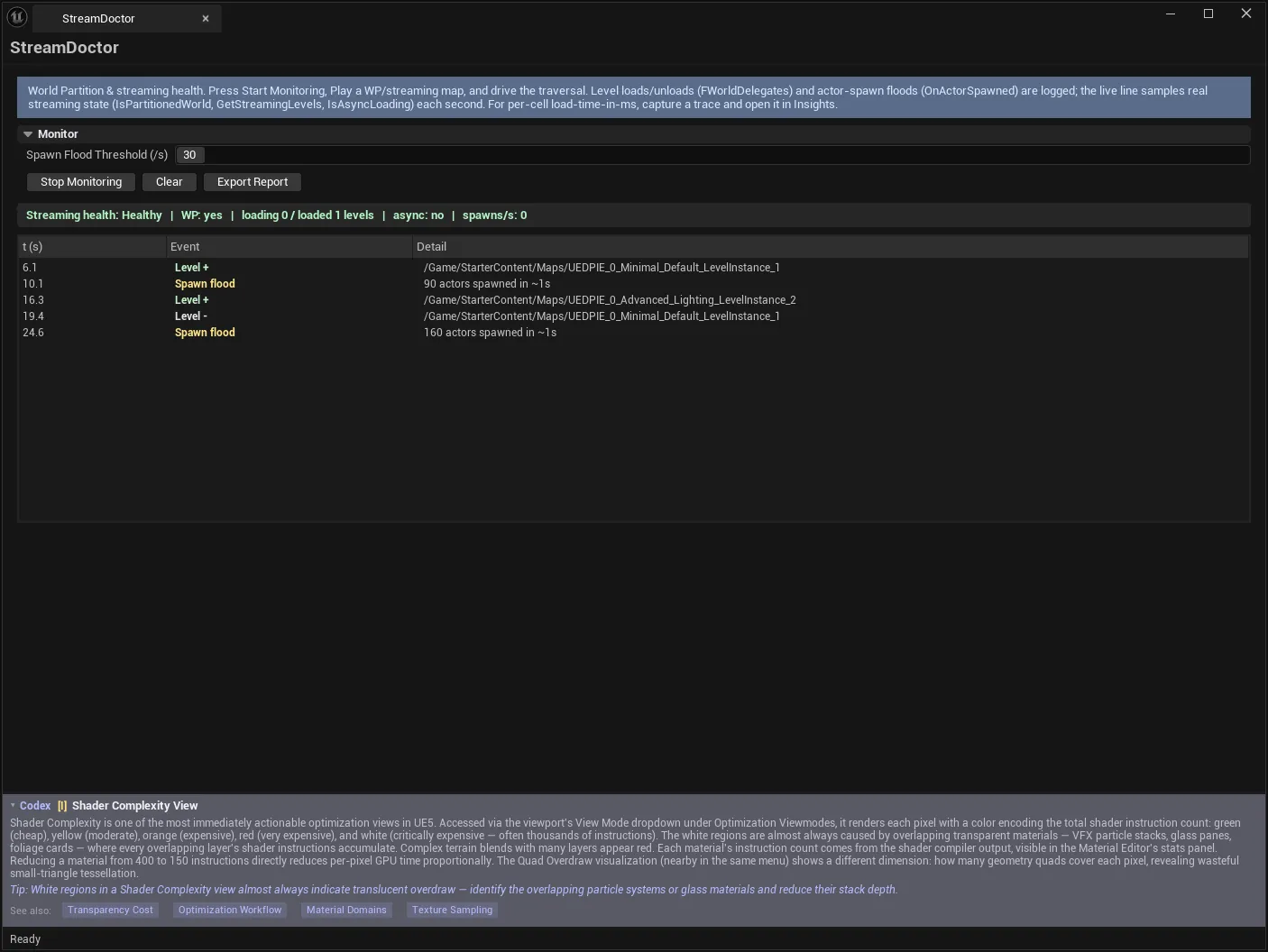
Live streaming observability during PIE. While monitoring, it records real level-streaming events, samples streaming state once a second, and watches for actor-spawn floods — then classifies the result into a plain health verdict.
Open-world traversal stutter is notoriously hard to talk about precisely. This turns “it hitches when I run north” into an event log with timestamps.
When to use it
Section titled “When to use it”- Traversal stutter in a World Partition or streaming-level map
- Following up an Async Load verdict from HitchScope
- Checking whether cells load and unload where you expect
- Catching actor-spawn floods when a region streams in
- Producing a record of a traversal session
What it isn’t for
Section titled “What it isn’t for”- Don’t expect per-cell load times in milliseconds. That needs the LoadTime trace channel — see below.
- Don’t run it outside PIE. It monitors a running session; the tool says “Not in PIE” rather than pretending.
Opening the tool
Section titled “Opening the tool”- Open the EQLabs Hub and search for streaming or
world partition(or browse to Tech → Performance). - Click the tool card.
- Start Monitoring, then Play a WP/streaming map and drive the traversal.
The order matters: start monitoring first, then play. The monitor attaches to the session’s delegates.
What it measures
Section titled “What it measures”| Signal | Source |
|---|---|
| Level streaming events | FWorldDelegates::LevelAddedToWorld / LevelRemovedFromWorld |
| Streaming state (sampled ~1 s) | UWorld::IsPartitionedWorld, GetStreamingLevels state, IsAsyncLoading |
| Actor-spawn floods | UWorld::OnActorSpawned |
Every number is a real engine API. The health verdict is a pure classifier over those live metrics.
Monitor settings
Section titled “Monitor settings”| Control | Notes |
|---|---|
| Spawn Flood Threshold (/s) | More than this many actors spawned in ~1 s is logged as a spawn flood |
| Start / Stop Monitoring | Attaches or detaches the monitor |
| Clear | Clears the event log |
| Export Report | Writes the session as an EQLabs report (JSON/CSV/HTML) |
The spawn-flood threshold wants tuning to your project. A map that legitimately spawns fifty actors per streamed region will flood constantly at a threshold of twenty — raise it until the log reflects genuinely abnormal bursts.
Event log
Section titled “Event log”| Column | Meaning |
|---|---|
| t (s) | When in the session |
| Event | What happened |
| Detail | Supporting information |
The log is the artefact. Correlating a stutter you felt at roughly 40 seconds against the events logged at 40 seconds is the whole workflow — and it is far more reliable than reasoning about which cell “should” have loaded.
Health verdict
Section titled “Health verdict”| Verdict | Meaning |
|---|---|
| Healthy | Streaming behaving normally |
| Warning | Pressure worth investigating |
| Critical | Streaming is in trouble |
What it delegates to Insights
Section titled “What it delegates to Insights”Per-cell load-time attribution in milliseconds and blocking-load callstacks are not provided here. They need the LoadTime trace channel plus TraceServices, and that deep attribution is delegated to a captured trace opened in Unreal Insights — the same doctrine as HitchScope.
This is a deliberate boundary rather than a gap. StreamDoctor tells you when streaming misbehaved and what kind of misbehaviour it was, always-on and cheap. Insights tells you which package took how long, at the cost of a full trace capture.
Workflow: chasing traversal stutter
Section titled “Workflow: chasing traversal stutter”- Start Monitoring.
- Play the World Partition map.
- Drive the traversal that stutters — the same route, at the same speed, several times.
- Stop Monitoring.
- Read the event log around the timestamps where you felt the hitch.
- Look for: dense level-add clusters, async loading during the stutter, spawn floods.
- If you need per-package timings, capture a trace with HitchScope and read it in Insights.
- Export Report.
Reading the results
Section titled “Reading the results”- A cluster of level-add events at the hitch means the cell grid or streaming distance is making too much arrive at once.
- A spawn flood at the hitch points at what the region spawns on load, not at streaming itself — pooling or staggering is the fix.
- Async loading spanning the hitch suggests a blocking load; the trace will name the package.
- Nothing at all in the log at the hitch is informative too: the cause is not streaming, and you can stop looking here.
Tips and gotchas
Section titled “Tips and gotchas”- Start Monitoring before pressing Play. Attaching mid-session misses the events that matter.
- It requires PIE. “Not in PIE” is the tool being honest, not failing.
- Tune the spawn-flood threshold to your project or the log fills with normal behaviour.
- Drive the same route repeatedly. One traversal is anecdote; three that log the same cluster is a finding.
- Sampling is ~1 s, so sub-second state changes may fall between samples. Events are captured as they fire; state is sampled.
- No per-cell millisecond attribution here. That boundary is deliberate.
Related tools
Section titled “Related tools”- HitchScope — classifies the hitch and captures the trace for Insights
- World Partition Inspector — inspect the cell grid and actor distribution
- OFPA Nexus — One File Per Actor management in WP projects
- MemSnap — what streamed content leaves behind
Opens our feedback form in a new tab with the tool name pre-filled.