
Cinematic Lab (standalone)
Fab product: EQLabs Cinematic Lab · Version: 1.0.0 (first release) · Engine: UE 5.4 – 5.8 Modules: 5 (3 Editor + 2 Runtime) · Requires: Level Sequence Editor, Movie Render Pipeline, Enhanced Input, Takes, OpenColorIO
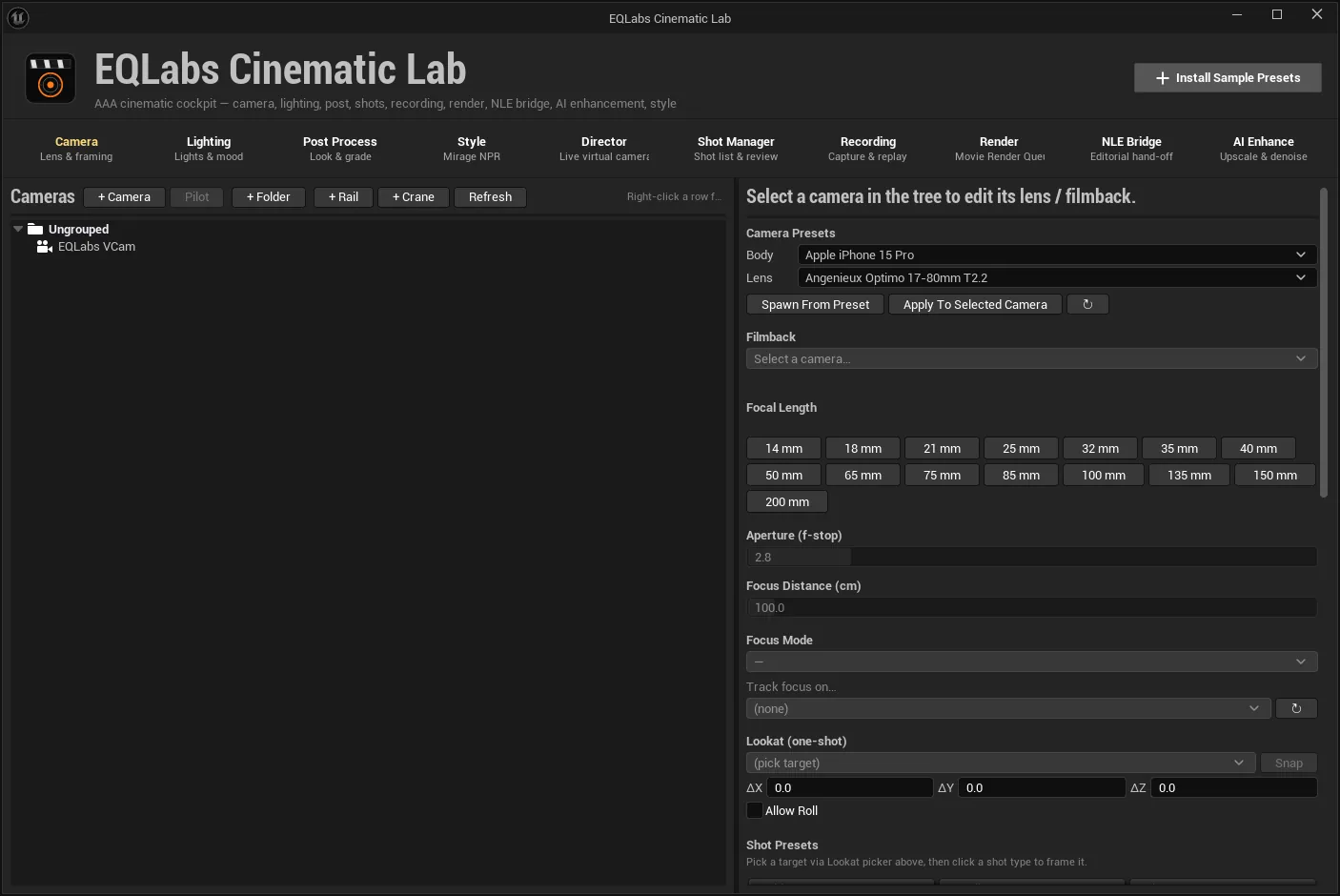
Cinematic Lab is one window that replaces the Sequencer / Outliner / Details-tab juggling a cinematic pass usually turns into. Ten tabs cover the pipeline end to end: set a camera body and lens, light the shot, grade it, stylise it, direct live virtual cameras, track shots and takes, capture gameplay, render through Movie Render Queue, hand off to an NLE, and upscale or denoise the result.
Cinematic Lab was never part of EQLabs Pro. It is its own product, and 1.0.0 is its first release.
Start here
Section titled “Start here”Getting started and project requirements — installing the plugin, opening the cockpit, and the four project settings several features depend on. Three of them fail silently when they are off, so read that page before deciding a feature is broken.
The ten tabs
Section titled “The ten tabs”| Tab | Subtitle | What it does |
|---|---|---|
| Camera | Lens & framing | Camera tree with folders, body + lens presets, filmback and focal length, shot-framing presets, composition overlays, DP assist, handheld operator profiles, dolly and crane moves, bookmarks |
| Lighting | Lights & mood | Light tree with folders, three-point rigs on a selected actor, cinematic rig stamps, full per-light property editing, time-of-day presets, IES profiles, a JSON-persisted preset library, and the Light Painter |
| Post Process | Look & grade | Post-process volume tree, ten grouped PPV sections from Bloom to a four-axis colour grade, a preset library, and Prism — 143 stackable camera FX with weights, ordering and saved Looks |
| Style | Mirage NPR | Scene-wide non-photorealistic looks, a keyable master intensity, per-actor and skybox exclusion |
| Director | Live virtual cameras | Virtual cameras that keep a subject framed at game time, follow and player-orbit modes, a coverage generator, composition presets, and an Auto-Director that cuts between cameras in PIE |
| Shot Manager | Shot list & review | Shot list from the active Level Sequence, per-shot Look State capture and restore, A/B compare and diff, take recording, circled takes, cast placement, per-shot render hand-off |
| Recording | Capture & replay | High-res screenshots, a replay-buffer ring with hotkeys, a runtime Gameplay Recorder for PIE and packaged builds, ffmpeg merger scripts, performance overlays |
| Render | Movie Render Queue | Render presets, burn-ins, OCIO with a parity check, per-shot look renders, a one-click dailies pass, and multi-pass / AOV EXR output for a compositor |
| NLE Bridge | Editorial hand-off | OTIO, EDL and FCP-XML export with circled takes as markers, a Nuke project skeleton, a Resolve LUT round-trip watcher, ACES working space |
| AI Enhance | Upscale & denoise | Real-time upscalers (TSR / DLSS / FSR / XeSS), path-tracer denoisers, and a post-export pipeline for Topaz, Real-ESRGAN and RIFE |
What it is not
Section titled “What it is not”- Not a replacement for Sequencer. Cinematic Lab drives Sequencer — it writes keys, reads the active Level Sequence, and hands shots to Movie Render Queue. You still cut in Sequencer.
- Not a renderer. Rendering goes through Epic’s Movie Render Queue; Cinematic Lab configures it.
- Not a compositor. It writes multi-layer EXRs and a Nuke project skeleton; the comp happens in Nuke.
- Not an AI upscaler. The AI Enhance tab configures Unreal’s own upscalers and shells out to third-party binaries you install and license yourself. It ships none of them.
Shipped documentation
Section titled “Shipped documentation”The plugin ships two reference documents alongside the code, both of which the pages above draw on:
Docs/Prism_CameraFX_UserGuide.md: the full Prism effect library reference.Docs/RenderPasses_Encoding_Spec.md: per-AOV encoding notes for the compositor. It states plainly which encodings have not yet been verified against a rendered frame, and that honesty is preserved here rather than smoothed over.
Verification
Section titled “Verification”Version 1.0.2 was cut with 106 automated tests passing and zero failures — 94 headless plus 12 in-editor UI tests — run against the release tree in a clean host project, then run again from the packaged plugin on each engine. It builds and packages green on UE 5.4, 5.5, 5.6, 5.7 and 5.8.
That is a statement about the test suite and the build matrix. Every tab has also been through a hands-on smoke pass on UE 5.4 before submission, and an end-to-end scripted showcase that exercises all ten tabs on one scene and keeps its outputs (renders, recordings, editorial exports) on disk for review.
The ten tabs, one by one
Section titled “The ten tabs, one by one”Opens our feedback form in a new tab with the tool name pre-filled.